MCP(Model Context Protocol)详解
MCP(Model Context Protocol)是 Anthropic 于 2024 年 11 月推出的开放协议,旨在标准化 LLM 与外部工具、数据源之间的连接方式。经过一年多的发展,MCP 已成为 Agent 工具接口的事实标准,被 Claude Desktop、Cursor、Windsurf、OpenAI Agents SDK 等主流产品广泛支持。
MCP 的核心思想
在 MCP 之前,每个 Agent 框架都有自己的工具接口:
# 不同框架的工具定义(不兼容!)

# OpenAI Function Calling
openai_tool = {
    "type": "function",
    "function": {"name": "search", "parameters": {...}}
}

# LangChain Tool
from langchain_core.tools import tool
@tool
def search(query: str) -> str: ...

# Anthropic Tool
anthropic_tool = {
    "name": "search",
    "description": "...",
    "input_schema": {...}
}
MCP 提供统一标准,让工具可以在不同框架间复用——你可以把它理解为 AI 世界的"USB-C 接口":
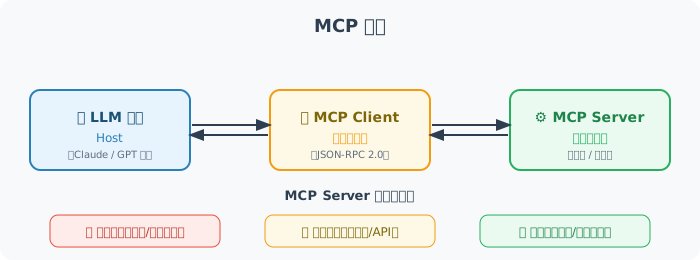
MCP 架构:

[LLM 应用/Host]  ←→  [MCP Client]  ←→  [MCP Server]
                        (标准协议)         (工具提供者)

MCP Server 可以是:
- 本地工具(文件系统、代码执行)
- 外部服务(数据库、API)
- 知识库(文档、向量存储)
MCP 服务器实现
# pip install mcp

from mcp.server import Server
from mcp.server.stdio import stdio_server
from mcp.types import (
    Tool, TextContent, CallToolResult,
    ListToolsResult
)

# 创建 MCP Server
server = Server("my-tools-server")

# 声明可用工具
@server.list_tools()
async def list_tools() -> ListToolsResult:
    return ListToolsResult(tools=[
        Tool(
            name="calculate",
            description="计算数学表达式",
            inputSchema={
                "type": "object",
                "properties": {
                    "expression": {
                        "type": "string",
                        "description": "要计算的数学表达式"
                    }
                },
                "required": ["expression"]
            }
        ),
        Tool(
            name="read_file",
            description="读取文件内容",
            inputSchema={
                "type": "object",
                "properties": {
                    "path": {
                        "type": "string",
                        "description": "文件路径"
                    }
                },
                "required": ["path"]
            }
        )
    ])

# 实现工具逻辑
@server.call_tool()
async def call_tool(name: str, arguments: dict) -> CallToolResult:
    if name == "calculate":
        import math
        try:
            expression = arguments["expression"]
            safe_env = {k: getattr(math, k) for k in dir(math) if not k.startswith('_')}
            # ⚠️ 安全警告:eval() 在生产环境中有安全风险
            # 建议使用 simpleeval 库替代:pip install simpleeval
            result = eval(expression, {"__builtins__": {}}, safe_env)
            return CallToolResult(
                content=[TextContent(type="text", text=f"{expression} = {result}")]
            )
        except Exception as e:
            return CallToolResult(
                content=[TextContent(type="text", text=f"错误:{e}")],
                isError=True
            )

    elif name == "read_file":
        path = arguments["path"]
        try:
            with open(path, 'r', encoding='utf-8') as f:
                content = f.read()
            return CallToolResult(
                content=[TextContent(type="text", text=content)]
            )
        except Exception as e:
            return CallToolResult(
                content=[TextContent(type="text", text=f"读取失败:{e}")],
                isError=True
            )

    else:
        return CallToolResult(
            content=[TextContent(type="text", text=f"未知工具:{name}")],
            isError=True
        )

# 以 stdio 模式运行(供 Claude Desktop 等客户端连接)
async def main():
    async with stdio_server() as (read_stream, write_stream):
        await server.run(read_stream, write_stream)

if __name__ == "__main__":
    import asyncio
    asyncio.run(main())
在 Agent 中使用 MCP 工具
# pip install mcp anthropic

import anthropic
from mcp import ClientSession, StdioServerParameters
from mcp.client.stdio import stdio_client
import asyncio

async def use_mcp_tools(query: str):
    """使用 MCP 工具的 Agent"""

    # 连接到 MCP Server
    server_params = StdioServerParameters(
        command="python",
        args=["my_mcp_server.py"],  # 上面定义的服务器文件
    )

    async with stdio_client(server_params) as (read, write):
        async with ClientSession(read, write) as session:

            # 初始化连接
            await session.initialize()

            # 获取可用工具
            tools_result = await session.list_tools()

            # 将 MCP 工具转换为 Anthropic 格式
            anthropic_tools = [
                {
                    "name": tool.name,
                    "description": tool.description,
                    "input_schema": tool.inputSchema
                }
                for tool in tools_result.tools
            ]

            client = anthropic.Anthropic()

            # 调用 Claude 并允许使用工具
            response = client.messages.create(
                model="claude-4-sonnet-20250514",
                max_tokens=1024,
                tools=anthropic_tools,
                messages=[{"role": "user", "content": query}]
            )

            # 处理工具调用
            while response.stop_reason == "tool_use":
                tool_results = []

                for content_block in response.content:
                    if content_block.type == "tool_use":
                        # 通过 MCP 执行工具
                        tool_result = await session.call_tool(
                            content_block.name,
                            content_block.input
                        )

                        tool_results.append({
                            "type": "tool_result",
                            "tool_use_id": content_block.id,
                            "content": tool_result.content[0].text
                        })

                # 继续对话
                response = client.messages.create(
                    model="claude-4-sonnet-20250514",
                    max_tokens=1024,
                    tools=anthropic_tools,
                    messages=[
                        {"role": "user", "content": query},
                        {"role": "assistant", "content": response.content},
                        {"role": "user", "content": tool_results}
                    ]
                )

            # 返回最终文本回复
            for block in response.content:
                if hasattr(block, "text"):
                    return block.text

# 测试
asyncio.run(use_mcp_tools("计算 sqrt(144) + pi * 2"))
MCP 的主要资源类型
# MCP 除了工具(Tools),还支持:

# 1. 资源(Resources):静态数据源
@server.list_resources()
async def list_resources():
    return [
        Resource(
            uri="file:///docs/readme.md",
            name="项目文档",
            mimeType="text/markdown"
        )
    ]

# 2. 提示词模板(Prompts)
@server.list_prompts()
async def list_prompts():
    return [
        Prompt(
            name="code_review",
            description="代码审查模板",
            arguments=[
                PromptArgument(name="code", required=True)
            ]
        )
    ]
MCP 2025 年重要更新
MCP 协议在 2025 年经历了重大演进,主要体现在以下方面:
1. Streamable HTTP 传输(2025 年 3 月)
MCP 引入 Streamable HTTP 替代原来的 HTTP + SSE 传输方式,解决了远程 MCP 服务的多个痛点:
# 新的 Streamable HTTP 传输模式
from mcp.server.fastmcp import FastMCP

# FastMCP 是更简洁的 MCP Server 创建方式
mcp = FastMCP("my-remote-server")

@mcp.tool()
def get_weather(city: str) -> str:
    """查询城市天气"""
    return f"{city}的天气:晴,25°C"

# 以 Streamable HTTP 模式运行(支持远程访问)
# 统一端点,不再需要单独的 /sse 端点
if __name__ == "__main__":
    mcp.run(transport="streamable-http", port=8000)
Streamable HTTP vs 旧版 HTTP + SSE:
| 特性 | HTTP + SSE(旧) | Streamable HTTP(新) |
|---|---|---|
| 端点 | 需要 /sse + /messages 两个端点 | 统一单一端点 |
| 连接恢复 | 连接断开不可恢复 | 支持 Session 恢复 |
| 服务端压力 | 长连接持续占用资源 | 按需流式,可选普通 HTTP 响应 |
| 部署友好度 | 需要支持 SSE 的基础设施 | 标准 HTTP,兼容任何基础设施 |
2. 远程 MCP 与认证
2025 年 MCP 规范增加了对远程服务器的完善支持,包括基于 OAuth 2.1 的认证机制:
远程 MCP 架构:

[本地 Agent]  ←→  [MCP Client]  ←→  [互联网]  ←→  [远程 MCP Server]
                                        ↑
                                  OAuth 2.1 认证
                                  + Streamable HTTP
3. MCP 生态系统现状(2025-2026)
截至 2026 年初,MCP 已被广泛采纳:
| 客户端 | MCP 支持状态 |
|---|---|
| Claude Desktop | ✅ 最早支持 |
| Cursor | ✅ 深度集成 |
| Windsurf | ✅ 支持 |
| OpenAI Agents SDK | ✅ 原生支持 |
| VS Code (Copilot) | ✅ 支持 |
| Dify | ✅ 插件支持 |
社区 MCP Server 已超过数千个,覆盖数据库、云服务、开发工具等各类场景。
4. Elicitation:向用户请求信息
2025 年 MCP 规范新增 Elicitation 功能,允许 MCP Server 在执行工具时主动向用户请求额外信息(如确认危险操作、填写缺少的参数),而非直接失败:
# Elicitation 示例:MCP Server 请求用户确认
@server.call_tool()
async def call_tool(name: str, arguments: dict) -> CallToolResult:
    if name == "delete_file":
        path = arguments["path"]

        # 通过 Elicitation 向用户确认
        confirmation = await server.elicit(
            message=f"确定要删除文件 {path} 吗?此操作不可恢复。",
            schema={
                "type": "object",
                "properties": {
                    "confirm": {
                        "type": "boolean",
                        "description": "确认删除",
                        "default": False
                    }
                }
            }
        )

        if not confirmation.get("confirm"):
            return CallToolResult(
                content=[TextContent(type="text", text="操作已取消")]
            )

        # 用户确认后执行删除
        os.remove(path)
        return CallToolResult(
            content=[TextContent(type="text", text=f"已删除 {path}")]
        )
Elicitation 的核心价值:
- 危险操作前获取用户确认(删除文件、发送邮件等)
- 运行时收集缺失参数(数据库连接信息、API Key 等)
- 在多步骤工作流中获取用户偏好选择
5. Sampling:MCP Server 调用 LLM
Sampling 功能允许 MCP Server 反过来请求 Host 端的 LLM 能力,实现"工具调用 AI"的闭环:
# Sampling 示例:MCP Server 利用 LLM 能力
@server.call_tool()
async def call_tool(name: str, arguments: dict) -> CallToolResult:
    if name == "smart_summarize":
        file_path = arguments["path"]

        with open(file_path, 'r') as f:
            content = f.read()

        # MCP Server 请求 Host 端的 LLM 进行摘要
        summary_result = await server.sample(
            messages=[
                {
                    "role": "user",
                    "content": {
                        "type": "text",
                        "text": f"请用 3 句话总结以下文档内容:\n\n{content}"
                    }
                }
            ],
            max_tokens=200,
            model_preferences={
                "hints": [{"name": "claude-4-sonnet"}],
                "costPriority": 0.3,  # 成本优先级(0-1)
                "speedPriority": 0.7,  # 速度优先级
            }
        )

        return CallToolResult(
            content=[TextContent(
                type="text",
                text=f"文档摘要:\n{summary_result.content.text}"
            )]
        )

# Sampling 工作流:
# Host(LLM) → 调用 MCP Tool → MCP Server 需要 LLM 能力
#                                → 通过 Sampling 请求 Host 的 LLM
#                                ← 返回 LLM 结果
#             ← 返回工具结果
Sampling 的典型场景:
- 代码分析工具需要 LLM 解释代码意图
- 数据处理工具需要 LLM 判断异常数据的含义
- 文件管理工具需要 LLM 自动分类和命名
小结
MCP 的价值:
- 标准化:统一的工具接口,跨框架复用——"写一次,到处用"
- 安全性:明确的权限边界,OAuth 2.1 认证
- 可组合性:多个 MCP Server 组合使用
- 远程支持:Streamable HTTP 让 MCP 从本地走向云端
- 生态繁荣:Claude Desktop、Cursor、OpenAI Agents SDK 等已全面支持