多 Agent 通信模式
多 Agent 系统中,Agent 间如何交换信息是核心设计决策。不同的通信模式适合不同的场景,选择错误会导致系统变得难以维护或性能低下。
本节介绍三种最常见的通信模式,并用代码演示它们的实现方式。读完本节后,你应该能根据项目需求选择合适的模式。
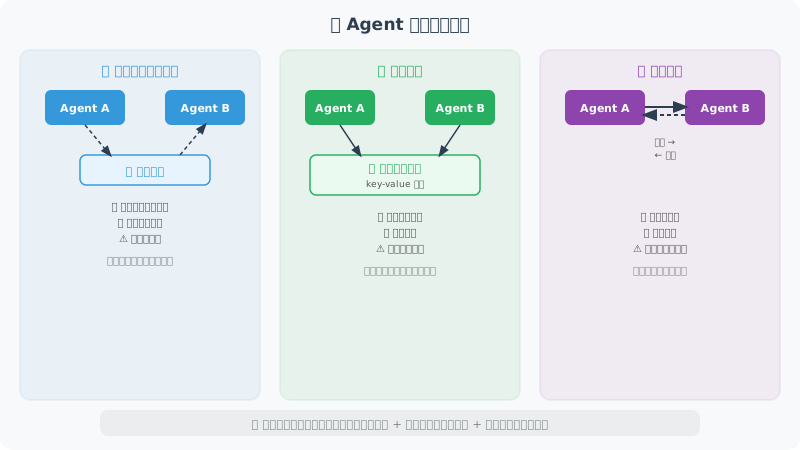
三种通信模式
模式一:消息队列(异步通信)
消息队列是松耦合的通信方式:发送方将消息放入"频道",接收方从频道中取出消息。两个 Agent 不需要同时在线,也不需要知道对方的实现细节。这种模式在微服务架构中非常常见。
from typing import TypedDict, Optional
from queue import Queue
import threading

# ============================
# 模式1:消息队列(异步通信)
# ============================

class MessageBus:
    """简单的消息总线,支持 Agent 间异步通信"""

    def __init__(self):
        self.channels: dict[str, Queue] = {}

    def create_channel(self, name: str):
        """创建频道"""
        self.channels[name] = Queue()

    def publish(self, channel: str, message: dict):
        """发布消息"""
        if channel not in self.channels:
            self.create_channel(channel)
        self.channels[channel].put(message)

    def subscribe(self, channel: str, timeout: float = 5.0) -> Optional[dict]:
        """订阅消息(等待)"""
        if channel not in self.channels:
            return None
        try:
            return self.channels[channel].get(timeout=timeout)
        except:
            return None

# 使用示例
bus = MessageBus()

def researcher_agent(bus: MessageBus, topic: str):
    """研究员 Agent"""
    # 执行研究
    research_result = f"关于'{topic}'的研究结果..."

    # 发布结果
    bus.publish("research_results", {
        "from": "researcher",
        "topic": topic,
        "result": research_result
    })

def writer_agent(bus: MessageBus):
    """写作 Agent:等待研究结果"""
    # 等待研究结果
    message = bus.subscribe("research_results", timeout=10)

    if message:
        content = f"基于研究:{message['result'][:50]}...,撰写文章..."
        bus.publish("articles", {
            "from": "writer",
            "content": content
        })

# 并发运行
def run_pipeline(topic: str):
    import threading

    t1 = threading.Thread(target=researcher_agent, args=(bus, topic))
    t2 = threading.Thread(target=writer_agent, args=(bus,))

    t1.start()
    t2.start()
    t1.join()
    t2.join()

    article = bus.subscribe("articles", timeout=15)
    return article

# ============================
# 模式2:共享状态(LangGraph 方式)
# ============================

# 共享状态是 LangGraph 的核心通信方式。
# 每个节点通过修改共享的 State 来"通信",
# 就像团队成员在共享文档中协作一样。
# 优点:状态完全透明,可以随时检查当前进展。

from typing import TypedDict, Annotated
from langgraph.graph import StateGraph, END, START
import operator

class TeamState(TypedDict):
    """团队共享状态"""
    task: str
    research_notes: Annotated[list, operator.add]  # 可追加
    drafts: Annotated[list, operator.add]          # 可追加
    feedback: Annotated[list, operator.add]        # 可追加
    final_output: Optional[str]

# 每个节点通过修改共享 State 来"通信"
def researcher(state: TeamState) -> dict:
    """研究节点:读取任务,写入研究结果"""
    from openai import OpenAI
    client = OpenAI()

    response = client.chat.completions.create(
        model="gpt-4o-mini",
        messages=[{"role": "user", "content": f"请研究:{state['task']},给出3个要点"}],
        max_tokens=200
    )

    notes = response.choices[0].message.content
    return {"research_notes": [notes]}

def writer(state: TeamState) -> dict:
    """写作节点:读取研究结果,写入草稿"""
    from openai import OpenAI
    client = OpenAI()

    context = "\n".join(state.get("research_notes", []))
    response = client.chat.completions.create(
        model="gpt-4o-mini",
        messages=[{"role": "user", "content": f"基于研究:{context},写200字文章"}],
        max_tokens=300
    )

    draft = response.choices[0].message.content
    return {"drafts": [draft]}

def editor(state: TeamState) -> dict:
    """编辑节点:审查草稿,给出最终输出"""
    latest_draft = state.get("drafts", [""])[-1]
    final = f"【已审核】{latest_draft}"
    return {"final_output": final}

# 构建团队工作流
team_graph = StateGraph(TeamState)
team_graph.add_node("researcher", researcher)
team_graph.add_node("writer", writer)
team_graph.add_node("editor", editor)
team_graph.add_edge(START, "researcher")
team_graph.add_edge("researcher", "writer")
team_graph.add_edge("writer", "editor")
team_graph.add_edge("editor", END)

team_app = team_graph.compile()

result = team_app.invoke({
    "task": "Python 装饰器的应用",
    "research_notes": [],
    "drafts": [],
    "feedback": [],
    "final_output": None
})
print(result["final_output"][:200])

# ============================
# 模式3:直接调用(同步)
# ============================

# 最简单的模式:一个 Agent 像调用函数一样直接调用另一个 Agent。
# 适合简单的依赖关系,但因为是同步阻塞的,
# 调用链太长会影响响应速度。

class AgentNetwork:
    """Agent 网络:Agent 可以直接调用其他 Agent"""

    def __init__(self):
        self.agents = {}

    def register(self, name: str, agent_func):
        """注册 Agent"""
        self.agents[name] = agent_func

    def call(self, agent_name: str, message: str) -> str:
        """调用 Agent"""
        agent = self.agents.get(agent_name)
        if not agent:
            return f"Agent '{agent_name}' 不存在"
        return agent(message)

network = AgentNetwork()

def translate_agent(text: str) -> str:
    from openai import OpenAI
    client = OpenAI()
    response = client.chat.completions.create(
        model="gpt-4o-mini",
        messages=[{"role": "user", "content": f"翻译为英文:{text}"}],
        max_tokens=100
    )
    return response.choices[0].message.content

network.register("translator", translate_agent)

# 一个 Agent 可以调用另一个
result = network.call("translator", "人工智能正在改变世界")
print(result)
选择通信模式
消息队列:
- 适合:松耦合,Agent 可以独立扩展
- 优点:解耦,支持真正的异步
- 缺点:调试困难,状态追踪复杂

共享状态(LangGraph):
- 适合:有明确工作流的协作
- 优点:状态透明,易于调试
- 缺点:紧耦合,需要预先定义完整的 State

直接调用:
- 适合:简单的 Agent 间依赖
- 优点:简单直观
- 缺点:同步阻塞,耦合度高
小结
多 Agent 通信是构建协作系统的基础。本节介绍了三种核心通信模式:
- 消息队列:通过
MessageBus实现松耦合的异步通信,适合需要独立扩展的场景,但调试较为困难 - 共享状态:利用 LangGraph 的
StateGraph,各节点通过修改共享的TypedDict来交换信息,状态透明、易于调试 - 直接调用:通过
AgentNetwork实现同步的 Agent 间调用,简单直观但耦合度高
选择通信模式时,核心考量因素是耦合度和可观测性的权衡。生产环境中,共享状态模式(LangGraph)因其透明性和可调试性而成为最受欢迎的选择。
📖 想深入了解各框架的通信模式设计? 请阅读 14.6 论文解读:多 Agent 系统前沿研究,涵盖 MetaGPT、ChatDev、AutoGen 等框架的通信模式对比分析。
💡 设计启发:MetaGPT 论文中的一个重要发现是——非结构化的自由对话会导致信息丢失和误解累积。 让 Agent 之间传递结构化的中间产物(如 JSON、代码、文档)比传递自然语言消息更可靠。
下一节:14.3 角色分工与任务分配