语音交互集成
本节目标:为 Agent 集成语音识别(STT)和语音合成(TTS)能力,理解实时语音处理架构与多语言支持策略。
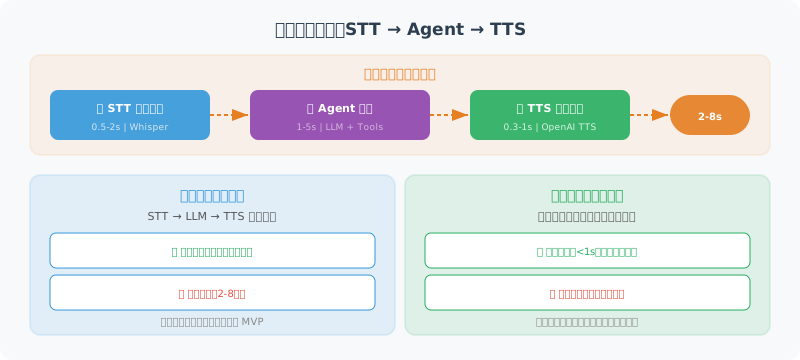
语音交互架构概览
语音 Agent 的核心挑战在于延迟。用户对语音交互的期望是"像与人对话一样自然",这意味着从说完话到听到回复的延迟不能超过 1-2 秒。整个链路涉及三个延迟源:
| 环节 | 典型延迟 | 优化方向 |
|---|---|---|
| 语音识别(STT) | 0.5-2s | 流式识别、端点检测 |
| Agent 推理 | 1-5s | 流式输出、缓存 |
| 语音合成(TTS) | 0.3-1s | 流式合成、预生成 |
| 端到端总延迟 | 2-8s | 全链路流式处理 |
两种架构模式
模式一:分步处理(STT → LLM → TTS)
音频录制完成后,依次进行语音识别、LLM 推理、语音合成。实现简单,延迟较高(3-8 秒),适合对实时性要求不高的场景。本节前半部分采用此模式。
模式二:全链路流式(Streaming Pipeline)
语音识别边听边转、LLM 边想边输出、TTS 边合成边播放,三个环节并行流水线执行。延迟可降至 1-2 秒,但实现复杂度高。OpenAI 的 Realtime API 采用此模式。
语音识别(Speech-to-Text)
使用 OpenAI 的 Whisper 模型将语音转为文字:
from openai import OpenAI
from pathlib import Path

class SpeechToText:
    """语音转文字工具"""

    def __init__(self):
        self.client = OpenAI()

    def transcribe(
        self,
        audio_path: str,
        language: str = "zh"
    ) -> str:
        """将音频文件转为文字"""

        with open(audio_path, "rb") as audio_file:
            transcript = self.client.audio.transcriptions.create(
                model="whisper-1",
                file=audio_file,
                language=language,
                response_format="text"
            )

        return transcript

    def transcribe_with_timestamps(
        self,
        audio_path: str,
        language: str = "zh"
    ) -> dict:
        """转录并返回时间戳"""

        with open(audio_path, "rb") as audio_file:
            transcript = self.client.audio.transcriptions.create(
                model="whisper-1",
                file=audio_file,
                language=language,
                response_format="verbose_json",
                timestamp_granularities=["segment"]
            )

        return {
            "text": transcript.text,
            "segments": [
                {
                    "text": seg.text,
                    "start": seg.start,
                    "end": seg.end
                }
                for seg in (transcript.segments or [])
            ]
        }


# 使用示例
stt = SpeechToText()
text = stt.transcribe("user_voice.mp3")
print(f"用户说:{text}")
语音合成(Text-to-Speech)
将 Agent 的文字回复转为语音:
class TextToSpeech:
    """文字转语音工具"""

    VOICES = ["alloy", "echo", "fable", "onyx", "nova", "shimmer"]

    def __init__(self, voice: str = "nova"):
        self.client = OpenAI()
        self.voice = voice

    def speak(
        self,
        text: str,
        output_path: str = "response.mp3",
        speed: float = 1.0
    ) -> str:
        """将文字转为语音文件"""

        response = self.client.audio.speech.create(
            model="tts-1",       # 或 "tts-1-hd" 高清版
            voice=self.voice,
            input=text,
            speed=speed          # 0.25 - 4.0
        )

        response.stream_to_file(output_path)
        return output_path

    def stream_speak(self, text: str):
        """流式语音合成(边生成边播放)"""

        response = self.client.audio.speech.create(
            model="tts-1",
            voice=self.voice,
            input=text
        )

        # 返回字节流,可以边接收边播放
        return response.content


# 使用示例
tts = TextToSpeech(voice="nova")
tts.speak("你好!我是你的AI助手,有什么可以帮你的吗?")
语音对话循环
import asyncio

class VoiceConversation:
    """语音对话系统"""

    def __init__(self, agent_func):
        self.stt = SpeechToText()
        self.tts = TextToSpeech(voice="nova")
        self.agent = agent_func  # Agent 处理函数

    async def process_voice(self, audio_path: str) -> str:
        """处理一轮语音对话"""

        # 1. 语音 → 文字
        print("🎤 识别语音中...")
        user_text = self.stt.transcribe(audio_path)
        print(f"📝 识别结果: {user_text}")

        # 2. Agent 处理
        print("🤔 Agent 思考中...")
        response_text = await self.agent(user_text)
        print(f"💬 Agent 回复: {response_text}")

        # 3. 文字 → 语音
        print("🔊 生成语音...")
        audio_output = self.tts.speak(response_text)
        print(f"✅ 语音已保存: {audio_output}")

        return audio_output
OpenAI Realtime API:低延迟语音交互
2024 年底,OpenAI 推出了 Realtime API [1],支持音频直接输入/输出(Audio-in, Audio-out),跳过了传统的 STT → LLM → TTS 三段式流程,将端到端延迟降低到亚秒级。
核心特点
- 语音到语音(Speech-to-Speech):模型直接接收音频输入并生成音频输出,无需中间的文字转换步骤
- WebSocket 长连接:通过 WebSocket 建立持久连接,支持双向实时通信
- 函数调用(Function Calling):即使在语音模式下,Agent 也可以调用外部工具
- 语音活动检测(VAD):内置端点检测,自动判断用户是否说完
基础连接示例
import asyncio
import websockets
import json
import base64

class RealtimeVoiceAgent:
    """基于 OpenAI Realtime API 的语音 Agent"""

    REALTIME_URL = "wss://api.openai.com/v1/realtime?model=gpt-4o-realtime-preview"

    def __init__(self, api_key: str, instructions: str = "你是一个友好的语音助手"):
        self.api_key = api_key
        self.instructions = instructions

    async def connect(self):
        """建立 WebSocket 连接"""
        headers = {
            "Authorization": f"Bearer {self.api_key}",
            "OpenAI-Beta": "realtime=v1"
        }

        async with websockets.connect(
            self.REALTIME_URL,
            additional_headers=headers
        ) as ws:
            # 配置会话
            await ws.send(json.dumps({
                "type": "session.update",
                "session": {
                    "instructions": self.instructions,
                    "voice": "nova",
                    "input_audio_format": "pcm16",
                    "output_audio_format": "pcm16",
                    "turn_detection": {
                        "type": "server_vad",  # 服务端语音活动检测
                        "threshold": 0.5,
                        "silence_duration_ms": 500
                    }
                }
            }))

            # 事件处理循环
            async for message in ws:
                event = json.loads(message)
                await self._handle_event(event)

    async def _handle_event(self, event: dict):
        """处理服务端事件"""
        event_type = event.get("type", "")

        if event_type == "response.audio.delta":
            # 收到音频片段,可以立即播放
            audio_chunk = base64.b64decode(event["delta"])
            await self._play_audio(audio_chunk)

        elif event_type == "response.text.delta":
            # 收到文本片段(调试用)
            print(event["delta"], end="", flush=True)

        elif event_type == "response.function_call_arguments.done":
            # Agent 请求调用工具
            await self._handle_tool_call(event)

    async def _play_audio(self, chunk: bytes):
        """播放音频片段(需要集成音频播放库)"""
        # 实际实现中使用 pyaudio 或 sounddevice
        pass

    async def _handle_tool_call(self, event: dict):
        """处理工具调用"""
        # 与文本模式的 Function Calling 逻辑一致
        pass
💡 选型建议:如果你的 Agent 需要"像打电话一样"的实时语音交互(如客服机器人、语音助手),Realtime API 是目前体验最好的选择。如果只是偶尔需要语音输入/输出(如语音备忘录),传统的 STT + TTS 方案更简单可控。
多语言与方言支持
Whisper 的语言能力
OpenAI Whisper 支持 99 种语言的语音识别,但不同语言的准确率差异显著:
| 语言类别 | 代表语言 | WER(词错误率) | 建议 |
|---|---|---|---|
| 高资源语言 | 英语、中文普通话 | < 5% | 直接使用,效果优秀 |
| 中资源语言 | 日语、韩语、德语 | 5-15% | 可用,建议指定 language 参数 |
| 低资源语言 | 粤语、藏语、方言 | 15-30% | 需要后处理修正 |
多语言 Agent 设计策略
class MultilingualVoiceAgent:
    """多语言语音 Agent"""

    # 语言到 TTS 音色的映射
    VOICE_MAP = {
        "zh": "nova",      # 中文用 nova(自然感强)
        "en": "alloy",     # 英文用 alloy
        "ja": "shimmer",   # 日文用 shimmer
    }

    def __init__(self):
        self.stt = SpeechToText()
        self.client = OpenAI()

    async def detect_and_respond(self, audio_path: str) -> str:
        """自动检测语言并用同种语言回复"""

        # Whisper 自动检测语言
        with open(audio_path, "rb") as f:
            result = self.client.audio.transcriptions.create(
                model="whisper-1",
                file=f,
                response_format="verbose_json"
            )

        detected_lang = result.language  # 如 "chinese", "english"
        lang_code = {"chinese": "zh", "english": "en", "japanese": "ja"
                    }.get(detected_lang, "en")

        # 用检测到的语言回复
        voice = self.VOICE_MAP.get(lang_code, "nova")

        # Agent 处理(在 System Prompt 中指定回复语言)
        response = await self._process_with_language(result.text, lang_code)

        # 用对应语言的音色合成语音
        tts = TextToSpeech(voice=voice)
        return tts.speak(response)
语音情感分析
语音不仅传递文字信息,还包含情感线索(语气、语速、音调)。在客服、心理健康等场景中,识别用户情绪有重要价值:
class VoiceSentimentAnalyzer:
    """基于语音的情感分析"""

    def __init__(self):
        self.client = OpenAI()

    async def analyze(self, audio_path: str) -> dict:
        """分析语音的文字内容和情感"""

        # 第一步:转录语音
        with open(audio_path, "rb") as f:
            transcript = self.client.audio.transcriptions.create(
                model="whisper-1", file=f,
                response_format="verbose_json",
                timestamp_granularities=["segment"]
            )

        # 第二步:让 LLM 分析情感
        # 注意:这里只分析文本语义的情感,
        # 真正的声学情感分析需要专门模型(如 emotion2vec)
        analysis_prompt = f"""分析以下语音转录文本的情感,返回 JSON:
{{
  "text": "原文",
  "sentiment": "positive/neutral/negative",
  "emotion": "主要情绪(如:开心、焦虑、愤怒、平静)",
  "urgency": "high/medium/low",
  "confidence": 0.0-1.0
}}

转录文本:{transcript.text}"""

        response = self.client.chat.completions.create(
            model="gpt-4o",
            messages=[{"role": "user", "content": analysis_prompt}],
            response_format={"type": "json_object"}
        )

        return json.loads(response.choices[0].message.content)
语音 Agent 设计模式
在实践中,语音 Agent 有几种常见的设计模式:
模式一:语音前端 + 文本后端
最简单的模式。语音只是输入/输出的"皮肤",Agent 核心仍然处理文本。适合绝大多数场景。
🎤 用户语音 → [STT] → 文本 → [Agent] → 文本 → [TTS] → 🔊 回复语音
模式二:语音感知 Agent
Agent 能感知语音特征(语速、停顿、情绪),据此调整回复策略。例如检测到用户语气焦急时,回复更简洁直接。
模式三:持续监听 Agent
Agent 持续监听环境音频,在检测到唤醒词或特定事件时激活。适合智能家居、车载场景。需要轻量级的本地 VAD(语音活动检测)模型。
各模式对比
| 模式 | 复杂度 | 延迟 | 适用场景 |
|---|---|---|---|
| 语音前端 + 文本后端 | ⭐ | 3-8s | 通用助手、客服 |
| 语音感知 Agent | ⭐⭐⭐ | 3-8s | 情感客服、心理咨询 |
| 持续监听 Agent | ⭐⭐⭐⭐ | 1-3s | 智能家居、车载 |
| Realtime API Agent | ⭐⭐ | 0.5-2s | 实时对话、电话 Agent |
参考文献
[1] OpenAI. "Realtime API." OpenAI Platform Documentation, 2024. https://platform.openai.com/docs/guides/realtime
小结
| 功能 | 模型 | 说明 |
|---|---|---|
| 语音识别 | Whisper | 支持 50+ 语言,准确率高 |
| 语音合成 | TTS-1 | 6 种音色可选 |
| 语音对话 | 组合使用 | STT → Agent → TTS 完整链路 |