13.3 Build Your First Graph Agent
This section walks you through building a complete LangGraph Agent step by step, including tool calls and iterative reasoning.
Unlike the previous approach of using the OpenAI native API or LangChain's AgentExecutor, LangGraph uses a graph to describe Agent behavior. The advantage of this approach is that the execution flow is visualizable, controllable, and persistable — you can clearly see which steps the Agent took, pause and resume at any node, and precisely control the flow direction by adding edges.
Building a Graph Agent involves four steps:
- Define tools: same as before, use the
@tooldecorator to define tool functions - Create nodes: each node is a processing function that receives State and returns updates
- Build the graph: use
add_nodeto add nodes, andadd_edge/add_conditional_edgesto connect them - Compile and run: call
compile()to get an executable Agent
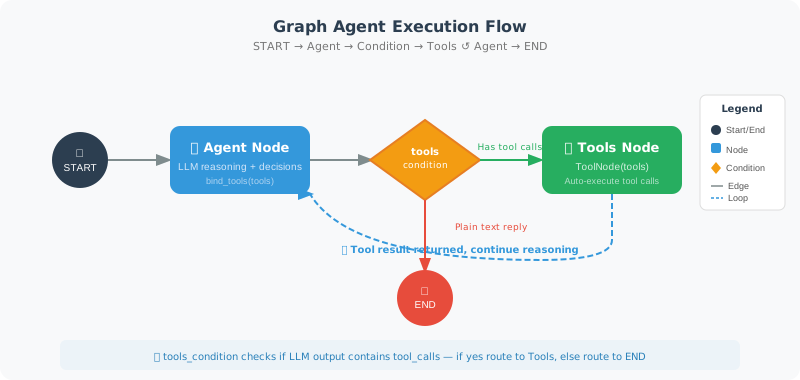
In the code below, we use LangGraph's built-in MessagesState (message list state), ToolNode (automatically executes tools), and tools_condition (determines whether tool calls are needed) — these are shortcut components LangGraph provides for common Agent patterns.
# first_graph_agent.py
from langgraph.graph import StateGraph, END, START, MessagesState
from langgraph.prebuilt import ToolNode, tools_condition
from langchain_openai import ChatOpenAI
from langchain_core.tools import tool
from langchain_core.messages import HumanMessage, SystemMessage
import math

# ============================
# 1. Define Tools
# ============================

@tool
def calculate(expression: str) -> str:
    """Evaluate a mathematical expression. Supports sqrt, sin, cos, log, pi, e, etc."""
    try:
        safe_env = {k: getattr(math, k) for k in dir(math) if not k.startswith('_')}
        # ⚠️ Security warning: eval() can still be bypassed even with restricted __builtins__
        # In production, use safe expression parsers like simpleeval or numexpr
        result = eval(expression, {"__builtins__": {}}, safe_env)
        if isinstance(result, float):
            return f"{result:.6g}"
        return str(result)
    except Exception as e:
        return f"Calculation error: {e}"

@tool
def get_fact(topic: str) -> str:
    """Get basic knowledge about a topic."""
    facts = {
        "python": "Python was created by Guido van Rossum, released in 1991. It is an interpreted, high-level language.",
        "langchain": "LangChain is a framework for building LLM applications, supporting Agents, RAG, Chains, and more.",
        "speed of light": "The speed of light in a vacuum is approximately 299,792,458 meters per second.",
        "earth": "Earth has a diameter of approximately 12,742 km and is about 150 million km from the Sun.",
    }

    for key, fact in facts.items():
        if key.lower() in topic.lower():
            return fact

    return f"No pre-loaded knowledge available for '{topic}'"

tools = [calculate, get_fact]

# ============================
# 2. Create the Agent Node
# ============================

llm = ChatOpenAI(model="gpt-4o", temperature=0)
llm_with_tools = llm.bind_tools(tools)

def agent_node(state: MessagesState) -> dict:
    """Agent core node: calls LLM to decide the next step"""
    messages = state["messages"]

    if not any(isinstance(m, SystemMessage) for m in messages):
        messages = [
            SystemMessage(content="You are an intelligent assistant with access to a calculator and knowledge base tools.")
        ] + messages

    response = llm_with_tools.invoke(messages)
    return {"messages": [response]}

# ============================
# 3. Build the Graph
# ============================

# Building the graph involves three steps: add nodes, add edges, compile.
# - "agent" node: LLM decision-making
# - "tools" node: uses the built-in ToolNode to automatically execute tools
# - tools_condition: built-in condition function that checks if the LLM response contains tool calls
#   If tool calls exist → route to "tools"
#   If not (plain text response) → route to END (finish)
# - "tools" → "agent": after tool execution, return to Agent for continued reasoning (forms a loop)

graph = StateGraph(MessagesState)

# Add nodes
graph.add_node("agent", agent_node)
graph.add_node("tools", ToolNode(tools))  # Built-in tool node

# Add edges
graph.add_edge(START, "agent")
graph.add_conditional_edges(
    "agent",
    tools_condition,  # Built-in condition: has tool calls → "tools", otherwise → END
)
graph.add_edge("tools", "agent")  # After tool execution, return to Agent

# Compile
app = graph.compile()

# ============================
# 4. Visualize (if relevant libraries are installed)
# ============================

try:
    from IPython.display import Image, display
    display(Image(app.get_graph().draw_mermaid_png()))
except:
    print("Graph structure (Mermaid format):")
    print(app.get_graph().draw_mermaid())

# ============================
# 5. Run Tests
# ============================

def chat(question: str):
    """Chat with the Agent"""
    result = app.invoke({
        "messages": [HumanMessage(content=question)]
    })

    # The last message is the AI's response
    final_msg = result["messages"][-1]
    return final_msg.content

# Tests
print(chat("When was Python released?"))
print(chat("What is the speed of light? How many milliseconds does it take to circle the Earth?"))
print(chat("Calculate sqrt(2) to 4 decimal places."))
Understanding the core of the code above: the graph structure forms a "loop" — agent → tools → agent → tools → ... → END. In each iteration, the agent node calls the LLM for reasoning, and tools_condition checks whether the LLM's response contains a tool call request. If it does, the flow goes to the tools node to execute the tool; if not (meaning the LLM believes it can answer directly), the flow goes to END. This is how the Agent's "reasoning-action loop" is expressed in graph structure.
Tracing the Execution Process
When debugging an Agent, understanding each step of its reasoning process is crucial. The app.stream() method streams execution state node by node, letting you clearly see: which node the Agent made a decision at, which tool was called, and what result was returned.
# Use stream to trace each step
for event in app.stream({"messages": [HumanMessage(content="What is Earth's diameter in km? Convert it to miles.")]}):
    for node_name, state in event.items():
        if node_name != "__end__":
            print(f"\n[Node: {node_name}]")
            last_msg = state.get("messages", [])[-1] if state.get("messages") else None
            if last_msg:
                if hasattr(last_msg, 'content') and last_msg.content:
                    print(f"  Message: {last_msg.content[:200]}")
                if hasattr(last_msg, 'tool_calls') and last_msg.tool_calls:
                    for tc in last_msg.tool_calls:
                        print(f"  Tool call: {tc['name']}({tc['args']})")
Comparison with LangChain AgentExecutor
If you've used LangChain's AgentExecutor (Chapter 13), you might ask: why go through the trouble of building an Agent with a graph? Let's understand the fundamental difference between the two through a comparison:
# LangChain AgentExecutor approach (black box)
from langchain.agents import create_openai_tools_agent, AgentExecutor

agent = create_openai_tools_agent(llm, tools, prompt)
executor = AgentExecutor(agent=agent, tools=tools)
result = executor.invoke({"input": "Calculate sqrt(2)"})
# The internal loop is opaque to you

# LangGraph approach (white box)
graph = StateGraph(MessagesState)
graph.add_node("agent", agent_node)
graph.add_node("tools", ToolNode(tools))
# You have full control over the graph structure, edge conditions, and when to terminate
app = graph.compile()
| Dimension | AgentExecutor | LangGraph |
|---|---|---|
| Transparency | Black-box loop | Every node and edge is visible |
| Control | Limited configuration | Fully customizable |
| Persistence | Not supported | Checkpoint natively supported |
| Human-AI collaboration | Requires extra implementation | Built-in interrupt/resume |
| Use case | Simple tool calls | Complex multi-step workflows |
💡 Migration advice: If your Agent only needs a simple "LLM + tool call" loop,
AgentExecutoris sufficient. When you need conditional branching, multi-stage flows, human approval nodes, or intermediate state persistence, migrate to LangGraph.
Common Pitfalls and Best Practices
When building your first Graph Agent, a few common mistakes are worth noting:
Pitfall 1: Forgetting to handle empty message lists
# ❌ Wrong: directly accessing the last message, may cause IndexError
def agent_node(state: MessagesState):
    response = llm.invoke(state["messages"])
    return {"messages": [response]}

# ✅ Correct: ensure the message list is not empty
def agent_node(state: MessagesState):
    messages = state.get("messages", [])
    if not messages:
        messages = [HumanMessage(content="Hello")]
    response = llm_with_tools.invoke(messages)
    return {"messages": [response]}
Pitfall 2: Tool function exceptions crashing the entire Agent
# ❌ Wrong: exception propagates upward
@tool
def risky_tool(query: str) -> str:
    """A tool that might fail"""
    return requests.get(f"https://api.example.com/{query}").text

# ✅ Correct: catch exceptions inside the tool, return friendly error messages
@tool
def safe_tool(query: str) -> str:
    """Safe tool implementation"""
    try:
        response = requests.get(f"https://api.example.com/{query}", timeout=5)
        response.raise_for_status()
        return response.text
    except Exception as e:
        return f"Tool call failed: {type(e).__name__}: {e}"
Pitfall 3: Infinite loops without a safe exit
LangGraph's default recursion_limit is 25 steps, but in complex scenarios you may need to set it explicitly:
# Set maximum recursion steps to prevent infinite loops
result = app.invoke(
    {"messages": [HumanMessage(content="Do a complex analysis")]},
    config={"recursion_limit": 15}  # Maximum 15 steps
)
Summary
The first Graph Agent demonstrates:
StateGraph+MessagesStatefor quick constructionToolNode+tools_conditionfor built-in tool handlingapp.stream()for tracing the execution process
Next section: 13.4 Conditional Routing and Loop Control