13.2 LangGraph Core Concepts: Nodes, Edges, and State
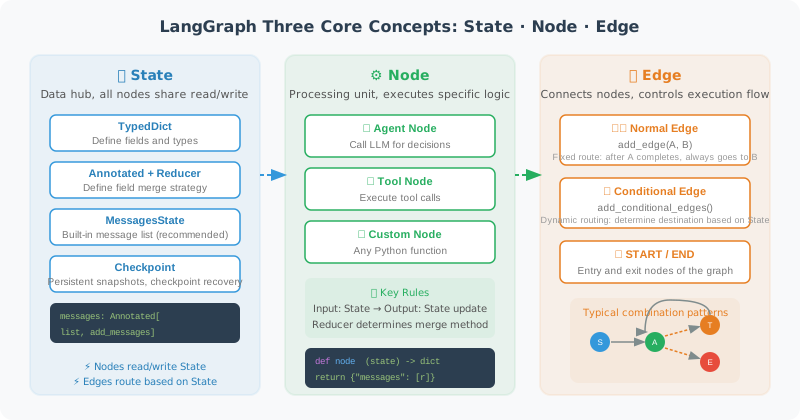
State
State is LangGraph's data center — all nodes read from and write to State.
from typing import TypedDict, Annotated, Optional
from langgraph.graph import MessagesState
import operator

# Method 1: Use the built-in MessagesState (recommended)
# Already includes: messages: Annotated[list, add_messages]
class MyState(MessagesState):
    # Add extra fields on top of the base
    user_name: Optional[str]
    task_complete: bool

# Method 2: Fully custom
from langchain_core.messages import BaseMessage

class CustomState(TypedDict):
    # Use Annotated + operator.add to express "append" semantics
    messages: Annotated[list[BaseMessage], operator.add]

    # Regular fields (each update overwrites)
    current_step: str
    error_count: int
    result: Optional[str]
Advanced Usage of State Reducers
Reducers are a mechanism in LangGraph that is easy to overlook but extremely powerful. When multiple nodes simultaneously update the same field in State, the Reducer determines how to merge those updates.
from typing import Annotated
import operator

# Reducer Example 1: Append (most common)
# The messages field uses operator.add as its Reducer
# Effect: new messages are appended to the end of the list, not replacing the entire list
class ChatState(TypedDict):
    messages: Annotated[list, operator.add]  # Append semantics

# Reducer Example 2: Custom Reducer function
def merge_results(existing: dict, new: dict) -> dict:
    """Custom merge strategy: deep merge two dictionaries"""
    merged = {**existing}
    for key, value in new.items():
        if key in merged and isinstance(merged[key], list):
            merged[key] = merged[key] + value  # Append lists
        else:
            merged[key] = value  # Overwrite other types
    return merged

class AnalysisState(TypedDict):
    # Using a custom Reducer: results from multiple analysis nodes are merged, not overwritten
    analysis_results: Annotated[dict, merge_results]
    step_count: int

# Reducer Example 3: Using add_messages (LangChain built-in)
from langgraph.graph import add_messages

class AgentState(TypedDict):
    # add_messages is smarter than operator.add:
    # - Automatically handles message deduplication (based on message ID)
    # - Supports message updates (new messages with the same ID replace old ones)
    messages: Annotated[list, add_messages]
⚠️ Common pitfall: If you forget to add a Reducer to a list-type field, every time a node returns
{"messages": [new_msg]}it will replace rather than append to the message list. This is the most common bug for beginners.
Checkpoint Persistence
Checkpoints are the core mechanism in LangGraph for implementing "checkpoint recovery" and "session persistence." At each state transition, LangGraph can automatically save a Checkpoint (snapshot), and execution can later be resumed from any Checkpoint.
# In-memory Checkpoint (for development/testing)
from langgraph.checkpoint.memory import MemorySaver

memory_checkpointer = MemorySaver()
app = graph.compile(checkpointer=memory_checkpointer)

# Use thread_id to identify an independent execution session
config = {"configurable": {"thread_id": "user-session-001"}}

# First round of conversation
result1 = app.invoke(
    {"messages": [HumanMessage(content="My name is Alice")]},
    config=config
)

# Second round of conversation — automatically restores previous state
result2 = app.invoke(
    {"messages": [HumanMessage(content="What's my name?")]},
    config=config
)
# Agent can remember "Alice" because state was persisted via Checkpoint

# SQLite Checkpoint (recommended for production)
from langgraph.checkpoint.sqlite import SqliteSaver

# Data persisted to disk, not lost after restart
db_checkpointer = SqliteSaver.from_conn_string("checkpoints.db")
app = graph.compile(checkpointer=db_checkpointer)

# PostgreSQL Checkpoint (distributed production environments)
# pip install langgraph-checkpoint-postgres
# from langgraph.checkpoint.postgres import PostgresSaver
# pg_checkpointer = PostgresSaver.from_conn_string("postgresql://...")
Typical use cases for Checkpoints:
| Scenario | Description |
|---|---|
| Multi-turn conversation persistence | User closes browser and returns; conversation state is not lost |
| Human-in-the-Loop | Pause execution to wait for human approval; resume from pause point after approval |
| Long-running tasks | Data analysis may run for several minutes; supports mid-task checkpoint/resume |
| Error recovery | A node fails; after fixing, retry from the failure point rather than from the beginning |
| Time-travel debugging | Roll back to a previous Checkpoint to inspect the State at that time |
Node
from langchain_openai import ChatOpenAI
from langchain_core.messages import HumanMessage, AIMessage, SystemMessage
from langgraph.graph import StateGraph, END, START, MessagesState

llm = ChatOpenAI(model="gpt-4o")

# A node is just a regular Python function
def agent_node(state: MessagesState) -> dict:
    """
    Agent node: calls LLM to process messages

    Receives: current State
    Returns: the updated portion of State (a dictionary)
    """
    messages = state["messages"]

    # Call LLM
    response = llm.invoke(messages)

    # Return updates (only return the changed parts)
    return {"messages": [response]}

def tool_node(state: MessagesState) -> dict:
    """Tool node: execute tool calls"""
    import json

    last_message = state["messages"][-1]
    tool_results = []

    for tool_call in last_message.tool_calls:
        # Execute tool (simulated here)
        result = f"Result of tool {tool_call['name']}"

        from langchain_core.messages import ToolMessage
        tool_results.append(ToolMessage(
            content=result,
            tool_call_id=tool_call["id"]
        ))

    return {"messages": tool_results}
Edge
# Regular edge: fixed direction
graph.add_edge("node_a", "node_b")  # A always points to B

# Conditional edge: dynamically determined
def route_after_agent(state: MessagesState) -> str:
    """Decide the next step based on Agent output"""
    last_message = state["messages"][-1]

    # If there are tool calls → execute tools
    if hasattr(last_message, "tool_calls") and last_message.tool_calls:
        return "tool_node"

    # Otherwise → end
    return END

graph.add_conditional_edges(
    "agent_node",
    route_after_agent,
    {
        "tool_node": "tool_node",
        END: END
    }
)
Complete ReAct Graph
from langchain_core.tools import tool
import math

@tool
def calculate(expression: str) -> str:
    """Evaluate a mathematical expression"""
    try:
        result = eval(expression, {"__builtins__": {}},
                     {k: getattr(math, k) for k in dir(math)})
        return str(result)
    except Exception as e:
        return f"Error: {e}"

tools = [calculate]
llm_with_tools = llm.bind_tools(tools)

def agent_node(state: MessagesState) -> dict:
    response = llm_with_tools.invoke(state["messages"])
    return {"messages": [response]}

def tool_executor(state: MessagesState) -> dict:
    from langchain_core.messages import ToolMessage
    import json

    last_msg = state["messages"][-1]
    results = []

    for tool_call in last_msg.tool_calls:
        if tool_call["name"] == "calculate":
            result = calculate.invoke(tool_call["args"])
        else:
            result = "Unknown tool"

        results.append(ToolMessage(
            content=str(result),
            tool_call_id=tool_call["id"]
        ))

    return {"messages": results}

def should_use_tools(state: MessagesState) -> str:
    last_msg = state["messages"][-1]
    if hasattr(last_msg, "tool_calls") and last_msg.tool_calls:
        return "tools"
    return END

# Build the graph
graph = StateGraph(MessagesState)
graph.add_node("agent", agent_node)
graph.add_node("tools", tool_executor)
graph.add_edge(START, "agent")
graph.add_conditional_edges("agent", should_use_tools)
graph.add_edge("tools", "agent")  # After tool execution, return to agent

app = graph.compile()

# Run
result = app.invoke({"messages": [HumanMessage(content="Calculate sqrt(2) * pi")]})
print(result["messages"][-1].content)
Error Handling and Retry Strategies
In production environments, Agent nodes (especially those calling external APIs) can fail at any time. LangGraph provides multiple error handling patterns:
import time
from langchain_core.runnables import RunnableConfig

# Pattern 1: try-except inside the node (most flexible)
def resilient_tool_node(state: MessagesState) -> dict:
    """Tool node with error handling"""
    last_msg = state["messages"][-1]
    results = []

    for tool_call in last_msg.tool_calls:
        try:
            result = execute_tool(tool_call)
            results.append(ToolMessage(
                content=str(result),
                tool_call_id=tool_call["id"]
            ))
        except Exception as e:
            # When a tool fails, return error info rather than raising an exception
            # This gives the Agent a chance to self-correct
            results.append(ToolMessage(
                content=f"Tool execution failed: {str(e)}. Please try a different approach.",
                tool_call_id=tool_call["id"]
            ))

    return {"messages": results}

# Pattern 2: Conditional routing with retry count
class RetryState(MessagesState):
    retry_count: int
    max_retries: int

def should_retry(state: RetryState) -> str:
    """Retry decision: retry if failure count hasn't exceeded the limit"""
    last_msg = state["messages"][-1]

    if "failed" in last_msg.content.lower() and state["retry_count"] < state["max_retries"]:
        return "retry"
    elif "failed" in last_msg.content.lower():
        return "fallback"  # Exceeded retry count, take degraded path
    else:
        return "success"

# Pattern 3: Timeout control
# LangGraph supports setting timeouts via RunnableConfig
config = RunnableConfig(
    recursion_limit=25,  # Maximum recursion steps (prevent infinite loops)
    # Other configurations...
)
result = app.invoke(input_data, config=config)
💡 Best practice: In an Agent's tool nodes, never let exceptions propagate directly and crash the entire graph. Catch exceptions and return the error information as a ToolMessage to the Agent, letting the LLM decide the next step based on the error (retry, try a different approach, or inform the user). This "graceful degradation" pattern is the hallmark of production-grade Agents.
Summary
LangGraph's three elements:
- State: shared data container, structure defined by TypedDict
- Node: processing function, receives State, returns partial updates
- Edge: connection relationship, regular edge or conditional edge
Next section: 13.3 Build Your First Graph Agent