Deployment and Operations
📝 Before You Continue: Read 11.5 and 11.4 first. This section orchestrates them into containers, producing a system you can start with one command, monitor, and debug.
The offline, online, and frontend stages are now developed and run locally. But how do you reproduce everything quickly on another machine? This section uses Docker Compose for containerized deployment.
After reading this chapter, you will be able to:
- Explain why Docker Compose (environment consistency / fast startup / isolation / easy scaling)
- Read the configuration of the five services in
docker-compose.yamland understand container-to-container communication via service-name DNS - Describe how the frontend multi-stage build (Node build + Nginx serve) shrinks the image
- Execute the full startup flow: start infrastructure → run the offline pipeline → ingest data → build indexes → browse
- Troubleshoot common issues with
docker compose ps, health checks, andredis-cli - Work through 4 tiered practice problems
11.6.0 Why Docker Compose
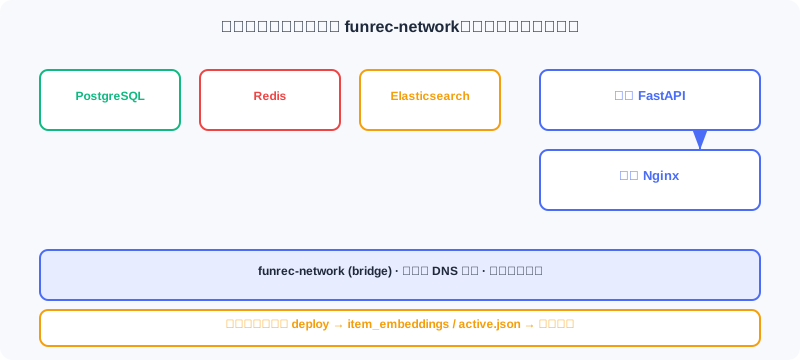
This project depends on five services: PostgreSQL (business data), Redis (feature cache), Elasticsearch (search), the backend API, and the frontend app. Model files pass between the offline and online stages through a shared directory.
Manual deployment means installing PG/Redis/ES on every machine, configuring networking, and dealing with version compatibility — tedious, error-prone, and full of environment drift. Docker Compose describes all services and dependencies in declarative YAML, and one command starts the whole system. Advantages:
- Environment consistency: containers bundle every dependency, so dev/test/production match.
- Fast startup:
docker compose upstarts services in dependency order automatically — no manual assembly. - Isolation and safety: each service runs in its own container without interfering with others.
- Easy to extend: adding a service only requires a config change — existing services are untouched.
11.6.1 Docker Compose Configuration in Detail
docker-compose.yaml defines six services (including the backend build). Let's walk through them one by one.
Database: PostgreSQL:
services:
  postgres:
    image: postgres:15-alpine
    container_name: funrec-postgres
    environment:
      POSTGRES_USER: funrec
      POSTGRES_PASSWORD: funrec123
      POSTGRES_DB: funrec_db
    ports:
      - "5432:5432"
    volumes:
      - postgres_data:/var/lib/postgresql/data          # ← KEY LINE: named volume persists data
    networks:
      - funrec-network
The named volume postgres_data in volumes persists data — delete the container and the data survives; networks lets it communicate with other services.
Cache: Redis:
  redis:
    image: redis:7-alpine
    container_name: funrec-redis
    ports:
      - "6379:6379"
    volumes:
      - redis_data:/data
    networks:
      - funrec-network
    healthcheck:
      test: ["CMD", "redis-cli", "ping"]
      interval: 10s
      timeout: 3s
      retries: 5                                       # ← KEY LINE: unhealthy only after consecutive failures
The healthcheck runs redis-cli ping periodically; 5 consecutive timeouts (3s each) mark it unhealthy, so services that depend on it can wait until it's healthy before starting.
Search: Elasticsearch:
  elasticsearch:
    image: docker.elastic.co/elasticsearch/elasticsearch:9.2.0
    container_name: funrec-elasticsearch
    environment:
      - discovery.type=single-node                     # ← KEY LINE: single-node mode, fine for development
      - xpack.security.enabled=false
      - "ES_JAVA_OPTS=-Xms512m -Xmx512m"               # ← KEY LINE: cap the JVM heap so dev machines don't run out of memory
    ports:
      - "9200:9200"
      - "9300:9300"
    volumes:
      - elasticsearch_data:/usr/share/elasticsearch/data
    networks:
      - funrec-network
    healthcheck:
      test: ["CMD-SHELL", "curl -f http://localhost:9200/_cluster/health || exit 1"]
      interval: 30s
      timeout: 10s
      retries: 5
Backend: FastAPI:
  backend:
    build:
      context: ./backend
      dockerfile: dockerfile
    container_name: funrec-backend
    ports:
      - "8000:8000"
    environment:
      - DATABASE_URL=postgresql://funrec:funrec123@postgres:5432/funrec_db
      - REDIS_URL=redis://redis:6379/0
      - ELASTICSEARCH_URL=http://elasticsearch:9200
      - MODEL_DEPLOY_DIR=/app/tmp/web_project/deployed_models
    volumes:
      - ./backend:/app
      - ../tmp:/app/tmp
      - ${FUNREC_RAW_DATA_PATH}:/data
    depends_on:
      - postgres
      - elasticsearch
      - redis
    command: uvicorn app.main:app --host 0.0.0.0 --port 8000 --reload
    networks:
      - funrec-network
Note that the database/Redis addresses use service names (like postgres, redis) rather than localhost — containers resolve each other via Docker DNS. The backend Dockerfile builds in layers (dependencies first, then code), so code changes don't reinstall dependencies:
FROM python:3.11-slim
WORKDIR /app
RUN apt-get update && apt-get install -y gcc postgresql-client curl \
    && rm -rf /var/lib/apt/lists/*
RUN pip install uv
COPY pyproject.toml ./
RUN uv pip install --system -e .                  # ← KEY LINE: dependency layer first, exploits cache
COPY . .
EXPOSE 8000
CMD ["uvicorn", "app.main:app", "--host", "0.0.0.0", "--port", "8000"]
Frontend (multi-stage build): Node builds the static files first, then Nginx serves them:
  frontend:
    build:
      context: ./frontend
      dockerfile: dockerfile
    container_name: funrec-frontend
    ports:
      - "3000:80"
    depends_on:
      - backend
    networks:
      - funrec-network
The Dockerfile is multi-stage — the final image contains only the build output + Nginx, with no Node or dev dependencies:
# Build stage
FROM node:22-alpine as build
WORKDIR /app
COPY package*.json ./
RUN npm ci
COPY . .
RUN npm run build                                # ← KEY LINE: produce the dist static assets
# Production stage
FROM nginx:alpine
COPY --from=build /app/dist /usr/share/nginx/html   # ← KEY LINE: copy only the build output — smaller image
COPY nginx.conf /etc/nginx/conf.d/default.conf
EXPOSE 80
CMD ["nginx", "-g", "daemon off;"]
Networks and data: shared networks and named volumes are defined at the end:
volumes:
  postgres_data:
  redis_data:
  elasticsearch_data:
networks:
  funrec-network:
    driver: bridge                             # ← KEY LINE: same bridge network, services reach each other by name
11.6.2 Environment Setup and Startup Flow
Prerequisites: install Docker, Docker Compose (bundled with Desktop), and uv (pip install uv). Verify:
docker --version
docker compose version
uv --version
Data preparation: download and extract funrec-movielens-1m.zip, and note its absolute path (containing movies.pkl/ratings.pkl/users.pkl/image/).
Get the code: all code for this project lives in the web_project/ directory of the datawhalechina/fun-rec repository:
git clone https://github.com/datawhalechina/fun-rec.git
cd fun-rec/web_project
Environment variables: copy .env.example to .env and set the data paths:
cd web_project
cp .env.example .env
# Edit .env:
# FUNREC_RAW_DATA_PATH=/path/to/funrec-movielens-1m
# FUNREC_PROCESSED_DATA_PATH=/path/to/funrec-processed
FUNREC_PROCESSED_DATA_PATH holds feature engineering and training intermediates, and must be writable.
Start the infrastructure:
docker compose up --build                    # build images on first run
docker compose up -d --build                 # run in the background
docker compose logs -f backend               # follow backend logs
Run the offline pipeline (train models, initialize data):
cd backend
uv sync
make run-offline-pipeline
It runs in sequence: feature engineering → train YoutubeDNN/DeepFM → push features to Redis → deploy models to the shared directory (roughly 10–20 minutes).
Load data into the database:
make ingest-data-to-database # create tables + import users/movies/ratings + create test users
Index movies into Elasticsearch:
make index-movies-to-elasticsearch # title/genre/cast become searchable
Access the app:
| Service | URL | Notes |
|---|---|---|
| Frontend | http://localhost:3000 | User interface |
| Backend API | http://localhost:8000 | API service |
| API docs | http://localhost:8000/docs | Swagger |
| Elasticsearch | http://localhost:9200 | Search service |
Test account: test@funrec.com / test123456. After logging in, you'll see personalized recommendations, search, details, and ratings.
11.6.3 Health Checks and Debugging
Check status:
docker compose ps
# NAME  STATUS  PORTS ... everything should be Up
Any service showing Exited/Restarting failed to start — check its logs.
Verify each service:
curl http://localhost:8000/health           # backend → {"status": "healthy"}
docker exec -it funrec-postgres pg_isready -U funrec   # PG → accepting connections
docker exec -it funrec-redis redis-cli ping            # Redis → PONG
curl http://localhost:9200                          # ES → version info
Inspect Redis data (verify features went live):
docker exec -it funrec-redis redis-cli hget user:6041:profile frequent_genres
docker exec -it funrec-redis redis-cli llen user:6041:history
Troubleshooting common issues:
- Container fails to start →
docker compose logs backend; check .env paths, port conflicts, and whether dependencies are ready. - Database connection fails →
docker compose logs postgres, look forready to accept connections. - Model loading fails →
ls ${FUNREC_PROCESSED_DATA_PATH}/web_project/deployed_models/; if empty, rerun the offline pipeline. - Search returns nothing →
curl http://localhost:9200/_cat/indices; if there's nomoviesindex, rerun the indexing command.
Analysis: The hard part of deployment isn't "writing the config" — it's getting five services healthy in dependency order and being able to pinpoint failures fast. Health checks, named volumes, service-name DNS, logs, and
redis-cliprobes together form an observable, recoverable delivery baseline.
⚠️ Common Mistakes in 11.6
| # | Mistake | Example | Why It's Wrong | Fix |
|---|---|---|---|---|
| 1 | Using localhost between containers | backend connects to localhost:5432 | In-container localhost is the container itself, not PG | Use the service name postgres |
| 2 | No persistent volume mounted | Data lost when the container is removed | Only named volumes persist | Mount volumes like postgres_data |
| 3 | ES memory uncapped | Default heap eats the dev machine | Jank/OOM | Cap at 512m via ES_JAVA_OPTS |
| 4 | Skipping the offline pipeline | Recommendations come up empty | No models/features | Run make run-offline-pipeline first |
| 5 | Frontend not built | Copying source without npm run build | Nginx has no dist | Multi-stage build produces dist |
Chapter Summary
📌 Key Takeaways
| Concept | Key Points | Why It Matters |
|---|---|---|
| Value of Compose | Consistent/fast/isolated/extensible | One-command reproduction of a multi-service system |
| Service-name DNS | postgres/redis reach each other | Foundation of container networking |
| Persistent volumes | Named volumes hold data | Data survives container removal |
| Multi-stage build | Node build + Nginx serve | Minimal frontend image |
| Startup flow | Infra→offline→ingest→index→browse | Order matters |
| Health & debugging | healthcheck + logs + cli | Observable and recoverable |
❓ FAQ
Q1: Why does the backend use service names instead of the host IP?
A: Within a Docker network, Compose's built-in DNS resolves service names to container IPs.
localhostinside a container points to the container itself, not PG, so it can never connect. Service names are the correct way for containers to talk to each other.
Q2: How do model files get from the offline container to the online one?
A: Through a shared directory (volume mount): the offline
deploy_localwritesdeployed_models/, and the onlineRecallResourceManagerreads from the same mounted path, withactive.jsonpointing at the version. It's fundamentally "file transfer," not "network calls."
Q3: What does the frontend's multi-stage build save?
A: The final image contains only
dist/+ Nginx — no Node.js,node_modules, or other dev dependencies. Both the image size and the attack surface shrink, making production safer and faster.
🔗 Connections to Later Chapters
- The
make run-offline-pipelinecommand from 11.3 is the entry point for this section's offline step. - The 11.4 online service loads the models deployed here via the
MODEL_DEPLOY_DIRvolume. - The 11.5 frontend is served statically via this section's Nginx multi-stage build.
- 11.1's technology choices (PG/Redis/ES/Compose) land here as operational configuration.
Practice Problems
Work through all problems in order — they get progressively harder. Each has a complete solution you can reveal after trying it yourself.
Problem 11.6.1 — Container Communication 🟢 Easy
What happens if the backend's DATABASE_URL is postgresql://funrec:funrec123@localhost:5432/funrec_db? What's the correct form?
💡 Solution (click to reveal)
Answer: Inside the container, localhost points at the backend itself — PostgreSQL is unreachable and startup fails with connection refused. Use the service name instead: @postgres:5432 (Compose DNS resolves to the PG container).
Key points:
- Use service names to reach other containers on the network.
- Inside a container, localhost means "yourself."
Problem 11.6.2 — Data Persistence 🟢 Easy
Without the postgres_data named volume, what happens to the data after docker compose down? And with the volume mounted?
💡 Solution (click to reveal)
Answer: No volume: the container filesystem is destroyed along with it — users/movies/ratings are all gone, and you'd need to rerun ingest-data-to-database. With a named volume: data lives in a host-side volume and survives container removal and recreation.
Key points:
- Stateful services must mount persistent volumes.
- Volume and container lifecycles are decoupled.
Problem 11.6.3 — Startup Order 🟡 Medium
If you skip make run-offline-pipeline and go straight to the frontend's home page recommendations, what happens? Give the root cause and the minimal fix.
💡 Solution (click to reveal)
Answer: The backend's /health may report healthy (the service is up), but the recommendation API can't load models/item embeddings → RecallResourceManager resources are missing, and retrieval fails or returns empty. Root cause: the online stage depends on the models and features the offline stage produces. Fix: cd backend && uv sync && make run-offline-pipeline, then make ingest-data-to-database and make index-movies-to-elasticsearch.
Key points:
- Offline "produces" and online "consumes" — the order can't be reversed.
- Healthy ≠ functionally ready; verify that resources exist.
🏆 Challenge: Add Cache Warm-up 🔴 Hard
In production, you want the backend to proactively warm Redis with popular movie embeddings and high-frequency user profiles at startup, cutting latency for the first cold requests. Based on this chapter's components, identify which layer this change touches and what to watch out for (within 150 words).
💡 Hint
Modify the online service's startup hook (e.g., after RecallResourceManager._ensure_resources_loaded): batch-read high-frequency user profiles/history from PG into Redis; popular movie embeddings are already in item_embeddings.npy and load directly. Watch out for: run warm-up only after the PG/Redis dependencies are healthy (depends_on + retries); warm only hot keys to keep Redis from bloating; use a background task so startup isn't blocked.