Your First Agent: Hello Agent!
The exciting moment has finally arrived — let's build our first real Agent! It can use tools, reason, and complete actual tasks.
What Counts as a Real Agent?
The simplest Agent must have the following capabilities:
- Perceive: Receive user input
- Reason: Understand what needs to be done
- Act: Call tools to execute operations
- Observe: Get tool results
- Respond: Provide the final answer
Simply calling an LLM to generate text does not count as an Agent. The ability to autonomously decide which tools to call is what makes it an Agent.
Project Structure
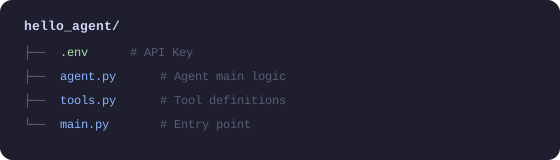
Step 1: Define Tools
# tools.py
import math
import datetime
import requests
from typing import Annotated

def calculator(expression: Annotated[str, "A math expression, e.g. '2 + 3 * 4'"]) -> str:
    """
    Evaluate a mathematical expression.
    Supports basic operations (+,-,*,/) and math functions (sqrt, pow, sin, cos, etc.).
    """
    try:
        # Safely evaluate the math expression
        # Only allow math operations to prevent code injection
        allowed_names = {
            'sqrt': math.sqrt,
            'pow': math.pow,
            'sin': math.sin,
            'cos': math.cos,
            'tan': math.tan,
            'log': math.log,
            'pi': math.pi,
            'e': math.e,
            'abs': abs,
            'round': round,
        }
        result = eval(expression, {"__builtins__": {}}, allowed_names)
        return f"Result: {expression} = {result}"
    except Exception as e:
        return f"Calculation error: {str(e)}"


def get_current_time(
    timezone: Annotated[str, "Timezone name, e.g. 'America/New_York' or 'UTC'"] = "UTC"
) -> str:
    """Get the current time"""
    import zoneinfo
    try:
        tz = zoneinfo.ZoneInfo(timezone)
        now = datetime.datetime.now(tz)
    except (KeyError, Exception):
        # If timezone is invalid, use local time
        now = datetime.datetime.now()
    return f"Current time ({timezone}): {now.strftime('%Y-%m-%d %H:%M:%S')}"


def search_wikipedia(
    query: Annotated[str, "Keywords to search for"]
) -> str:
    """
    Search for information on Wikipedia.
    Suitable for querying historical events, people, geography, scientific concepts, etc.
    """
    try:
        # Use the Wikipedia API
        url = "https://en.wikipedia.org/api/rest_v1/page/summary/" + query
        response = requests.get(url, timeout=5)

        if response.status_code == 200:
            data = response.json()
            return f"Wikipedia - {data.get('title', query)}:\n{data.get('extract', 'No summary found.')[:500]}"
        else:
            return f"No Wikipedia page found for '{query}'"
    except Exception as e:
        return f"Search failed: {str(e)}"


def remember_note(
    content: Annotated[str, "The note content to save"],
    title: Annotated[str, "Note title"] = "Untitled"
) -> str:
    """Save information as a note for later use"""
    import json
    import os

    notes_file = "agent_notes.json"

    # Read existing notes
    if os.path.exists(notes_file):
        with open(notes_file, 'r', encoding='utf-8') as f:
            notes = json.load(f)
    else:
        notes = []

    # Add new note
    note = {
        "title": title,
        "content": content,
        "time": datetime.datetime.now().isoformat()
    }
    notes.append(note)

    # Save
    with open(notes_file, 'w', encoding='utf-8') as f:
        json.dump(notes, f, ensure_ascii=False, indent=2)

    return f"✅ Note saved: '{title}'"
Step 2: Build the Agent
# agent.py
import os
import json
from openai import OpenAI
from dotenv import load_dotenv
from tools import calculator, get_current_time, search_wikipedia, remember_note
from rich.console import Console
from rich.panel import Panel

load_dotenv()

console = Console()
client = OpenAI()

# Tool registry: map Python functions to OpenAI tool format
TOOLS_REGISTRY = {
    "calculator": calculator,
    "get_current_time": get_current_time,
    "search_wikipedia": search_wikipedia,
    "remember_note": remember_note,
}

# Tool definitions in OpenAI Function Calling format
TOOLS_DEFINITION = [
    {
        "type": "function",
        "function": {
            "name": "calculator",
            "description": "Evaluate mathematical expressions, supporting basic operations and math functions (sqrt, sin, cos, etc.)",
            "parameters": {
                "type": "object",
                "properties": {
                    "expression": {
                        "type": "string",
                        "description": "Math expression, e.g. '2 + 3 * 4' or 'sqrt(16)'"
                    }
                },
                "required": ["expression"]
            }
        }
    },
    {
        "type": "function",
        "function": {
            "name": "get_current_time",
            "description": "Get the current date and time",
            "parameters": {
                "type": "object",
                "properties": {
                    "timezone": {
                        "type": "string",
                        "description": "Timezone, default UTC",
                        "default": "UTC"
                    }
                },
                "required": []
            }
        }
    },
    {
        "type": "function",
        "function": {
            "name": "search_wikipedia",
            "description": "Search Wikipedia for information — suitable for encyclopedic knowledge queries",
            "parameters": {
                "type": "object",
                "properties": {
                    "query": {
                        "type": "string",
                        "description": "Search keywords"
                    }
                },
                "required": ["query"]
            }
        }
    },
    {
        "type": "function",
        "function": {
            "name": "remember_note",
            "description": "Save important information as a note",
            "parameters": {
                "type": "object",
                "properties": {
                    "content": {
                        "type": "string",
                        "description": "Note content"
                    },
                    "title": {
                        "type": "string",
                        "description": "Note title",
                        "default": "Untitled"
                    }
                },
                "required": ["content"]
            }
        }
    }
]


class HelloAgent:
    """
    Your first Agent: Hello Agent!
    Equipped with tool use, multi-turn conversation, and reasoning capabilities.
    """

    def __init__(self, model: str = "gpt-4o-mini"):
        self.model = model
        self.messages = [
            {
                "role": "system",
                "content": """You are an intelligent assistant that can use various tools to help users.

You have access to the following tools:
- calculator: Solve math problems
- get_current_time: Get the current time
- search_wikipedia: Look up encyclopedic knowledge
- remember_note: Save important information

When using tools, first analyze the user's needs, choose the appropriate tool, execute it, and then provide a clear answer.
If no tool is needed, answer directly."""
            }
        ]

    def _execute_tool(self, tool_name: str, tool_args: dict) -> str:
        """Execute a tool call"""
        tool_func = TOOLS_REGISTRY.get(tool_name)
        if not tool_func:
            return f"Error: Unknown tool '{tool_name}'"

        try:
            result = tool_func(**tool_args)
            return str(result)
        except Exception as e:
            return f"Tool execution failed: {str(e)}"

    def chat(self, user_message: str) -> str:
        """
        Chat with the Agent.
        Implements the complete ReAct loop: Reason → Act → Observe
        """
        # Add user message
        self.messages.append({"role": "user", "content": user_message})

        console.print(f"\n[bold blue]User:[/bold blue] {user_message}")

        # Agent loop (max 10 iterations to prevent infinite loops)
        max_iterations = 10
        for iteration in range(max_iterations):

            # Call the LLM
            response = client.chat.completions.create(
                model=self.model,
                messages=self.messages,
                tools=TOOLS_DEFINITION,
                tool_choice="auto"  # Let the model decide whether to use tools
            )

            message = response.choices[0].message
            finish_reason = response.choices[0].finish_reason

            # Add model response to history
            self.messages.append(message)

            # If the model decides to answer directly (no tool use)
            if finish_reason == "stop":
                console.print(f"[bold green]Agent:[/bold green] {message.content}")
                return message.content

            # If the model decides to use tools
            if finish_reason == "tool_calls" and message.tool_calls:
                for tool_call in message.tool_calls:
                    tool_name = tool_call.function.name
                    tool_args = json.loads(tool_call.function.arguments)

                    # Display tool call (debug info)
                    console.print(
                        Panel(
                            f"Tool: [yellow]{tool_name}[/yellow]\n"
                            f"Args: {tool_args}",
                            title="🔧 Tool Call",
                            border_style="yellow"
                        )
                    )

                    # Execute the tool
                    result = self._execute_tool(tool_name, tool_args)

                    console.print(f"[dim]Tool result: {result}[/dim]")

                    # Add tool result to history
                    self.messages.append({
                        "role": "tool",
                        "tool_call_id": tool_call.id,
                        "content": result
                    })

        return "Sorry, processing timed out. Please try again."

    def reset(self):
        """Reset conversation history"""
        self.messages = self.messages[:1]  # Keep only the system prompt
        console.print("[dim]Conversation reset[/dim]")
Step 3: Run It!
# main.py
from agent import HelloAgent
from rich.console import Console
from rich.panel import Panel

console = Console()

def main():
    console.print(Panel(
        "[bold]🤖 Hello Agent is running![/bold]\n"
        "I can help you: do math, check the time, search Wikipedia, and save notes.\n"
        "Type 'quit' to exit, 'reset' to clear the conversation.",
        title="Agent Started",
        border_style="green"
    ))

    agent = HelloAgent()

    while True:
        user_input = input("\nYou: ").strip()

        if not user_input:
            continue

        if user_input.lower() == "quit":
            console.print("[bold]Goodbye![/bold]")
            break

        if user_input.lower() == "reset":
            agent.reset()
            continue

        agent.chat(user_input)

if __name__ == "__main__":
    main()
Sample Output
$ python main.py

╭──────────────────────────────────────────╮
│  🤖 Hello Agent is running!              │
│  I can help you: do math, check time...  │
╰──────────────────────────────────────────╯

You: What time is it right now?

User: What time is it right now?
╭── 🔧 Tool Call ──╮
│ Tool: get_current_time    │
│ Args: {}                  │
╰───────────────────╯
Tool result: Current time (UTC): 2026-03-12 06:30:22

Agent: The current time is 06:30 UTC on March 12, 2026.

You: Calculate (123 * 456 + 789) / 3

User: Calculate (123 * 456 + 789) / 3
╭── 🔧 Tool Call ──╮
│ Tool: calculator          │
│ Args: {'expression': '(123 * 456 + 789) / 3'}    │
╰───────────────────╯
Tool result: Result: (123 * 456 + 789) / 3 = 18945.0

Agent: The result is 18,945.
Step by step: 123 × 456 = 56,088; plus 789 = 56,877; divided by 3 = 18,945.

You: Search for information about "artificial intelligence"

(Automatically calls the search_wikipedia tool and returns a Wikipedia summary)
Code Analysis: The Agent's Core Loop
This simple Agent demonstrates a complete implementation of the ReAct pattern:
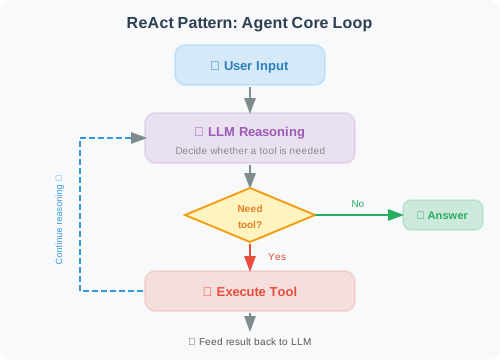
This loop continues until the LLM determines it can provide a final answer.
Summary
Congratulations! You've successfully built your first Agent! This Agent demonstrates:
- ✅ Tool registration: Exposing Python functions to the LLM
- ✅ Autonomous decision-making: The LLM decides when to use tools
- ✅ Iterative reasoning: Continuous reasoning until the task is complete
- ✅ Multi-turn conversation: Remembering conversation history
Subsequent chapters will build on this foundation to construct more powerful Agent systems.
Next chapter: Chapter 2: LLM Fundamentals