API Key Management & Security Best Practices
API Keys are credentials for accessing LLM services. If leaked, they can result in serious financial losses. This section explains how to manage API Keys securely.
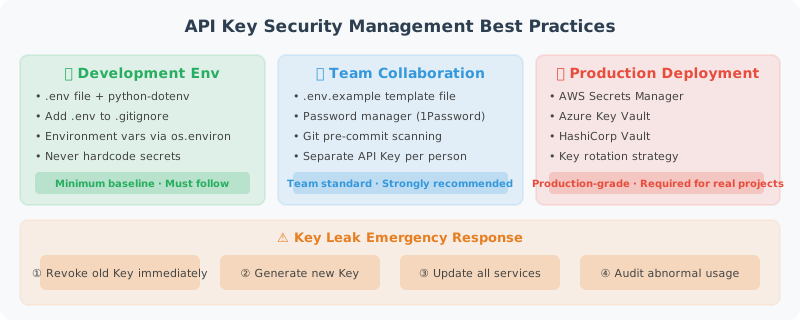
Never Do This
# ❌ Never do this!
client = OpenAI(api_key="sk-proj-abc123xyz...")  # Hardcoded in the source code

# ❌ Don't commit it to Git either
# Even in a private repository, develop good habits
Once an API Key is committed to GitHub, even if deleted immediately, it may have already been discovered by automated scanning tools. GitHub itself has a Secret Scanning feature that detects and notifies OpenAI to revoke leaked keys.
The Right Approach: Use a .env File
# Create a .env file (do not commit to version control)
cat > .env << EOF
# LLM API Keys
OPENAI_API_KEY=sk-proj-your-key-here
ANTHROPIC_API_KEY=your-anthropic-key
DASHSCOPE_API_KEY=your-qwen-key

# Other configuration
DEFAULT_MODEL=gpt-4o-mini
MAX_TOKENS=2000
EOF

# Make sure .gitignore includes .env
echo ".env" >> .gitignore
echo ".env.local" >> .gitignore
# config.py: Centralized configuration management
import os
from dotenv import load_dotenv
from pathlib import Path

# Load .env file
# Searches upward from the current directory for .env
load_dotenv()

class Config:
    """Application configuration"""

    # LLM configuration
    OPENAI_API_KEY: str = os.getenv("OPENAI_API_KEY", "")
    ANTHROPIC_API_KEY: str = os.getenv("ANTHROPIC_API_KEY", "")

    # Model configuration
    DEFAULT_MODEL: str = os.getenv("DEFAULT_MODEL", "gpt-4o-mini")
    MAX_TOKENS: int = int(os.getenv("MAX_TOKENS", "2000"))
    TEMPERATURE: float = float(os.getenv("TEMPERATURE", "0.7"))

    @classmethod
    def validate(cls):
        """Validate that required configuration exists"""
        required_keys = ["OPENAI_API_KEY"]
        missing = [k for k in required_keys if not getattr(cls, k)]

        if missing:
            raise ValueError(
                f"Missing required environment variables: {', '.join(missing)}\n"
                f"Please check your .env file or set the environment variables."
            )
        return True

# Validate at application startup
config = Config()
config.validate()
Create a .env.example Template
Commit .env.example to Git so other developers know which keys are needed:
# .env.example (commit to Git, without real values)
# Copy this file to .env and fill in your real API Keys

# OpenAI API Key
# Get it at: https://platform.openai.com/api-keys
OPENAI_API_KEY=your-openai-api-key-here

# Anthropic API Key (optional)
# Get it at: https://console.anthropic.com/
ANTHROPIC_API_KEY=your-anthropic-api-key-here

# Alibaba Cloud Qwen (optional)
DASHSCOPE_API_KEY=your-dashscope-api-key-here

# DeepSeek (optional, excellent cost-performance ratio)
# Get it at: https://platform.deepseek.com/
DEEPSEEK_API_KEY=your-deepseek-api-key-here

# Default model configuration
DEFAULT_MODEL=gpt-4o-mini
MAX_TOKENS=2000
Multi-Environment Configuration Management
# settings.py: Configuration management supporting multiple environments
from pydantic_settings import BaseSettings
from typing import Optional

class Settings(BaseSettings):
    """
    Use pydantic-settings to manage configuration.
    Automatically reads from environment variables with type validation.
    """

    # API Keys
    openai_api_key: str
    anthropic_api_key: Optional[str] = None
    dashscope_api_key: Optional[str] = None

    # Model configuration
    default_model: str = "gpt-4o-mini"
    max_tokens: int = 2000
    temperature: float = 0.7

    # Application configuration
    debug: bool = False
    log_level: str = "INFO"

    class Config:
        env_file = ".env"
        env_file_encoding = "utf-8"
        case_sensitive = False  # OPENAI_API_KEY = openai_api_key

# Install: pip install pydantic-settings
settings = Settings()
print(f"Using model: {settings.default_model}")
API Key Management Best Practices in Real Development
1. Request Different Keys for Different Purposes
Development Key  → For local development, set a low usage limit
Test Key         → For CI/CD testing
Production Key   → Highest privilege, only accessible in production
2. Set Usage Alerts
Set usage limits and alerts in the OpenAI dashboard:
- Monthly Hard Limit: Prevents overspending
- Alert Threshold: Early warning
3. Key Rotation
# Support multiple key rotation to avoid single points of failure
import itertools
import os

class APIKeyRotator:
    """API Key rotation manager"""

    def __init__(self):
        # Read multiple keys from environment variables
        keys = []
        for i in range(1, 6):  # Up to 5 keys
            key = os.getenv(f"OPENAI_API_KEY_{i}")
            if key:
                keys.append(key)

        # Also accept a single key
        single_key = os.getenv("OPENAI_API_KEY")
        if single_key:
            keys.append(single_key)

        if not keys:
            raise ValueError("No API Keys found")

        self._key_cycle = itertools.cycle(keys)
        self._key_count = len(keys)

    def get_next_key(self) -> str:
        """Get the next key (rotation)"""
        return next(self._key_cycle)

    @property
    def key_count(self) -> int:
        return self._key_count

# Usage
rotator = APIKeyRotator()
print(f"Loaded {rotator.key_count} API Key(s)")
4. Production Environment: Use a Secrets Management Service
# Production environments should NOT use .env files
# Instead, use a professional secrets management service

# Option 1: AWS Secrets Manager
import boto3
import json

def get_secret_from_aws(secret_name: str, region: str = "us-east-1") -> dict:
    """Retrieve a secret from AWS Secrets Manager"""
    client = boto3.client("secretsmanager", region_name=region)
    response = client.get_secret_value(SecretId=secret_name)
    return json.loads(response["SecretString"])

# Usage:
# secrets = get_secret_from_aws("prod/openai-keys")
# OPENAI_API_KEY = secrets["api_key"]

# Option 2: Alibaba Cloud KMS
# Option 3: HashiCorp Vault
# Option 4: Kubernetes Secrets
Validate That a Key Is Working
# key_validator.py
from openai import OpenAI, AuthenticationError

def validate_openai_key(api_key: str) -> bool:
    """Validate whether an OpenAI API Key is valid"""
    try:
        client = OpenAI(api_key=api_key)
        # Validate the key in the cheapest way possible
        client.models.list()
        return True
    except AuthenticationError:
        return False
    except Exception as e:
        print(f"Error during validation: {e}")
        return False

# Validate at application startup
import os
from dotenv import load_dotenv
load_dotenv()

key = os.getenv("OPENAI_API_KEY")
if validate_openai_key(key):
    print("✅ API Key is valid")
else:
    print("❌ API Key is invalid. Please check.")
Hide Sensitive Information in Logs
import logging
import re

class SensitiveDataFilter(logging.Filter):
    """Filter sensitive information from logs"""

    # Match OpenAI Key format
    PATTERNS = [
        (r'sk-[a-zA-Z0-9]{20,}', 'sk-***REDACTED***'),
        (r'Bearer [a-zA-Z0-9\-._~+/]+=*', 'Bearer ***REDACTED***'),
    ]

    def filter(self, record: logging.LogRecord) -> bool:
        record.msg = self._redact(str(record.msg))
        return True

    def _redact(self, text: str) -> str:
        for pattern, replacement in self.PATTERNS:
            text = re.sub(pattern, replacement, text)
        return text

# Configure logging
logger = logging.getLogger(__name__)
logger.addFilter(SensitiveDataFilter())

# Test: even if a key is accidentally printed, it will be filtered
logger.info("Using key: sk-proj-abc123xyz789...")
# Output: Using key: sk-***REDACTED***
Security Checklist
Before each code commit, confirm the following:
-
.envfile is in.gitignore - No hardcoded API Keys in the code
-
.env.exampletemplate has been created - Usage limits have been set in the OpenAI dashboard
- Logs do not output the full API Key
Next section: 2.4 Your First Agent: Hello Agent!