Multi-Agent Communication Patterns
In a multi-Agent system, how Agents exchange information is a core design decision. Different communication patterns suit different scenarios; choosing the wrong one can make the system difficult to maintain or cause performance issues.
This section introduces the three most common communication patterns and demonstrates their implementation with code. After reading this section, you should be able to choose the appropriate pattern based on your project's needs.
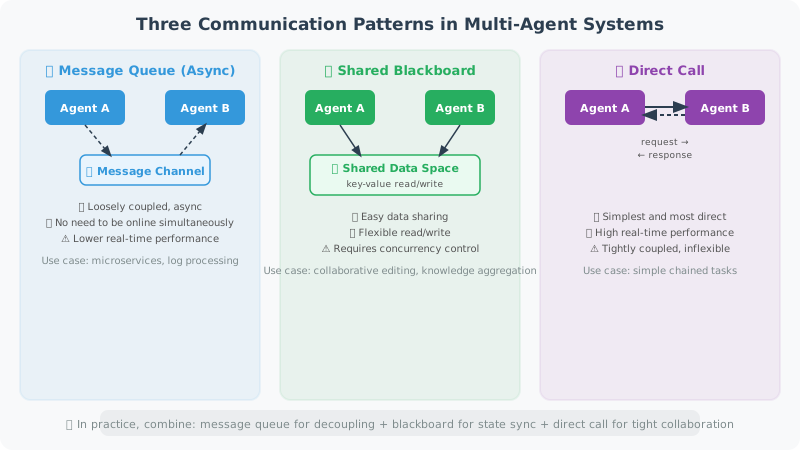
Three Communication Patterns
Pattern 1: Message Queue (Asynchronous Communication)
A message queue is a loosely coupled communication method: the sender places a message into a "channel," and the receiver retrieves it from the channel. The two Agents don't need to be online simultaneously, nor do they need to know each other's implementation details. This pattern is very common in microservice architectures.
from typing import TypedDict, Optional
from queue import Queue
import threading

# ============================
# Pattern 1: Message Queue (Asynchronous Communication)
# ============================

class MessageBus:
    """Simple message bus supporting asynchronous communication between Agents"""

    def __init__(self):
        self.channels: dict[str, Queue] = {}

    def create_channel(self, name: str):
        """Create a channel"""
        self.channels[name] = Queue()

    def publish(self, channel: str, message: dict):
        """Publish a message"""
        if channel not in self.channels:
            self.create_channel(channel)
        self.channels[channel].put(message)

    def subscribe(self, channel: str, timeout: float = 5.0) -> Optional[dict]:
        """Subscribe to messages (wait)"""
        if channel not in self.channels:
            return None
        try:
            return self.channels[channel].get(timeout=timeout)
        except:
            return None

# Usage example
bus = MessageBus()

def researcher_agent(bus: MessageBus, topic: str):
    """Researcher Agent"""
    # Conduct research
    research_result = f"Research results on '{topic}'..."

    # Publish results
    bus.publish("research_results", {
        "from": "researcher",
        "topic": topic,
        "result": research_result
    })

def writer_agent(bus: MessageBus):
    """Writer Agent: waits for research results"""
    # Wait for research results
    message = bus.subscribe("research_results", timeout=10)

    if message:
        content = f"Based on research: {message['result'][:50]}..., writing article..."
        bus.publish("articles", {
            "from": "writer",
            "content": content
        })

# Run concurrently
def run_pipeline(topic: str):
    import threading

    t1 = threading.Thread(target=researcher_agent, args=(bus, topic))
    t2 = threading.Thread(target=writer_agent, args=(bus,))

    t1.start()
    t2.start()
    t1.join()
    t2.join()

    article = bus.subscribe("articles", timeout=15)
    return article

# ============================
# Pattern 2: Shared State (LangGraph approach)
# ============================

# Shared state is LangGraph's core communication method.
# Each node "communicates" by modifying the shared State,
# just like team members collaborating on a shared document.
# Advantage: state is fully transparent and can be inspected at any time.

from typing import TypedDict, Annotated
from langgraph.graph import StateGraph, END, START
import operator

class TeamState(TypedDict):
    """Team shared state"""
    task: str
    research_notes: Annotated[list, operator.add]  # Appendable
    drafts: Annotated[list, operator.add]          # Appendable
    feedback: Annotated[list, operator.add]        # Appendable
    final_output: Optional[str]

# Each node "communicates" by modifying the shared State
def researcher(state: TeamState) -> dict:
    """Research node: reads task, writes research results"""
    from openai import OpenAI
    client = OpenAI()

    response = client.chat.completions.create(
        model="gpt-4o-mini",
        messages=[{"role": "user", "content": f"Please research: {state['task']}, provide 3 key points"}],
        max_tokens=200
    )

    notes = response.choices[0].message.content
    return {"research_notes": [notes]}

def writer(state: TeamState) -> dict:
    """Writing node: reads research results, writes draft"""
    from openai import OpenAI
    client = OpenAI()

    context = "\n".join(state.get("research_notes", []))
    response = client.chat.completions.create(
        model="gpt-4o-mini",
        messages=[{"role": "user", "content": f"Based on research: {context}, write a 200-word article"}],
        max_tokens=300
    )

    draft = response.choices[0].message.content
    return {"drafts": [draft]}

def editor(state: TeamState) -> dict:
    """Editor node: reviews draft, produces final output"""
    latest_draft = state.get("drafts", [""])[-1]
    final = f"[Reviewed] {latest_draft}"
    return {"final_output": final}

# Build team workflow
team_graph = StateGraph(TeamState)
team_graph.add_node("researcher", researcher)
team_graph.add_node("writer", writer)
team_graph.add_node("editor", editor)
team_graph.add_edge(START, "researcher")
team_graph.add_edge("researcher", "writer")
team_graph.add_edge("writer", "editor")
team_graph.add_edge("editor", END)

team_app = team_graph.compile()

result = team_app.invoke({
    "task": "Applications of Python decorators",
    "research_notes": [],
    "drafts": [],
    "feedback": [],
    "final_output": None
})
print(result["final_output"][:200])

# ============================
# Pattern 3: Direct Call (Synchronous)
# ============================

# The simplest pattern: one Agent directly calls another Agent like a function.
# Suitable for simple dependencies, but because it's synchronously blocking,
# long call chains can affect response speed.

class AgentNetwork:
    """Agent network: Agents can directly call other Agents"""

    def __init__(self):
        self.agents = {}

    def register(self, name: str, agent_func):
        """Register an Agent"""
        self.agents[name] = agent_func

    def call(self, agent_name: str, message: str) -> str:
        """Call an Agent"""
        agent = self.agents.get(agent_name)
        if not agent:
            return f"Agent '{agent_name}' does not exist"
        return agent(message)

network = AgentNetwork()

def translate_agent(text: str) -> str:
    from openai import OpenAI
    client = OpenAI()
    response = client.chat.completions.create(
        model="gpt-4o-mini",
        messages=[{"role": "user", "content": f"Translate to English: {text}"}],
        max_tokens=100
    )
    return response.choices[0].message.content

network.register("translator", translate_agent)

# One Agent can call another
result = network.call("translator", "Artificial intelligence is changing the world")
print(result)
Choosing a Communication Pattern
Message Queue:
- Best for: loose coupling, Agents can scale independently
- Pros: decoupled, supports true async
- Cons: difficult to debug, complex state tracking

Shared State (LangGraph):
- Best for: collaboration with a clear workflow
- Pros: transparent state, easy to debug
- Cons: tightly coupled, requires pre-defining the complete State

Direct Call:
- Best for: simple dependencies between Agents
- Pros: simple and intuitive
- Cons: synchronously blocking, high coupling
Summary
Multi-Agent communication is the foundation for building collaborative systems. This section introduced three core communication patterns:
- Message Queue: Achieves loosely coupled asynchronous communication via
MessageBus, suitable for scenarios requiring independent scaling, but harder to debug - Shared State: Uses LangGraph's
StateGraph, where nodes exchange information by modifying a sharedTypedDict; state is transparent and easy to debug - Direct Call: Implements synchronous Agent-to-Agent calls via
AgentNetwork; simple and intuitive but with high coupling
When choosing a communication pattern, the core consideration is the trade-off between coupling and observability. In production environments, the shared state pattern (LangGraph) is the most popular choice due to its transparency and debuggability.
📖 Want to dive deeper into communication pattern designs across frameworks? Read 16.6 Paper Readings: Frontier Research in Multi-Agent Systems, covering comparative analysis of communication patterns in MetaGPT, ChatDev, AutoGen, and other frameworks.
💡 Design insight: An important finding in the MetaGPT paper is that unstructured free-form conversation leads to information loss and accumulated misunderstandings. Having Agents pass structured intermediate artifacts (such as JSON, code, documents) between each other is more reliable than passing natural language messages.
Next section: 16.3 Role Division and Task Allocation