13.5 Human-in-the-Loop: Human-AI Collaboration
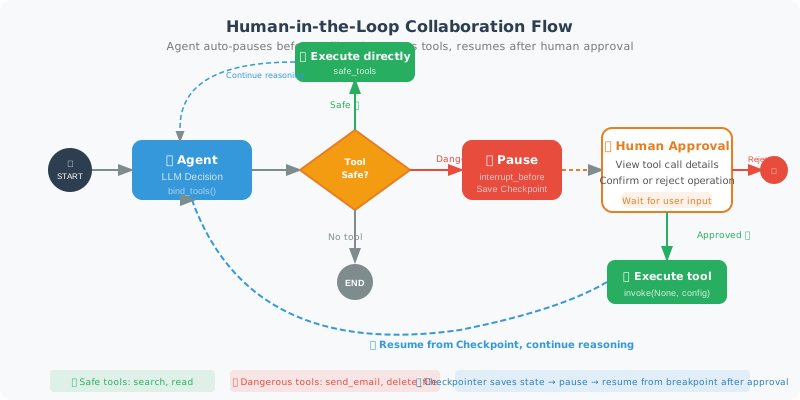
In production environments, letting an Agent run completely autonomously is risky — operations like deleting files, sending emails, and processing payments are irreversible once they go wrong. The Human-in-the-Loop mechanism allows the Agent to pause before executing dangerous operations and wait for human confirmation before continuing.
LangGraph implements this capability through the Checkpointer mechanism. The Checkpointer saves a state snapshot at every step of graph execution, allowing the graph to pause and resume at any node.
Using Checkpointer for Pause and Resume
Core Idea
- Classify tools by danger level: categorize tools as "safe" or "dangerous"
- Conditional routing: when a dangerous tool call is detected, stop graph execution
- State saving: save the graph's current state via
MemorySaver - Human approval: obtain user confirmation externally
- Resume execution: after approval, use
app.invoke(None, config)to continue from where it paused
from langgraph.graph import StateGraph, END, START, MessagesState
from langgraph.checkpoint.memory import MemorySaver
from langgraph.prebuilt import ToolNode, tools_condition
from langchain_openai import ChatOpenAI
from langchain_core.tools import tool
from langchain_core.messages import HumanMessage, AIMessage

# ============================
# Define Sensitive Tools Requiring Human Confirmation
# ============================

@tool
def send_email(to: str, subject: str, body: str) -> str:
    """Send an email (dangerous operation, requires human confirmation)"""
    print(f"\n[Simulated] Sending email to {to}")
    return f"Email sent to {to}"

@tool
def delete_file(path: str) -> str:
    """Delete a file (dangerous operation, requires human confirmation)"""
    print(f"\n[Simulated] Deleting file: {path}")
    return f"File {path} deleted"

@tool
def safe_search(query: str) -> str:
    """Safe search (no confirmation needed)"""
    return f"Search results for '{query}': [relevant information...]"

DANGEROUS_TOOLS = {"send_email", "delete_file"}
tools = [send_email, delete_file, safe_search]

# ============================
# Node Definitions
# ============================

llm = ChatOpenAI(model="gpt-4o", temperature=0)
llm_with_tools = llm.bind_tools(tools)

def agent_node(state: MessagesState) -> dict:
    response = llm_with_tools.invoke(state["messages"])
    return {"messages": [response]}

def check_needs_approval(state: MessagesState) -> str:
    """Check if any dangerous tool calls require approval"""
    last_msg = state["messages"][-1]

    if hasattr(last_msg, "tool_calls") and last_msg.tool_calls:
        for tc in last_msg.tool_calls:
            if tc["name"] in DANGEROUS_TOOLS:
                return "needs_approval"
        return "tools"  # Safe tools execute directly

    return END

# ============================
# Build Graph with Checkpointer
# ============================

graph = StateGraph(MessagesState)
graph.add_node("agent", agent_node)
graph.add_node("tools", ToolNode(tools))

graph.add_edge(START, "agent")
graph.add_conditional_edges("agent", check_needs_approval, {
    "needs_approval": END,  # Pause! Wait for human approval
    "tools": "tools",
    END: END
})
graph.add_edge("tools", "agent")

# MemorySaver allows resuming execution
memory = MemorySaver()

# Note on the interrupt mechanism:
# Two complementary safety strategies are used here:
# 1. check_needs_approval (conditional routing): returns END for dangerous tools, stopping graph execution
# 2. interrupt_before (compile parameter): acts as an extra safety net, pausing before all tool nodes
#
# Actual behavior:
# - Safe tools (e.g., safe_search): routed to "tools" node by check_needs_approval,
#   but interrupt_before will pause before execution (remove this line to let safe tools auto-execute)
# - Dangerous tools (e.g., send_email): directly routed to END by check_needs_approval
#
# If you only want to interrupt for dangerous tools, remove interrupt_before
# and rely entirely on check_needs_approval's routing logic.

app = graph.compile(
    checkpointer=memory,
    interrupt_before=["tools"]  # Extra safety net: pause before all tool executions
)

# ============================
# Run with Human Approval
# ============================

def run_with_human_approval(task: str):
    """Execute a task; dangerous operations require human confirmation"""

    thread_id = "human_approval_demo"
    config = {"configurable": {"thread_id": thread_id}}

    print(f"\nTask: {task}")

    # First run
    state = app.invoke(
        {"messages": [HumanMessage(content=task)]},
        config=config
    )

    # Check if approval is needed
    last_msg = state["messages"][-1]
    if hasattr(last_msg, "tool_calls") and last_msg.tool_calls:
        dangerous_calls = [
            tc for tc in last_msg.tool_calls
            if tc["name"] in DANGEROUS_TOOLS
        ]

        if dangerous_calls:
            print("\n⚠️  Dangerous operation detected, human confirmation required:")
            for tc in dangerous_calls:
                print(f"  Tool: {tc['name']}")
                print(f"  Parameters: {tc['args']}")

            approval = input("\nApprove execution? (y/n): ").strip().lower()

            if approval == 'y':
                print("✅ Approved, continuing execution...")
                # Resume execution
                final_state = app.invoke(None, config=config)
                return final_state["messages"][-1].content
            else:
                print("❌ Rejected, operation cancelled")
                # Inject rejection message
                app.invoke(
                    {"messages": [HumanMessage(content="The user has rejected this operation. Please inform the user.")]},
                    config=config
                )
                return "Operation cancelled by user"

    return last_msg.content if hasattr(last_msg, 'content') else "Task completed"

# Test
result = run_with_human_approval("Please send an email to boss@company.com with the subject 'Test Email'")
print(f"\nFinal result: {result}")
Three Approval Patterns
In real applications, human-AI collaboration isn't limited to just "approve/reject." Depending on the business scenario, three approval strategies can be designed:
Pattern 1: Simple Approve/Reject (Gate Pattern)
This is the example above — the Agent proposes an operation, and the human decides whether to execute it.
# Use case: irreversible operations (delete, send, pay)
# Flow: Agent → pause → human decision → execute or cancel
Pattern 2: Edit Then Execute (Edit Pattern)
Humans can not only approve/reject, but also modify the Agent's decision content before executing.
def edit_and_resume(app, config, state):
    """Allow humans to edit the Agent's tool call parameters"""
    last_msg = state["messages"][-1]

    if hasattr(last_msg, "tool_calls") and last_msg.tool_calls:
        tc = last_msg.tool_calls[0]
        print(f"Agent wants to execute: {tc['name']}({tc['args']})")

        # Allow human to modify parameters
        edited_args = input("Modify parameters (JSON format, press Enter to keep original): ").strip()

        if edited_args:
            import json
            tc['args'] = json.loads(edited_args)
            # Update the message in state
            app.update_state(config, {"messages": [last_msg]})

        # Continue execution (with original or modified parameters)
        return app.invoke(None, config=config)
Pattern 3: Tiered Approval (Tiered Pattern)
Different risk levels of operations use different approval strategies:
# Risk level definitions
TOOL_RISK_LEVELS = {
    "search": "low",          # Low risk: auto-execute
    "read_file": "low",
    "send_email": "medium",   # Medium risk: requires confirmation
    "create_order": "medium",
    "delete_data": "high",    # High risk: requires double confirmation
    "transfer_money": "high",
}

def tiered_approval(tool_name: str) -> str:
    """Determine approval strategy based on risk level"""
    risk = TOOL_RISK_LEVELS.get(tool_name, "medium")

    if risk == "low":
        return "auto_approve"    # Auto-execute
    elif risk == "medium":
        return "single_approve"  # Single confirmation
    else:
        return "double_approve"  # Double confirmation + audit log
Human-in-the-Loop in Production
In production environments, "human confirmation" is typically not a command-line input() call, but implemented through an asynchronous notification system:
# Typical production architecture
"""
1. Agent encounters an operation requiring approval → pause execution
2. Backend saves Checkpoint to persistent storage (PostgreSQL/Redis)
3. Send approval notification (Slack/email/Teams/DingTalk)
4. Human makes a decision in the approval interface
5. Frontend/Webhook calls the resume API
6. Agent resumes from Checkpoint and continues execution
"""

# Example using PostgreSQL for persistent Checkpoints
from langgraph.checkpoint.postgres import PostgresSaver

# Connect to database
DB_URI = "postgresql://user:pass@localhost:5432/agent_db"
checkpointer = PostgresSaver.from_conn_string(DB_URI)

# Compile graph with persistent checkpointer
app = graph.compile(
    checkpointer=checkpointer,
    interrupt_before=["dangerous_tools"]
)

# FastAPI endpoint: resume execution
# @app.post("/approve/{thread_id}")
# async def approve_action(thread_id: str, approved: bool):
#     config = {"configurable": {"thread_id": thread_id}}
#     if approved:
#         result = agent_app.invoke(None, config=config)
#         return {"status": "completed", "result": result}
#     else:
#         return {"status": "rejected"}
💡 Key note: In production,
MemorySaveris only suitable for development and testing. For formal deployment, usePostgresSaverorRedisSaverto ensure Agent state can be recovered after service restarts.
Summary
Key points for implementing Human-in-the-Loop:
- MemorySaver: saves graph execution state, supports resumption
- interrupt_before/after: interrupt before or after specific nodes
- thread_id: identifies a session, used for state recovery
- Safety policy: dangerous operations (delete, send email, payment) must require confirmation
Next section: 13.6 Practice: Workflow Automation Agent