API Service Wrapping: FastAPI / Flask
Section Goal: Learn how to wrap an Agent as a usable API service using FastAPI.
Why Choose FastAPI?
| Feature | FastAPI | Flask |
|---|---|---|
| Async support | ✅ Native async | ⚠️ Requires extension |
| Type validation | ✅ Pydantic auto-validation | ❌ Manual required |
| API documentation | ✅ Auto-generated Swagger | ❌ Requires extension |
| Performance | ⚡ High performance | 🏃 Moderate |
| Streaming responses | ✅ Native SSE support | ⚠️ More complex |
For Agent services, FastAPI's async support and streaming responses are key advantages.
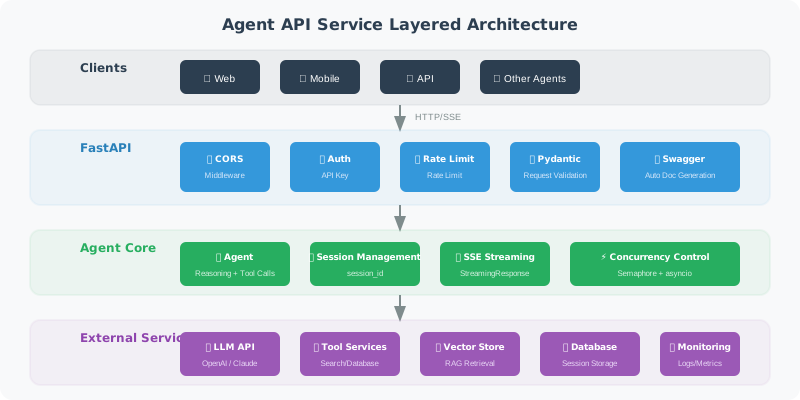
Basic API Framework
from fastapi import FastAPI, HTTPException, Header, Depends
from fastapi.middleware.cors import CORSMiddleware
from pydantic import BaseModel, Field
from typing import Optional
import os

app = FastAPI(
    title="Agent API",
    description="Intelligent Assistant API Service",
    version="1.0.0"
)

# CORS configuration
app.add_middleware(
    CORSMiddleware,
    allow_origins=["*"],  # In production, restrict to specific domains
    allow_methods=["*"],
    allow_headers=["*"],
)

# ===== Request/Response Models =====

class ChatRequest(BaseModel):
    """Chat request"""
    message: str = Field(..., min_length=1, max_length=5000,
                         description="User message")
    session_id: Optional[str] = Field(None, description="Session ID")

class ChatResponse(BaseModel):
    """Chat response"""
    reply: str = Field(..., description="Agent reply")
    session_id: str = Field(..., description="Session ID")
    tool_calls: list[dict] = Field(default_factory=list,
                                    description="Tool call records")

class HealthResponse(BaseModel):
    """Health check response"""
    status: str
    version: str

# ===== Authentication =====

async def verify_api_key(
    x_api_key: str = Header(..., description="API Key")
):
    """Verify API Key"""
    valid_keys = os.getenv("VALID_API_KEYS", "").split(",")
    if x_api_key not in valid_keys:
        raise HTTPException(status_code=401, detail="Invalid API Key")
    return x_api_key

# ===== API Endpoints =====

@app.get("/health", response_model=HealthResponse)
async def health_check():
    """Health check endpoint"""
    return HealthResponse(status="healthy", version="1.0.0")

@app.post("/chat", response_model=ChatResponse)
async def chat(
    request: ChatRequest,
    api_key: str = Depends(verify_api_key)
):
    """Chat endpoint"""
    import uuid

    session_id = request.session_id or str(uuid.uuid4())

    # Call your Agent here
    # result = await agent.run(request.message, session_id)

    # Example return
    return ChatResponse(
        reply="This is the Agent's reply",
        session_id=session_id,
        tool_calls=[]
    )
Streaming Responses (SSE)
Let users see the Agent's response process in real time:
from fastapi.responses import StreamingResponse
import json
import asyncio

@app.post("/chat/stream")
async def chat_stream(
    request: ChatRequest,
    api_key: str = Depends(verify_api_key)
):
    """Streaming chat endpoint (Server-Sent Events)"""

    async def event_generator():
        """Generate SSE event stream"""

        # Send start event
        yield f"data: {json.dumps({'type': 'start', 'session_id': 'xxx'})}\n\n"

        # Simulate streaming generation (replace with LLM streaming output in practice)
        full_response = "This is an example of a streaming reply, each character is sent to the client progressively."

        for char in full_response:
            yield f"data: {json.dumps({'type': 'token', 'content': char})}\n\n"
            await asyncio.sleep(0.05)  # Simulate generation delay

        # Send end event
        yield f"data: {json.dumps({'type': 'end'})}\n\n"

    return StreamingResponse(
        event_generator(),
        media_type="text/event-stream",
        headers={
            "Cache-Control": "no-cache",
            "Connection": "keep-alive",
        }
    )
Frontend Receiving SSE
// ⚠️ Note: Native EventSource API only supports GET requests
// For POST request SSE, use the fetch API to handle manually

// ✅ Correct approach: use fetch API to receive SSE streaming responses
async function streamChat(message) {
    const response = await fetch('/chat/stream', {
        method: 'POST',
        headers: {
            'Content-Type': 'application/json',
            'X-API-Key': 'your-key'
        },
        body: JSON.stringify({ message })
    });

    const reader = response.body.getReader();
    const decoder = new TextDecoder();

    while (true) {
        const { done, value } = await reader.read();
        if (done) break;

        const text = decoder.decode(value);
        // Parse SSE data
        const lines = text.split('\n');
        for (const line of lines) {
            if (line.startsWith('data: ')) {
                const data = JSON.parse(line.slice(6));
                if (data.type === 'token') {
                    // Append to page
                    document.getElementById('output').textContent += data.content;
                }
            }
        }
    }
}
Error Handling and Middleware
from fastapi import Request
from fastapi.responses import JSONResponse
import time
import logging

logger = logging.getLogger("agent_api")

# Global exception handler
@app.exception_handler(Exception)
async def global_exception_handler(request: Request, exc: Exception):
    """Global exception handler"""
    logger.error(f"Unhandled exception: {exc}", exc_info=True)
    return JSONResponse(
        status_code=500,
        content={
            "error": "Internal server error",
            "detail": "Service temporarily unavailable, please try again later"
            # Don't expose specific error details in production
        }
    )

# Request logging middleware
@app.middleware("http")
async def log_requests(request: Request, call_next):
    """Log each request"""
    start = time.time()

    response = await call_next(request)

    elapsed = time.time() - start
    logger.info(
        f"{request.method} {request.url.path} "
        f"→ {response.status_code} ({elapsed:.3f}s)"
    )

    return response
Starting the Service
if __name__ == "__main__":
    import uvicorn

    uvicorn.run(
        "app:app",
        host="0.0.0.0",
        port=8000,
        workers=4,        # Use multiple workers in production
        reload=False,      # Disable hot reload in production
        log_level="info"
    )
After starting, visit http://localhost:8000/docs to see the auto-generated API documentation.
Summary
| Concept | Description |
|---|---|
| FastAPI | High-performance async web framework, suitable for Agent services |
| Pydantic Models | Automatically validate request parameters |
| SSE Streaming | Real-time push of Agent generation process |
| Middleware | Global logging, error handling, authentication |
Next Section Preview: With the API service ready, the next step is to package it with Docker for deployment in any environment.