Agent Application Deployment Architecture
Section Goal: Understand what architectural changes are needed when moving an Agent from development to production, and master the unique deployment challenges and solutions for Agents.
Unique Challenges of Agent Deployment
Deploying an Agent application is fundamentally different from deploying a traditional web service. Traditional API request processing typically takes milliseconds and is predictable; Agent request processing is more like "executing a mini-program" — with uncertain time, uncertain steps, and uncertain resource consumption.
Five Unique Challenges
Challenge 1: Unpredictable Execution Time
A simple Q&A might complete in 2 seconds, while a request involving multi-step reasoning + tool calls may take 30 seconds or even minutes. This makes traditional request timeout settings and load balancing strategies no longer applicable.
# Traditional API: predictable execution time
@app.get("/users/{id}")
async def get_user(id: int):  # Latency: ~50ms, std dev ~10ms
    return db.get_user(id)

# Agent API: unpredictable execution time
@app.post("/agent/chat")
async def agent_chat(msg: str):  # Latency: 2s-120s, std dev ~30s
    return await agent.process(msg)
Challenge 2: Side Effects of Tool Calls
Agents don't just "answer questions" — they may send emails, write files, call external APIs, and execute code. This means retrying a failed request may cause side effects to execute repeatedly (e.g., sending duplicate emails).
Challenge 3: State Management for Long Contexts
Agent conversations may span dozens of turns, carrying tens of thousands of tokens of context. This state needs to be shared across multiple service instances and must not be lost.
Challenge 4: Uncontrolled Costs
A complex request may trigger multiple LLM calls (reasoning + tool selection + result summarization), with per-request costs ranging from 1.00. Without limits, a malicious user can quickly exhaust the budget.
Challenge 5: Observability Difficulties
Traditional service logs are linear (request → processing → response), while Agent execution is tree-shaped or graph-shaped (reasoning → tool A → sub-reasoning → tool B → backtrack → tool C → final reply). Standard logging and monitoring tools struggle to capture this complex execution path.
Comparison of Three Architecture Patterns
Depending on team size, traffic requirements, and cost budget, Agent application deployment can choose from three architecture patterns:
Pattern 1: Monolithic Architecture
All components (API, Agent logic, tools, storage) run in the same process.
[Nginx] → [FastAPI + Agent + Tools + DB]
Use cases: Personal projects, prototype validation, < 100 QPS
Pros: Simple development, easy deployment, easy debugging
Cons: Cannot scale components independently, single point of failure
Pattern 2: Microservices Architecture
Split the Agent into multiple independent services communicating via message queues or RPC.
[API Gateway] → [API Service] → [Agent Service] → [Tool Service]
                      ↓                ↓                ↓
                  [Redis]         [Vector DB]      [External APIs]
Use cases: Team collaboration, 100–10,000 QPS, need independent scaling
Pros: Independent deployment and scaling of components, fault isolation, parallel team development
Cons: High operational complexity, increased network latency, requires distributed tracing
Pattern 3: Serverless Architecture
Use cloud functions (AWS Lambda, Cloudflare Workers) for on-demand execution without managing servers.
[API Gateway] → [Lambda: API Handler] → [Lambda: Agent Logic] → [Managed Services]
Use cases: High traffic fluctuation, pay-per-use, < 1,000 QPS
Pros: Zero operations, auto-scaling, pay per actual invocation
Cons: Cold start latency (1–5s), execution time limits (usually 15 minutes), difficult debugging
Quantitative Comparison of Three Patterns
| Dimension | Monolithic | Microservices | Serverless |
|---|---|---|---|
| Operational complexity | ⭐ | ⭐⭐⭐⭐ | ⭐⭐ |
| Scalability | Vertical | Horizontal + Vertical | Automatic |
| Cold start latency | None | None | 1–5s |
| Max request duration | Unlimited | Unlimited | 15min |
| Monthly cost (low traffic) | ~100+ | ~200 | ~300 |
| Suitable stage | MVP/Prototype | Growth phase | Exploration/Variable traffic |
💡 Recommended path: Most Agent projects should start with monolithic architecture, then migrate to microservices after validating product value. Premature architectural decomposition is a common over-engineering trap.
Agent Observability Requirements
The traditional "request logs + error rate + response time" trio is far from sufficient for Agent applications. You also need to track:
| Observation Dimension | Traditional API | Agent Application |
|---|---|---|
| Request chain | Single layer | Multi-layer nested (reasoning → tool → sub-reasoning) |
| Token usage | None | Input/output tokens per LLM call |
| Tool call records | None | Which tools were called, parameters, results |
| Reasoning quality | None | Whether Agent correctly understood user intent |
| Cost tracking | Fixed | Dynamic cost per request |
Recommended observability tool stack:
- LangSmith: LangChain's official Agent tracing platform, visualizes complete reasoning chains
- Phoenix (Arize): Open-source LLM observability tool, supports Trace and Evaluation
- OpenTelemetry + Custom Spans: Embed tracing points in each Agent step
from opentelemetry import trace

tracer = trace.get_tracer("agent-service")

async def agent_process(question: str):
    with tracer.start_as_current_span("agent.process") as span:
        span.set_attribute("user.question", question)

        with tracer.start_as_current_span("agent.text_to_sql"):
            sql = await text2sql.convert(question)
            span.set_attribute("generated.sql", sql)

        with tracer.start_as_current_span("agent.execute_query"):
            data = db.execute_readonly(sql)
            span.set_attribute("result.row_count", len(data))

        # ... subsequent steps
Development Environment vs. Production Environment
During development, you might run a Python script directly in the terminal. But to serve real users, more considerations are needed:
| Dimension | Development Environment | Production Environment |
|---|---|---|
| Concurrency | Single user | Hundreds/thousands concurrent |
| Availability | Can restart anytime | 24/7 uninterrupted operation |
| Error handling | print to see logs | Structured logs + alerts |
| State management | In-memory dictionary | Redis / database |
| Key management | .env file | Secret management service |
| Monitoring | Manual observation | Prometheus + Grafana |
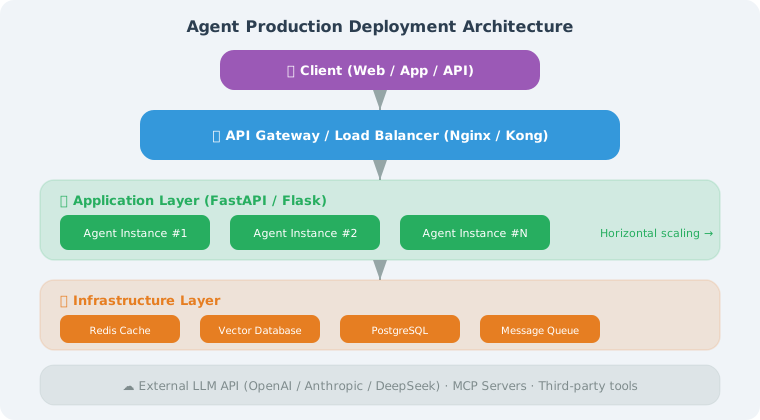
Typical Production Deployment Architecture
Core Component Description
from dataclasses import dataclass

@dataclass
class ProductionArchitecture:
    """Description of each layer in the production architecture"""

    layers = {
        "Load Balancer": {
            "Tools": "Nginx / AWS ALB / Cloudflare",
            "Responsibilities": [
                "SSL/TLS encryption termination",
                "Request distribution to multiple API instances",
                "Rate limiting and DDoS protection",
                "Health checks (automatically remove failed instances)"
            ]
        },
        "API Service": {
            "Tools": "FastAPI / Flask",
            "Responsibilities": [
                "Receive and validate user requests",
                "API Key / JWT authentication",
                "Session management (read/write from Redis)",
                "Request logging",
                "Streaming responses (SSE)"
            ]
        },
        "Agent Core": {
            "Tools": "LangChain / LangGraph / Custom",
            "Responsibilities": [
                "Understand user intent",
                "Call LLM for reasoning",
                "Execute tool calls",
                "Manage conversation context"
            ]
        },
        "Storage Layer": {
            "Redis": "Session state, cache, rate limit counters",
            "Vector DB": "Long-term memory, knowledge base retrieval",
            "Relational DB": "User info, usage records, audit logs"
        }
    }
State Management: From Memory to Redis
During development you use in-memory dictionaries for conversations; in production use Redis:
import json
from datetime import datetime

class RedisSessionManager:
    """Redis-based session management (production-grade)"""

    def __init__(self, redis_client, ttl: int = 3600):
        self.redis = redis_client
        self.ttl = ttl  # Session expiration time (seconds)

    def get_history(self, session_id: str) -> list[dict]:
        """Get conversation history"""
        key = f"session:{session_id}:messages"
        data = self.redis.get(key)

        if data:
            return json.loads(data)
        return []

    def add_message(
        self, session_id: str, role: str, content: str
    ):
        """Add message to session"""
        key = f"session:{session_id}:messages"
        history = self.get_history(session_id)

        history.append({
            "role": role,
            "content": content,
            "timestamp": datetime.now().isoformat()
        })

        # Keep only recent messages to avoid unlimited growth
        if len(history) > 50:
            history = history[-50:]

        self.redis.set(key, json.dumps(history, ensure_ascii=False))
        self.redis.expire(key, self.ttl)

    def clear_session(self, session_id: str):
        """Clear session"""
        self.redis.delete(f"session:{session_id}:messages")
Configuration Management
Production environment configuration needs to be more standardized:
from pydantic_settings import BaseSettings

class AgentConfig(BaseSettings):
    """Agent production configuration (loaded from environment variables)"""

    # API configuration
    openai_api_key: str
    openai_model: str = "gpt-4o"

    # Service configuration
    host: str = "0.0.0.0"
    port: int = 8000
    workers: int = 4

    # Redis configuration
    redis_url: str = "redis://localhost:6379"
    session_ttl: int = 3600

    # Rate limiting configuration
    rate_limit_per_minute: int = 60

    # Security configuration
    api_key_header: str = "X-API-Key"
    cors_origins: list[str] = ["*"]

    # Agent configuration
    max_steps: int = 10
    max_tokens: int = 4096
    temperature: float = 0.7

    class Config:
        env_file = ".env"
        env_prefix = "AGENT_"  # All environment variables prefixed with AGENT_

# Usage:
# Environment variable AGENT_OPENAI_API_KEY=sk-xxx is automatically loaded
# config = AgentConfig()
Summary
| Concept | Description |
|---|---|
| Layered Architecture | Load balancer → API service → Agent core → Storage |
| External State | Use Redis instead of in-memory dictionaries for session management |
| Configuration Management | Load config from environment variables, no hardcoding |
| Horizontal Scaling | Multi-instance deployment, stateless API layer |
Next Section Preview: Next we'll use FastAPI to wrap the Agent into a complete API service.