4.4 工作记忆:Scratchpad 模式
工作记忆是 Agent 在执行复杂任务时的"草稿纸"——记录推理步骤、中间结果,帮助 Agent 保持任务状态。
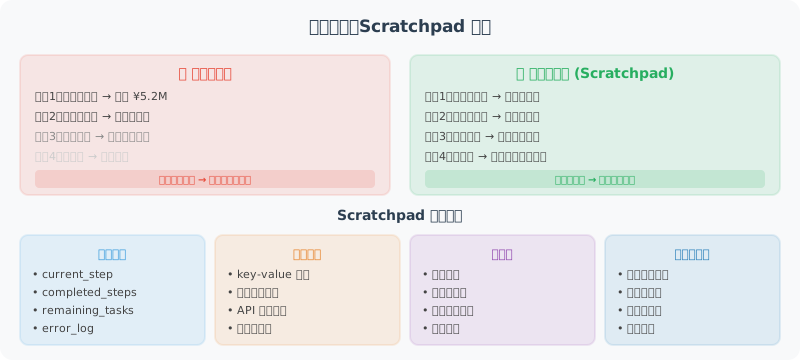
为什么需要工作记忆?
考虑一个真实场景:分析 Q1 财务数据——计算总收入、找增长最快的产品线、识别成本异常、生成摘要报告。没有工作记忆的 Agent 会"忘记"中间步骤:
- 步骤 1(总收入)的结果,步骤 3 怎么用?
- 分析了 20 个产品线,哪个增长最快?
- 发现了 3 个异常,每个的详情是什么?
这些中间信息不应该写回对话历史(会撑爆短期记忆),也不应该进长期记忆(一次性任务结束就丢)。它们属于"工作记忆"——任务进行时存在,任务结束即可清空。
Scratchpad 模式的核心设计
Scratchpad = 任务进行时的"草稿本"。Agent 在推理过程中用工具调用把中间结果写进 Scratchpad,后续步骤可读取并引用。
class Scratchpad:
    """草稿纸:键值存储 + 格式化输出为 Prompt 文本。"""
    def __init__(self):
        self._notes: dict[str, dict] = {}
        self._log: list[dict] = []

    def write(self, key: str, value, description: str = ""):
        """写入一条笔记(覆盖同 key)。"""
        self._notes[key] = {"value": value, "description": description}
        self._log.append({"action": "write", "key": key, "time": _now()})

    def read(self, key: str):
        return self._notes.get(key, {}).get("value")

    def list_keys(self) -> list[str]:
        return list(self._notes.keys())

    def to_prompt_text(self) -> str:
        """将当前内容序列化为可注入 system prompt 的文本。"""
        if not self._notes:
            return "工作记忆:(空)"
        lines = ["【工作记忆 - 已知信息】"]
        for k, e in self._notes.items():
            desc = f"({e['description']})" if e["description"] else ""
            lines.append(f"- {k}{desc}: {json.dumps(e['value'], ensure_ascii=False)}")
        return "\n".join(lines)

    def clear(self):
        self._notes.clear()
然后在 System Prompt 中每次调用前重新注入最新状态:
class ScratchpadAgent:
    """将 Scratchpad 暴露为工具集,让 LLM 自己决定何时读写。"""

    def _tools(self) -> list[dict]:
        return [
            {"type": "function", "function": {
                "name": "save_to_scratchpad",
                "description": "将中间计算结果保存到工作记忆,供后续步骤使用",
                "parameters": {"type": "object", "properties": {
                    "key": {"type": "string", "description": "键名,英文蛇形命名"},
                    "value": {"description": "要保存的值"},
                    "description": {"type": "string"}
                }, "required": ["key", "value"]}}},
            {"type": "function", "function": {
                "name": "read_from_scratchpad",
                "description": "读取之前保存的中间结果",
                "parameters": {"type": "object", "properties": {
                    "key": {"type": "string"}
                }, "required": ["key"]}}},
            {"type": "function", "function": {
                "name": "list_scratchpad_keys",
                "description": "列出工作记忆中的所有键名",
                "parameters": {"type": "object", "properties": {}}}}
        ]

    def solve(self, problem: str) -> str:
        self.scratchpad.clear()
        messages = [
            {"role": "system", "content": (
                "你是复杂多步骤问题助手。请将问题分解为多个步骤,"
                "每步完成后用 save_to_scratchpad 保存中间结果,"
                "后续步骤可读取前面结果。\n\n"
                + self.scratchpad.to_prompt_text()
            )},
            {"role": "user", "content": problem}
        ]
        for step in range(10):           # MAX_STEPS 硬上限
            # 关键:每次都重新构建 system_prompt,让模型看到最新 scratchpad
            messages[0]["content"] = self.scratchpad.to_prompt_text()
            resp = client.chat.completions.create(
                model="gpt-4.1", messages=messages,
                tools=self._tools(), tool_choice="auto"
            )
            msg = resp.choices[0].message
            messages.append(msg)
            if resp.choices[0].finish_reason == "stop":
                return msg.content
            # 执行工具调用...
            for tc in msg.tool_calls or []:
                result = self._execute_tool(tc.function.name, json.loads(tc.function.arguments))
                messages.append({"role": "tool", "tool_call_id": tc.id, "content": result})
        return "超过最大步骤数"
📦 完整代码(包含工具执行分发、测试数据、调用日志)见仓库
examples/chapter04/scratchpad_agent.py。
三个关键设计点
| 决策 | 选择 | 原因 |
|---|---|---|
| Scratchpad 暴露为工具 | 是 | 让 LLM 自己决定何时读写,模拟人脑"用草稿纸"的思考过程 |
| 每次重新构建 system_prompt | 必做 | scratchpad 状态变化后,模型必须看到最新内容,否则读到的是过期状态 |
| Scratchpad 不进长期记忆 | 是 | 任务结束 clear(),避免污染用户的长期画像 |
ReAct 中的工作记忆
ReAct 模式本身就是工作记忆的一种体现。每一轮的 Thought → Action → Observation 序列都写在消息历史中,模型在下一轮能"看到"前面所有推理步骤——这是隐式工作记忆。
但 ReAct 的"工作记忆"会随对话变长而膨胀。复杂任务应该用显式 Scratchpad 替代:把"关键中间结果"提取到 scratchpad(节省 token),而不是把所有步骤留在消息历史(重复消费 token)。
Scratchpad vs 短期记忆 vs 长期记忆
| 维度 | 短期记忆(4.2) | 工作记忆(4.4) | 长期记忆(4.3) |
|---|---|---|---|
| 存在位置 | 消息历史 | 独立数据结构 | 向量数据库 |
| 生命周期 | 当前会话 | 当前任务 | 跨会话永久 |
| 典型容量 | 数十轮 | 数十个键值对 | 数千条 |
| 检索方式 | 顺序 | 按 key 查找 | 语义相似度 |
| 典型内容 | 用户/助手消息 | 中间计算结果 | 用户偏好、身份 |
| 何时清空 | 会话结束 | 任务完成 | 用户撤回或过期 |
什么时候用 Scratchpad?
| 场景 | 是否需要 | 原因 |
|---|---|---|
| 单轮问答 | ❌ | 没有多步推理 |
| 3-5 步的链式推理 | ⚠️ 可选 | ReAct 自带工作记忆 |
| 10+ 步复杂任务(数据分析、多步检索) | ✅ 必须 | 关键中间结果显式保存,避免丢失 |
| 跨工具数据传递 | ✅ 必须 | "A 工具的结果作为 B 工具的输入" |
| 长时间运行的多步任务 | ✅ 必须 | 防止上下文窗口超限 |
小结
工作记忆(Scratchpad)的价值:
- 支持复杂多步骤任务,步骤间共享中间结果
- 避免重复计算和信息丢失
- 让 Agent 的推理过程更透明可追踪
- 任务完成后可清空,不污染长期记忆
💡 一句话区分:短期记忆管"对话历史",长期记忆管"用户是谁",工作记忆管"任务进行到哪一步"。