17.4 插件开发:tool / llm / skill / subagent 的插件接口
🐋 "加能力 = 写一个插件,不改核心。"
一、四类插件接口总览
DeepSeek Harness 里,所有"能力"都是插件。最常见的四类是:
| 插件类型 | 挂载点 | 作用 | 什么时候用 |
|---|---|---|---|
| tool | ctx.tools | 给 Agent 加一个工具 | Agent 需要新的"手"(查天气、发邮件、查数据库) |
| llm | ctx.llm | 接入一个新模型 | 你想用 DeepSeek Harness 但不想用官方模型 |
| skill | ctx.skillRegistry | 加一个 SKILL.md 工作流 | 复用一个多步骤的固定流程 |
| subagent | ctx.subagent | 加一个子 Agent 类型 | 需要隔离上下文跑并行子任务 |
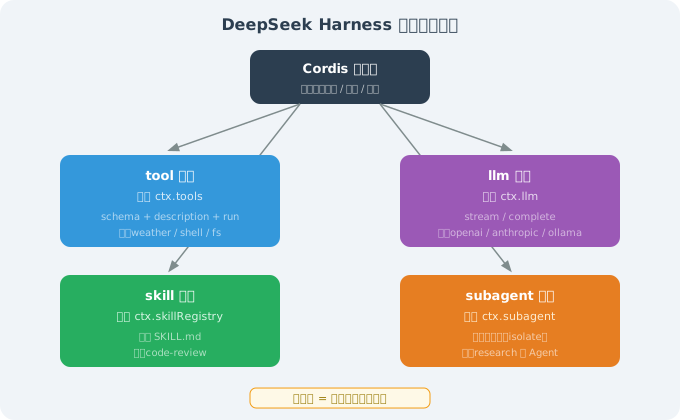
核心思想一句话:这四类插件的接口都遵循同一个模式——register(name, { description, schema?, run })。你只需要告诉 Harness"这个能力叫什么、给 LLM 读的描述是什么、怎么执行",剩下的(权限检查、错误处理、日志)框架都替你做了。
二、写一个 tool 插件(最常用)
2.1 完整实现
// plugins/weather.ts
import { Context } from 'cordis';
import { z } from 'zod';

export interface WeatherConfig {
  apiKey: string;
}

export function weatherPlugin(ctx: Context, config: WeatherConfig) {
  ctx.tools.register('weather', {
    // ① name:工具唯一标识,Agent 调用时用这个名字
    name: 'weather',

    // ② description:给 LLM 读的"使用说明书"
    //    决定 LLM 什么时候该调这个工具、怎么调
    description: '查询指定城市的当前天气。当用户问天气、气温、下雨时使用。',

    // ③ schema:参数 schema(zod 强类型)
    //    框架会用它做参数校验 + 生成 JSON Schema 给 LLM
    schema: z.object({
      city: z.string().describe('城市名,如 "上海"'),
    }),

    // ④ run:实际执行函数
    //    返回值会被回写给 LLM(就像 14.3 节 Agent Loop 的"工具结果回写")
    async run(args: { city: string }) {
      const res = await fetch(
        `https://api.openweathermap.org/data/2.5/weather?q=${args.city}&appid=${config.apiKey}`,
      );
      const data = await res.json();
      // 错误处理:API 失败时返回 { cod: "404", message: "city not found" } 等,
      // 此时没有 weather 字段,必须容错,否则 data.weather[0] 会抛 TypeError
      if (!data.weather) {
        return `查询失败:${data.message ?? '未知错误'}`;
      }
      // 开尔文转摄氏度(OpenWeatherMap 默认返回开尔文)
      return `城市 ${data.name}:${data.weather[0].description},${Math.round(data.main.temp - 273.15)}°C`;
    },
  });
}
四个字段的职责边界(这是理解"插件接口"的关键):
| 字段 | 谁用 | 作用 |
|---|---|---|
name | Agent(工具调用)+ 框架(注册表) | 唯一标识 |
description | LLM | 决定 LLM 何时、如何调用这个工具 |
schema | 框架(参数校验)+ LLM(生成 JSON Schema) | 强类型参数约束 |
run | 框架(执行) | 实际干活 |
为什么 description 和 schema 都要给 LLM? 因为 LLM 要做两件事:① 决定用不用这个工具(靠 description);② 如果要用,生成正确的参数(靠 schema)。缺了 description,LLM 想不起来有这个工具;缺了 schema,LLM 可能生成错误格式的参数。
2.2 运行示例:注册 → 调用 → 输出
假设你在配置里注册了 weather 插件(config.yaml 里 plugins: { weather: { apiKey: 'xxx' } }),然后问 Agent:
用户: 上海现在几度?
Agent 内部的过程:
[agent] 收到 "上海现在几度?"
[agent] 判断:问天气 → 命中 weather 工具的 description → 决定调用
[agent] 根据 schema 生成参数:{ city: "上海" }
[tool]  weather.run({ city: "上海" }) → fetch OpenWeatherMap API
[tool]  返回 "城市 Shanghai:clear sky,25°C"
[agent] 把工具结果回写,生成回复
[agent] 回复:上海现在晴,25°C。
解读:注意第 2 步——LLM 是从 description 里判断"该调 weather"的,从 schema 里知道"要传一个 city 参数"。如果你的 description 写的是"查询天气"而没有触发词("问天气/气温/下雨"),LLM 可能想不到去调它——这就是 description 要写具体触发词的原因。
三、写一个 llm 插件(接入自定义模型)
// plugins/my-llm.ts
import { Context } from 'cordis';

export function myLlmPlugin(ctx: Context, config: { endpoint: string; apiKey: string }) {
  ctx.llm.register('my-llm', {
    // 流式接口:返回 async generator(边生成边返回)
    async stream(messages, opts) {
      const res = await fetch(config.endpoint, {
        method: 'POST',
        headers: { Authorization: `Bearer ${config.apiKey}` },
        body: JSON.stringify({ messages, stream: true, ...opts }),
      });
      return readSSE(res);   // 解析 SSE 流
    },

    // 非流式接口:一次性返回完整结果
    async complete(messages, opts) {
      const res = await fetch(config.endpoint, {
        method: 'POST',
        headers: { Authorization: `Bearer ${config.apiKey}` },
        body: JSON.stringify({ messages, ...opts }),
      });
      return res.json();
    },
  });
}
注册后,配置里 llm.provider: "my-llm" 即可切换到你的模型——Agent 循环代码零改动。
为什么"零改动"这么重要? 因为"换模型"在传统 Agent 框架里往往要改一大堆代码(模型调用逻辑散落在各处)。而 DSH 把"模型调用"抽象成 stream / complete 两个接口,Agent Loop 只依赖这两个接口,不依赖具体模型。这就是"一切皆插件"的威力:换模型 = 换一个插件,而不是改核心。
对比第 15 章 Hermes 的"6 种执行后端"——思想同源(能力可换),但 DSH 把它抽象得更彻底:连"模型"本身都是插件,而不是"内置模型 + 可替换"。
四、写一个 skill 插件(SKILL.md 工作流)
// plugins/my-skill.ts
import { Context } from 'cordis';

export function mySkillPlugin(ctx: Context) {
  ctx.skillRegistry.register({
    name: 'code-review',
    description: '对代码变更进行多维度审查',
    // 指向 SKILL.md 文件(工作流的"说明书")
    skillFile: './skills/code-review/SKILL.md',
  });
}
配套 SKILL.md(与 Anthropic 格式兼容):
# Skill: Code Review
对代码变更进行系统化审查。

## 触发条件
用户要求 code review / review PR 时触发。

## 执行流程
1. git diff 获取变更
2. 按 安全/性能/可维护性 三维度审查
3. 输出 🔴 严重 / 🟡 建议 / 🟢 优点
📌 因为兼容 Anthropic
SKILL.md,这个 Skill 可以直接复用 Claude Code / OpenClaw 的社区技能。
skill 插件和 tool 插件的区别:tool 是"单步能力"(查天气、读文件),skill 是"多步工作流"(code review = git diff + 三维度审查 + 输出报告,是一个流程)。skill 内部可能调用多个 tool,但对外暴露为一个"可复用的流程"。
五、写一个 subagent 插件
// plugins/research-subagent.ts
import { Context } from 'cordis';

export function researchSubagentPlugin(ctx: Context) {
  ctx.subagent.register('research', {
    description: '独立研究一个主题,返回结构化摘要。用于需要大量检索的并行子任务。',
    async run(prompt: string) {
      // 关键:spawn({ isolate: true }) 创建"隔离上下文"的子 Agent
      // isolate = 子 Agent 看不到主 Agent 的对话历史,只拿到 prompt
      const sub = ctx.spawn({ isolate: true });
      return await sub.run(prompt);
    },
  });
}
主 Agent 通过 Task 工具派遣它,子 Agent 在隔离上下文里完成研究后返回。
为什么 isolate: true 是关键? 因为子 Agent 如果能看到主 Agent 的全部上下文,就会"受干扰"——它可能被主 Agent 的历史对话带偏,或者把不该看的敏感信息(其他任务的内容)带进自己的推理。隔离上下文让子 Agent 只专注它被分配的那一个任务,这是"子 Agent 能并行、能独立"的前提。
六、插件依赖声明
Cordis 允许插件声明依赖,保证装载顺序:
ctx.plugin(weatherPlugin, {
  apiKey: 'xxx',
  before: ['core.llm'],    // 必须在 core.llm 之前装载
  after: ['core.kernel'],  // 必须在 core.kernel 之后装载
});
为什么要显式声明依赖? 两个好处:① 装载顺序正确(weather 插件如果依赖 llm,就必须在 llm 之后装);② 缺失依赖提前报错(如果 core.llm 没装,框架启动时就会报错,而不是运行到一半才崩)。这比"隐式依赖"(靠约定俗成)可靠得多——详见 17.3 的"显式 DAG"。
七、create profile:秒级开发循环
写插件最爽的是 create 模式的热重载(见 17.2):
$ dsh --profile create dev
   → watches ./plugins/**/*.ts   # 监听 plugins 目录
   → on save: auto-reload in 200ms  # 保存即热重载
改插件 → 保存 → 立即生效,无需重启 Harness。
热重载为什么能"秒级"? 因为 Cordis 的插件模型天然支持"卸载 + 重新装载"——一个插件被卸载时,它的 ctx.effect 里注册的副作用(如断开数据库连接)会被清理,然后重新装载时再执行。这是"插件化架构"的免费红利:热重载不是额外功能,而是插件模型的自然结果。
八、本节小结
| 主题 | 关键要点 |
|---|---|
| 四类插件 | tool / llm / skill / subagent,接口统一为 register(name, {description, schema?, run}) |
| tool 四字段 | name(标识)+ description(LLM 读)+ schema(强类型)+ run(执行) |
| llm 插件 | 注册后 llm.provider 切换,Agent 循环零改动 |
| skill vs tool | tool 是单步能力,skill 是多步工作流 |
| subagent | isolate: true 隔离上下文,保证独立并行 |
| 依赖声明 | before / after 显式装载顺序 + 缺失提前报错 |
| 热重载 | 插件模型的红利,卸载+重装即可 |
下一节:17.5 横向对比:DeepSeek Harness vs Claude Code / OpenClaw / Hermes