5.2 ReAct: Reasoning + Acting Framework
ReAct (Reasoning + Acting) is one of the most important frameworks in Agent development, originating from the 2022 paper "ReAct: Synergizing Reasoning and Acting in Language Models" by Yao et al. from Princeton University and Google Brain. It combines the LLM's reasoning capabilities with tool use to create more reliable and transparent Agent behavior.
📄 Paper Background: Before ReAct, LLM reasoning (Chain-of-Thought) and action (tool calling) were two separate research directions. CoT made models "able to think" but "unable to act" — reasoning couldn't access external information; while tool calling made models "able to act" but "unable to think" — blindly executing without explaining the rationale. ReAct's core insight is: reasoning provides direction for action, action provides evidence for reasoning, and the two must alternate to solve complex problems.
Experiments in the paper across multiple tasks confirmed this: on HotpotQA (multi-hop QA), ReAct improved accuracy by about 6 percentage points over pure CoT, because CoT can only rely on the model's existing knowledge while ReAct can retrieve up-to-date facts via search. On ALFWorld (interactive text games), ReAct improved by 34 percentage points over pure action (Act-only), because explicit reasoning helped the Agent avoid blind trial-and-error.
The Core Idea of ReAct
ReAct's key innovation is making the thinking process explicit: the Agent "thinks out loud" before taking action, then acts.
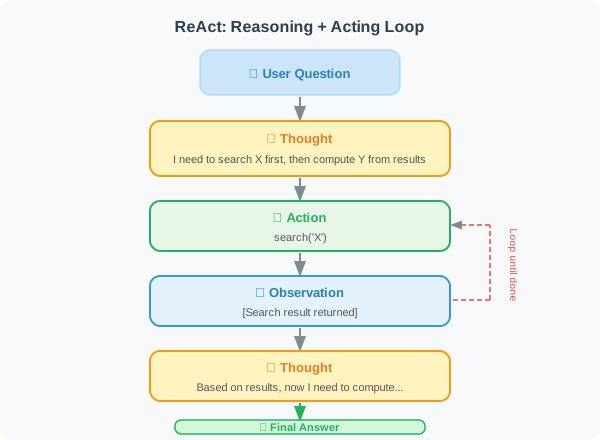
🎬 Interactive Animation: An animation comparing ReAct, pure CoT, and Act-only on the same multi-hop QA question — showing how reasoning guides action and how action informs reasoning.
Comparison with traditional Agents:
| Feature | Traditional Agent (black box) | ReAct Agent (transparent) |
|---|---|---|
| Thinking process | Hidden | Explicitly written to context |
| Explainability | Poor | Good |
| Self-correction | Difficult | Easy |
| Hallucination risk | High | Low (tool verification) |
Implementing a ReAct Agent from Scratch
import json
import re
from openai import OpenAI
from typing import Callable

client = OpenAI()

class ReActAgent:
    """
    ReAct Agent implementation.
    Explicit reasoning + tool calls interleaved.
    """

    def __init__(self, tools: dict[str, Callable], tool_descriptions: str):
        """
        Args:
            tools: mapping of tool name → tool function
            tool_descriptions: text description of available tools
        """
        self.tools = tools
        self.tool_descriptions = tool_descriptions
        self.scratchpad = []  # records the reasoning process

    def _build_system_prompt(self) -> str:
        return f"""You are an AI assistant that can use tools to solve problems.

Available tools:
{self.tool_descriptions}

Response format (strictly follow):
Thought: [analyze the current situation, decide the next step]
Action: tool_name[argument]
Observation: [result returned by the tool, filled by the system]
...(repeat until the problem is solved)
Final Answer: [synthesize all information and give the answer]

Notes:
- Choose only one tool at a time
- Action format must be: tool_name[argument]
- Wait for the observation result before continuing
- If no tool is needed, write "Final Answer:" directly
"""

    def _parse_action(self, text: str) -> tuple[str, str] | None:
        """Parse an Action from text"""
        # Match "Action: tool_name[argument]" format
        pattern = r'Action:\s*(\w+)\[([^\]]*)\]'
        match = re.search(pattern, text)
        if match:
            return match.group(1), match.group(2)
        return None

    def _is_final_answer(self, text: str) -> bool:
        """Check if there is a final answer"""
        return "Final Answer:" in text

    def _extract_final_answer(self, text: str) -> str:
        """Extract the final answer"""
        idx = text.find("Final Answer:")
        if idx != -1:
            return text[idx + len("Final Answer:"):].strip()
        return text

    def run(self, question: str, max_steps: int = 8) -> str:
        """
        Run the ReAct loop.

        Args:
            question: user's question
            max_steps: maximum number of steps

        Returns:
            final answer
        """
        self.scratchpad = []

        print(f"\n🔍 Question: {question}")
        print("=" * 60)

        # Build initial messages
        messages = [
            {"role": "system", "content": self._build_system_prompt()},
            {"role": "user", "content": f"Please answer the following question: {question}"}
        ]

        for step in range(max_steps):
            # Call LLM
            response = client.chat.completions.create(
                model="gpt-4o",
                messages=messages,
                stop=["Observation:"],  # stop before "Observation:", wait for tool execution
                max_tokens=500
            )

            output = response.choices[0].message.content
            print(f"\n{output}")

            self.scratchpad.append(output)

            # Check for final answer
            if self._is_final_answer(output):
                answer = self._extract_final_answer(output)
                print(f"\n✅ Final Answer: {answer}")
                return answer

            # Parse action
            action = self._parse_action(output)
            if not action:
                # No action found, may have given a direct answer
                if output.strip():
                    return output
                break

            tool_name, tool_input = action

            # Execute tool
            tool_func = self.tools.get(tool_name)
            if tool_func:
                try:
                    observation = tool_func(tool_input)
                except Exception as e:
                    observation = f"Tool execution error: {str(e)}"
            else:
                observation = f"Unknown tool: {tool_name}"

            # Print observation
            obs_text = f"Observation: {observation}"
            print(obs_text)
            self.scratchpad.append(obs_text)

            # Add the complete interaction to message history
            messages.append({
                "role": "assistant",
                "content": output + "\n" + obs_text
            })

        return "Reached maximum number of steps, unable to give a definitive answer"


# ============================
# Tool Definitions
# ============================

import math

def search(query: str) -> str:
    """Simulated search (use a real search API in production)"""
    # Pre-defined knowledge base
    knowledge = {
        "python creator": "Python was created by Guido van Rossum, first released in 1991",
        "speed of light": "The speed of light in a vacuum is approximately 299,792,458 m/s (about 300,000 km/s)",
        "earth circumference": "The Earth's equatorial circumference is approximately 40,075 km",
        "boiling point of water": "At standard atmospheric pressure, water boils at 100°C (212°F)",
    }

    for key, value in knowledge.items():
        if key in query.lower():
            return value

    return f"Search '{query}': found relevant information, recommend verifying with calculation"

def calculate(expression: str) -> str:
    """Calculate a mathematical expression"""
    try:
        safe_dict = {k: getattr(math, k) for k in dir(math) if not k.startswith('_')}
        # ⚠️ Security warning: eval() has security risks; use safe alternatives like simpleeval in production
        result = eval(expression, {"__builtins__": {}}, safe_dict)
        return f"{expression} = {result}"
    except Exception as e:
        return f"Calculation error: {e}"

def get_current_date(_: str = "") -> str:
    """Get the current date"""
    import datetime
    return datetime.datetime.now().strftime("%B %d, %Y")

# Tool descriptions (critical!)
tool_descriptions = """
- search[query]: search the internet for information
  Example: search[who created Python]

- calculate[expression]: evaluate a mathematical expression
  Supports: +, -, *, /, **, sqrt, sin, cos, log, pi
  Example: calculate[sqrt(144) + pi * 2]

- get_current_date[]: get today's date
  Example: get_current_date[]
"""

# ============================
# Test
# ============================

agent = ReActAgent(
    tools={
        "search": search,
        "calculate": calculate,
        "get_current_date": get_current_date
    },
    tool_descriptions=tool_descriptions
)

# Test 1: requires search + calculation
result = agent.run("How many milliseconds does it take light to travel around the Earth's equator?")

# Test 2: requires multi-step reasoning
result = agent.run("What year was Python released? How many years ago was that?")
Advantages and Limitations of ReAct
Advantages:
- Reasoning process is transparent and explainable
- Supports self-correction (can rethink when an incorrect result is observed)
- Reduces hallucinations (each step is verified by tools)
Limitations:
- Higher token consumption (each step requires writing out the thought process)
- Can feel cumbersome for simple tasks
- May get stuck in loops (needs
max_stepsprotection)
Summary
The three key elements of the ReAct framework:
- Explicit reasoning: the thinking process is written into the context
- Action-Observation loop: tool calls and reasoning alternate
- Natural termination: the loop ends when a final answer is reached
📖 Want to dive deeper into the academic frontiers of ReAct and planning/reasoning? Read 5.7 Paper Readings: Frontiers in Planning and Reasoning, covering in-depth analyses of key papers including ReAct, MRKL, Plan-and-Solve, Reflexion, and CRITIC.
💡 Practical advice: ReAct is the default architecture in most Agent frameworks (LangChain, LlamaIndex). But it's not a silver bullet — for pure reasoning tasks that don't need tools, CoT is more efficient; for workflows with fixed processes, direct orchestration (LangGraph) is more controllable. Choose the right architecture rather than defaulting to ReAct for everything.
References
[1] YAO S, ZHAO J, YU D, et al. ReAct: Synergizing reasoning and acting in language models[C]//ICLR. 2023.
[2] WEI J, WANG X, SCHUURMANS D, et al. Chain-of-thought prompting elicits reasoning in large language models[C]//NeurIPS. 2022.
[3] SHINN N, CASSANO F, GOPINATH A, et al. Reflexion: Language agents with verbal reinforcement learning[C]//NeurIPS. 2023.
Next: 5.3 Task Decomposition: Breaking Complex Problems into Subtasks