14.6 Practice: Build a Personal Assistant
🦞 "From zero to a 24/7 personal assistant, in five steps."
Goal
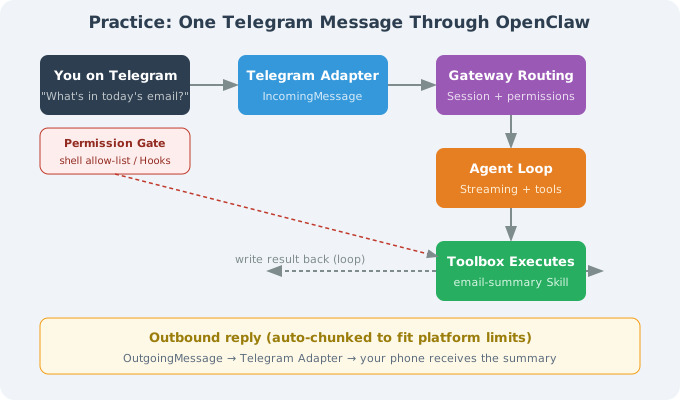
Build a personal assistant living in Telegram that can: read email summaries (Gmail), record/query todos, run restricted shell commands, and push daily schedules.
Step 1: Install & Initialize
curl -fsSL https://openclaw.ai/install.sh | bash
openclaw onboard
Onboard: LLM (Anthropic or your key) → Channel (Telegram via BotFather token) → persona → timezone.
Step 2: Configure Telegram
openclaw config set channels.telegram.botToken "$TELEGRAM_BOT_TOKEN"
openclaw config set channels.telegram.dmPolicy "contacts"
openclaw config set channels.telegram.groupPolicy "mention_only"
openclaw config set channels.telegram.rateLimit "3/m"
openclaw gateway     # ✓ Telegram bot online
Step 3: Install Skills
openclaw skills install email-summary
openclaw skills install todo-list
openclaw skills install daily-report
Step 4: Restrict Shell (Security)
# ~/.openclaw/config.yaml
permissions:
  - user: "telegram:123456789"   # you
    tools: ["*"]
    shell:
      allow: ["ls", "cat", "grep", "find", "pwd", "df", "du"]
      block: ["rm", "mv", "chmod", "sudo", "curl"]
  - user: "*"                    # everyone else
    action: "deny"
⚠️ Least privilege: shell allow-list only read-only commands; destructive ones explicitly blocked.
Step 5: Daemon (24/7)
macOS launchd / Linux pm2:
pm2 start "openclaw gateway" --name openclaw-gateway
pm2 save && pm2 startup
Acceptance: Three Commands
| Command | Expected | Capability |
|---|---|---|
| "What's in today's email?" | inbox summary | email-summary Skill |
| "Add a todo: meeting 9am" | write todo + confirm | todo-list + memory |
| "df" | disk usage (read-only) | shell allow-list df |
Failure Modes & Troubleshooting
| Symptom | Cause | Fix |
|---|---|---|
| bot doesn't reply | gateway down / bad token | openclaw doctor |
| "permission denied" | dmPolicy too strict | check contacts |
| shell blocked | not in allow-list | check allow |
| message spam | rateLimit too loose | drop to 3/m |
Section Summary
| Topic | Key point |
|---|---|
| 5 steps | install → Telegram → skills → permissions → daemon |
| Security | read-only shell allow-list + deny strangers |
| Daemon | launchd (mac) / pm2 (linux) |
| Acceptance | email summary / todo / read-only shell |
Next section: 14.7 Lessons for Engineers