Voice Interaction Integration
Section Goal: Integrate speech recognition (STT) and text-to-speech (TTS) capabilities into the Agent, and understand real-time voice processing architecture and multilingual support strategies.
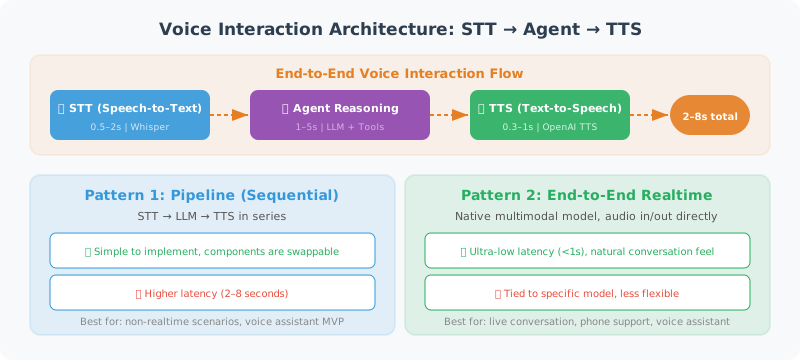
Voice Interaction Architecture Overview
The core challenge of voice Agents is latency. Users expect voice interaction to feel "as natural as talking to a person," meaning the delay from finishing speaking to hearing a reply cannot exceed 1–2 seconds. The entire pipeline involves three latency sources:
| Stage | Typical Latency | Optimization Direction |
|---|---|---|
| Speech Recognition (STT) | 0.5–2s | Streaming recognition, endpoint detection |
| Agent Reasoning | 1–5s | Streaming output, caching |
| Text-to-Speech (TTS) | 0.3–1s | Streaming synthesis, pre-generation |
| End-to-End Total Latency | 2–8s | Full-pipeline streaming |
Two Architecture Patterns
Pattern 1: Sequential Processing (STT → LLM → TTS)
After audio recording is complete, perform speech recognition, LLM reasoning, and speech synthesis in sequence. Simple to implement, higher latency (3–8 seconds), suitable for scenarios with low real-time requirements. The first half of this section uses this pattern.
Pattern 2: Full-Pipeline Streaming
Speech recognition transcribes while listening, LLM outputs while thinking, TTS synthesizes while playing — three stages execute in parallel pipeline. Latency can be reduced to 1–2 seconds, but implementation complexity is high. OpenAI's Realtime API uses this pattern.
Speech Recognition (Speech-to-Text)
Use OpenAI's Whisper model to convert speech to text:
from openai import OpenAI
from pathlib import Path

class SpeechToText:
    """Speech-to-text tool"""

    def __init__(self):
        self.client = OpenAI()

    def transcribe(
        self,
        audio_path: str,
        language: str = "en"
    ) -> str:
        """Convert an audio file to text"""

        with open(audio_path, "rb") as audio_file:
            transcript = self.client.audio.transcriptions.create(
                model="whisper-1",
                file=audio_file,
                language=language,
                response_format="text"
            )

        return transcript

    def transcribe_with_timestamps(
        self,
        audio_path: str,
        language: str = "en"
    ) -> dict:
        """Transcribe and return timestamps"""

        with open(audio_path, "rb") as audio_file:
            transcript = self.client.audio.transcriptions.create(
                model="whisper-1",
                file=audio_file,
                language=language,
                response_format="verbose_json",
                timestamp_granularities=["segment"]
            )

        return {
            "text": transcript.text,
            "segments": [
                {
                    "text": seg.text,
                    "start": seg.start,
                    "end": seg.end
                }
                for seg in (transcript.segments or [])
            ]
        }


# Usage example
stt = SpeechToText()
text = stt.transcribe("user_voice.mp3")
print(f"User said: {text}")
Text-to-Speech
Convert the Agent's text replies to audio:
class TextToSpeech:
    """Text-to-speech tool"""

    VOICES = ["alloy", "echo", "fable", "onyx", "nova", "shimmer"]

    def __init__(self, voice: str = "nova"):
        self.client = OpenAI()
        self.voice = voice

    def speak(
        self,
        text: str,
        output_path: str = "response.mp3",
        speed: float = 1.0
    ) -> str:
        """Convert text to an audio file"""

        response = self.client.audio.speech.create(
            model="tts-1",       # or "tts-1-hd" for high quality
            voice=self.voice,
            input=text,
            speed=speed          # 0.25 - 4.0
        )

        response.stream_to_file(output_path)
        return output_path

    def stream_speak(self, text: str):
        """Streaming speech synthesis (generate and play simultaneously)"""

        response = self.client.audio.speech.create(
            model="tts-1",
            voice=self.voice,
            input=text
        )

        # Return byte stream, can be received and played simultaneously
        return response.content


# Usage example
tts = TextToSpeech(voice="nova")
tts.speak("Hello! I'm your AI assistant. How can I help you today?")
Voice Conversation Loop
import asyncio

class VoiceConversation:
    """Voice conversation system"""

    def __init__(self, agent_func):
        self.stt = SpeechToText()
        self.tts = TextToSpeech(voice="nova")
        self.agent = agent_func  # Agent processing function

    async def process_voice(self, audio_path: str) -> str:
        """Process one round of voice conversation"""

        # 1. Audio → Text
        print("🎤 Recognizing speech...")
        user_text = self.stt.transcribe(audio_path)
        print(f"📝 Recognition result: {user_text}")

        # 2. Agent processing
        print("🤔 Agent thinking...")
        response_text = await self.agent(user_text)
        print(f"💬 Agent reply: {response_text}")

        # 3. Text → Audio
        print("🔊 Generating audio...")
        audio_output = self.tts.speak(response_text)
        print(f"✅ Audio saved: {audio_output}")

        return audio_output
OpenAI Realtime API: Low-Latency Voice Interaction
In late 2024, OpenAI launched the Realtime API [1], supporting direct audio input/output (Audio-in, Audio-out), bypassing the traditional STT → LLM → TTS three-stage process and reducing end-to-end latency to sub-second levels.
Core Features
- Speech-to-Speech: The model directly receives audio input and generates audio output, without intermediate text conversion steps
- WebSocket persistent connection: Establishes a persistent connection via WebSocket, supporting bidirectional real-time communication
- Function Calling: Even in voice mode, the Agent can call external tools
- Voice Activity Detection (VAD): Built-in endpoint detection, automatically determines when the user has finished speaking
Basic Connection Example
import asyncio
import websockets
import json
import base64

class RealtimeVoiceAgent:
    """Voice Agent based on OpenAI Realtime API"""

    REALTIME_URL = "wss://api.openai.com/v1/realtime?model=gpt-4o-realtime-preview"

    def __init__(self, api_key: str, instructions: str = "You are a friendly voice assistant"):
        self.api_key = api_key
        self.instructions = instructions

    async def connect(self):
        """Establish WebSocket connection"""
        headers = {
            "Authorization": f"Bearer {self.api_key}",
            "OpenAI-Beta": "realtime=v1"
        }

        async with websockets.connect(
            self.REALTIME_URL,
            additional_headers=headers
        ) as ws:
            # Configure session
            await ws.send(json.dumps({
                "type": "session.update",
                "session": {
                    "instructions": self.instructions,
                    "voice": "nova",
                    "input_audio_format": "pcm16",
                    "output_audio_format": "pcm16",
                    "turn_detection": {
                        "type": "server_vad",  # Server-side voice activity detection
                        "threshold": 0.5,
                        "silence_duration_ms": 500
                    }
                }
            }))

            # Event handling loop
            async for message in ws:
                event = json.loads(message)
                await self._handle_event(event)

    async def _handle_event(self, event: dict):
        """Handle server-side events"""
        event_type = event.get("type", "")

        if event_type == "response.audio.delta":
            # Received audio chunk, can play immediately
            audio_chunk = base64.b64decode(event["delta"])
            await self._play_audio(audio_chunk)

        elif event_type == "response.text.delta":
            # Received text chunk (for debugging)
            print(event["delta"], end="", flush=True)

        elif event_type == "response.function_call_arguments.done":
            # Agent requests tool call
            await self._handle_tool_call(event)

    async def _play_audio(self, chunk: bytes):
        """Play audio chunk (requires audio playback library integration)"""
        # In actual implementation, use pyaudio or sounddevice
        pass

    async def _handle_tool_call(self, event: dict):
        """Handle tool calls"""
        # Same logic as Function Calling in text mode
        pass
💡 Selection advice: If your Agent needs "phone call-like" real-time voice interaction (e.g., customer service bots, voice assistants), the Realtime API currently provides the best experience. If you only occasionally need voice input/output (e.g., voice memos), the traditional STT + TTS approach is simpler and more controllable.
Multilingual and Dialect Support
Whisper's Language Capabilities
OpenAI Whisper supports speech recognition in 99 languages, but accuracy varies significantly across languages:
| Language Category | Representative Languages | WER (Word Error Rate) | Recommendation |
|---|---|---|---|
| High-resource languages | English, Mandarin Chinese | < 5% | Use directly, excellent results |
| Medium-resource languages | Japanese, Korean, German | 5–15% | Usable, recommend specifying language parameter |
| Low-resource languages | Cantonese, Tibetan, dialects | 15–30% | Requires post-processing correction |
Multilingual Agent Design Strategy
class MultilingualVoiceAgent:
    """Multilingual voice Agent"""

    # Language to TTS voice mapping
    VOICE_MAP = {
        "en": "alloy",     # English uses alloy
        "zh": "nova",      # Chinese uses nova (more natural)
        "ja": "shimmer",   # Japanese uses shimmer
    }

    def __init__(self):
        self.stt = SpeechToText()
        self.client = OpenAI()

    async def detect_and_respond(self, audio_path: str) -> str:
        """Auto-detect language and reply in the same language"""

        # Whisper auto-detects language
        with open(audio_path, "rb") as f:
            result = self.client.audio.transcriptions.create(
                model="whisper-1",
                file=f,
                response_format="verbose_json"
            )

        detected_lang = result.language  # e.g., "english", "chinese"
        lang_code = {"chinese": "zh", "english": "en", "japanese": "ja"
                    }.get(detected_lang, "en")

        # Reply in the detected language
        voice = self.VOICE_MAP.get(lang_code, "nova")

        # Agent processing (specify reply language in System Prompt)
        response = await self._process_with_language(result.text, lang_code)

        # Synthesize speech with the corresponding language voice
        tts = TextToSpeech(voice=voice)
        return tts.speak(response)
Voice Sentiment Analysis
Voice conveys not only text information but also emotional cues (tone, speed, pitch). In customer service, mental health, and other scenarios, recognizing user emotions has important value:
class VoiceSentimentAnalyzer:
    """Voice-based sentiment analysis"""

    def __init__(self):
        self.client = OpenAI()

    async def analyze(self, audio_path: str) -> dict:
        """Analyze the text content and sentiment of speech"""

        # Step 1: Transcribe speech
        with open(audio_path, "rb") as f:
            transcript = self.client.audio.transcriptions.create(
                model="whisper-1", file=f,
                response_format="verbose_json",
                timestamp_granularities=["segment"]
            )

        # Step 2: Let LLM analyze sentiment
        # Note: This only analyzes the sentiment of the text semantics.
        # True acoustic sentiment analysis requires specialized models (e.g., emotion2vec)
        analysis_prompt = f"""Analyze the sentiment of the following speech transcription, return JSON:
{{
  "text": "original text",
  "sentiment": "positive/neutral/negative",
  "emotion": "primary emotion (e.g., happy, anxious, angry, calm)",
  "urgency": "high/medium/low",
  "confidence": 0.0-1.0
}}

Transcription: {transcript.text}"""

        response = self.client.chat.completions.create(
            model="gpt-4o",
            messages=[{"role": "user", "content": analysis_prompt}],
            response_format={"type": "json_object"}
        )

        return json.loads(response.choices[0].message.content)
Voice Agent Design Patterns
In practice, voice Agents have several common design patterns:
Pattern 1: Voice Frontend + Text Backend
The simplest pattern. Voice is just the "skin" for input/output; the Agent core still processes text. Suitable for the vast majority of scenarios.
🎤 User voice → [STT] → Text → [Agent] → Text → [TTS] → 🔊 Voice reply
Pattern 2: Voice-Aware Agent
The Agent can perceive voice characteristics (speed, pauses, emotion) and adjust reply strategy accordingly. For example, when detecting urgency in the user's tone, reply more concisely and directly.
Pattern 3: Continuous Listening Agent
The Agent continuously monitors ambient audio and activates when it detects a wake word or specific event. Suitable for smart home and in-car scenarios. Requires a lightweight local VAD (Voice Activity Detection) model.
Pattern Comparison
| Pattern | Complexity | Latency | Applicable Scenarios |
|---|---|---|---|
| Voice frontend + text backend | ⭐ | 3–8s | General assistants, customer service |
| Voice-aware Agent | ⭐⭐⭐ | 3–8s | Emotional customer service, counseling |
| Continuous listening Agent | ⭐⭐⭐⭐ | 1–3s | Smart home, in-car |
| Realtime API Agent | ⭐⭐ | 0.5–2s | Real-time conversation, phone Agent |
References
[1] OpenAI. "Realtime API." OpenAI Platform Documentation, 2024. https://platform.openai.com/docs/guides/realtime
Summary
| Feature | Model | Description |
|---|---|---|
| Speech recognition | Whisper | Supports 50+ languages, high accuracy |
| Text-to-speech | TTS-1 | 6 voice options |
| Voice conversation | Combined use | Complete STT → Agent → TTS pipeline |