12.7 LangChain Ecosystem 2026
Goal: Understand the latest developments in the LangChain ecosystem, master core tools such as LangGraph Platform, LangServe, and MCP integration, and learn the migration path from the legacy AgentExecutor to LangGraph.
The LangChain Ecosystem at a Glance
LangChain has grown from a single framework into a complete ecosystem. As of 2026, the core members of the LangChain ecosystem are:
| Tool | Positioning | Core value |
|---|---|---|
| LangChain | Core orchestration framework | Component abstractions + the LCEL expression language |
| LangGraph | Stateful Agent framework | Graph-based orchestration, loops, human-in-the-loop |
| LangGraph Platform | Managed runtime service | Deployment, scaling, persistence |
| LangServe | API deployment tool | Publish a Chain as a REST API in one line of code |
| LangSmith | Observability platform | Tracing, evaluation, prompt management |
| LangChain CLI | Project scaffolding | Templates for quickly bootstrapping a project |
💡 Evolution logic: LangChain is responsible for "defining components", LangGraph for "orchestrating flows", LangServe / LangGraph Platform for "deploying and running", and LangSmith for "monitoring and evaluation" — these four layers together cover the complete lifecycle of an Agent application.
LangGraph Platform: The Managed Service
LangGraph Platform is the managed runtime environment for LangGraph. It solves the thorniest problem in deploying Agent applications: stateful, long-running execution.
Why Do You Need LangGraph Platform?
A typical Agent application faces the following deployment difficulties:
| Difficulty | Traditional deployment | LangGraph Platform |
|---|---|---|
| Long-running tasks | HTTP timeouts; state lost when the process crashes | Built-in persistence with automatic recovery |
| Waiting on human-in-the-loop | You must implement pause/resume yourself | Native support for interrupt/resume |
| Concurrency management | You must add locking and rate limiting yourself | Built-in concurrency control and queueing |
| Horizontal scaling | Stateless services scale easily; stateful ones do not | A State Server manages state centrally |
| Streaming output | You need SSE plus backpressure handling | Built-in streaming API |
Core Architecture
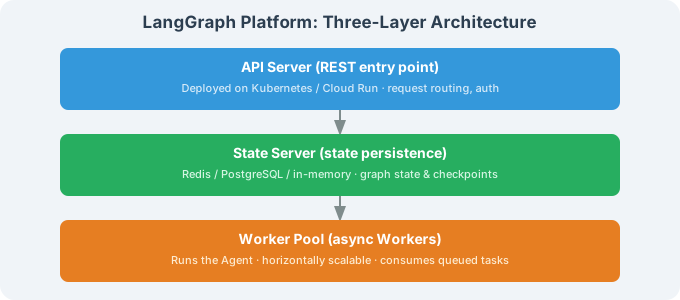
LangGraph Platform uses a three-layer architecture:
Usage Example
# 1. Define your LangGraph Agent
from langgraph.graph import StateGraph, MessagesState, START, END
from langgraph.prebuilt import ToolNode
from langchain_openai import ChatOpenAI
from langchain_core.tools import tool

@tool
def search_docs(query: str) -> str:
    """Search the documentation"""
    return f"Search results: documentation content related to {query}..."

@tool
def run_analysis(data: str) -> str:
    """Run a data analysis"""
    return f"Analysis result: statistical summary of {data}..."

tools = [search_docs, run_analysis]
llm = ChatOpenAI(model="gpt-4.1").bind_tools(tools)

def agent_node(state: MessagesState):
    response = llm.invoke(state["messages"])
    return {"messages": [response]}

def should_continue(state: MessagesState):
    last = state["messages"][-1]
    if last.tool_calls:
        return "tools"
    return END

# Build the graph
graph = StateGraph(MessagesState)
graph.add_node("agent", agent_node)
graph.add_node("tools", ToolNode(tools))
graph.add_edge(START, "agent")
graph.add_conditional_edges("agent", should_continue)
graph.add_edge("tools", "agent")

app = graph.compile()

# 2. Test locally
result = app.invoke({"messages": [{"role": "user", "content": "Search the LangGraph docs"}]})
print(result["messages"][-1].content)
# 3. Deploy to LangGraph Platform
# Create the langgraph.json configuration file
cat > langgraph.json << 'EOF'
{
    "dependencies": ["."],
    "graphs": {
        "agent": "./agent.py:app"
    },
    "env": ".env"
}
EOF

# Deploy
langgraph deploy

# Or self-host with Docker
langgraph build -t my-agent:latest
docker run -p 8000:8000 my-agent:latest
# 4. Call it from a client
from langgraph_sdk import get_client

# Connect to LangGraph Platform
client = get_client(url="http://localhost:8000")

# Create a thread (a stateful session)
thread = await client.threads.create()

# Send a message
run = await client.runs.create(
    thread_id=thread["thread_id"],
    assistant_id="agent",
    input={"messages": [{"role": "user", "content": "Help me analyze the recent data"}]},
    stream_mode="values",
)

# Receive the results as a stream
async for chunk in client.runs.join_stream(
    thread_id=thread["thread_id"],
    run_id=run["run_id"],
    stream_mode="values",
):
    if chunk.data and "messages" in chunk.data:
        last_msg = chunk.data["messages"][-1]
        if isinstance(last_msg, dict) and last_msg.get("content"):
            print(last_msg["content"], end="", flush=True)
💡 LangGraph Platform vs. rolling your own deployment: If your Agent needs human-in-the-loop (interrupt/resume) or long-running execution, LangGraph Platform saves you a huge amount of infrastructure work. For simple scenarios, LangServe is enough.
LangServe Deployment
LangServe lets you publish a LangChain application as a REST API in one line of code — perfect for scenarios that do not need complex state management.
Basic Deployment
# pip install langserve fastapi uvicorn

from fastapi import FastAPI
from langserve import add_routes
from langchain_openai import ChatOpenAI
from langchain_core.prompts import ChatPromptTemplate
from langchain_core.output_parsers import StrOutputParser

app = FastAPI(
    title="LangChain Agent API",
    version="1.0",
)

# Define the Chain
llm = ChatOpenAI(model="gpt-4.1-mini", temperature=0.7)
prompt = ChatPromptTemplate.from_messages([
    ("system", "You are a {role}."),
    ("human", "{question}")
])
chain = prompt | llm | StrOutputParser()

# Add the API routes in one line
add_routes(app, chain, path="/chat")

# Run with: uvicorn server:app --host 0.0.0.0 --port 8000
Once started, you automatically get the following endpoints:
| Endpoint | Method | Description |
|---|---|---|
/chat/invoke | POST | Synchronous call |
/chat/stream | POST | Streaming call (SSE) |
/chat/batch | POST | Batch call |
/chat/playground | GET | Interactive test page |
A Complete Agent API Example
from fastapi import FastAPI
from fastapi.middleware.cors import CORSMiddleware
from langserve import add_routes
from langchain_openai import ChatOpenAI
from langchain_core.tools import tool
from langchain.agents import AgentExecutor, create_openai_tools_agent
from langchain_core.prompts import ChatPromptTemplate, MessagesPlaceholder
from langchain_core.chat_history import InMemoryChatMessageHistory
from langchain_core.runnables.history import RunnableWithMessageHistory

app = FastAPI(title="Customer Service Agent API")

# CORS configuration
app.add_middleware(
    CORSMiddleware,
    allow_origins=["*"],
    allow_methods=["*"],
    allow_headers=["*"],
)

# ============================
# Tool definitions
# ============================

@tool
def search_faq(query: str) -> str:
    """Search the FAQ."""
    return f"FAQ result: {query}"

@tool
def check_order(order_id: str) -> str:
    """Look up the status of an order."""
    return f"Order {order_id}: shipped"

# ============================
# Building the Agent
# ============================

tools = [search_faq, check_order]
llm = ChatOpenAI(model="gpt-4.1", temperature=0)
prompt = ChatPromptTemplate.from_messages([
    ("system", "You are a customer service assistant. Use the tools to help the user."),
    MessagesPlaceholder("chat_history"),
    ("human", "{input}"),
    MessagesPlaceholder("agent_scratchpad"),
])

agent = create_openai_tools_agent(llm, tools, prompt)
agent_executor = AgentExecutor(agent=agent, tools=tools, verbose=False)

# Session history
store = {}
def get_history(session_id: str):
    if session_id not in store:
        store[session_id] = InMemoryChatMessageHistory()
    return store[session_id]

agent_with_history = RunnableWithMessageHistory(
    agent_executor,
    get_history,
    input_messages_key="input",
    history_messages_key="chat_history",
)

# Add the routes
add_routes(app, agent_with_history, path="/agent")

# Health check
@app.get("/health")
async def health():
    return {"status": "ok"}

# Start with: uvicorn server:app --host 0.0.0.0 --port 8000 --workers 4
Calling It from a Client
# Synchronous call
from langserve import RemoteRunnable

remote_chain = RemoteRunnable("http://localhost:8000/chat/")
result = remote_chain.invoke({"role": "assistant", "question": "Hello"})
print(result)

# Streaming call
for chunk in remote_chain.stream({"role": "assistant", "question": "Introduce yourself"}):
    print(chunk, end="", flush=True)
# Test with curl
curl -X POST http://localhost:8000/chat/invoke \
  -H "Content-Type: application/json" \
  -d '{"input": {"role": "assistant", "question": "Hello"}}'
LangChain Templates: Quick-Start Project Templates
The LangChain CLI ships official templates that help you quickly create specific kinds of applications:
# Install the LangChain CLI
pip install langchain-cli

# List the available templates
langchain templates list

# Create a project from a template
langchain app new my-rag-app --template rag-conversational

# Project structure
# my-rag-app/
# ├── app/                   # LangServe server
# │   ├── server.py          # FastAPI entry point
# │   └── __init__.py
# ├── chain/                 # Core logic
# │   ├── chain.py           # Chain definition
# │   └── __init__.py
# ├── pyproject.toml
# └── .env
Commonly used templates:
| Template name | Purpose | Core technology |
|---|---|---|
rag-conversational | Conversational RAG | Retrieval + Memory |
extraction-openai-functions | Information extraction | Function Calling |
openai-functions-agent | General-purpose Agent | Tools + Agent |
pinecone-semantic-search | Semantic search | Pinecone + Embeddings |
Integrating LangChain with MCP
MCP (Model Context Protocol) is a standardized protocol proposed by Anthropic that lets LLMs connect to external tools and data sources in a uniform way. The LangChain community already provides MCP integration.
📌 For a detailed introduction to MCP, see Chapter 17: Agent Communication Protocols.
Using MCP Tools
# pip install langchain-mcp

from langchain_mcp import MCPToolkit
from langchain_openai import ChatOpenAI
from langchain.agents import AgentExecutor, create_openai_tools_agent
from langchain_core.prompts import ChatPromptTemplate, MessagesPlaceholder

# Connect to an MCP Server
async def create_agent_with_mcp():
    # Option 1: connect to an MCP Server in stdio mode
    toolkit = MCPToolkit.from_server_command(
        command="npx",
        args=["-y", "@modelcontextprotocol/server-filesystem", "/tmp"],
    )

    # Option 2: connect to an MCP Server in SSE mode
    # toolkit = MCPToolkit.from_sse_url("http://localhost:3001/sse")

    async with toolkit.session() as session:
        # Automatically discover the tools provided by the MCP Server
        mcp_tools = toolkit.get_tools()

        llm = ChatOpenAI(model="gpt-4.1", temperature=0)

        prompt = ChatPromptTemplate.from_messages([
            ("system", "You can use filesystem tools to help the user."),
            MessagesPlaceholder("chat_history"),
            ("human", "{input}"),
            MessagesPlaceholder("agent_scratchpad"),
        ])

        agent = create_openai_tools_agent(llm, mcp_tools, prompt)
        agent_executor = AgentExecutor(
            agent=agent,
            tools=mcp_tools,
            verbose=True,
        )

        result = agent_executor.invoke({
            "input": "Read the contents of /tmp/notes.txt",
            "chat_history": [],
        })
        print(result["output"])

# Run it
import asyncio
asyncio.run(create_agent_with_mcp())
Exposing LangChain Tools as an MCP Server
# Expose your existing LangChain tools over the MCP protocol
# so that other MCP-compatible clients (such as Claude Desktop) can call them too

from langchain_core.tools import tool
from langchain_mcp import create_mcp_server

@tool
def search_internal_docs(query: str) -> str:
    """Search the internal documentation library"""
    return f"Search result: {query}"

@tool
def query_database(sql: str) -> str:
    """Execute a SQL query"""
    return f"Query result: [mock data]"

# Create the MCP Server
server = create_mcp_server(
    tools=[search_internal_docs, query_database],
    server_name="internal-tools",
    server_version="1.0.0",
)

# Start the Server
# server.run(transport="stdio")   # Claude Desktop integration
# server.run(transport="sse", port=3001)  # SSE mode
⚠️ The value of MCP integration: MCP means LangChain tools are no longer confined to the LangChain ecosystem — Claude Desktop and other MCP-compatible clients can all call your tools. This is especially valuable for sharing tools inside a company.
Major LangChain Changes in 2025–2026
Architectural Evolution from LangChain v0.1 to v0.3
LangChain went through dramatic architectural changes during 2024–2025. If you maintain legacy code, the following migration guide is essential:
| Change | v0.1 (old) | v0.3 (new) | Impact |
|---|---|---|---|
| Package structure | from langchain import ... | from langchain_openai import ... | All import paths |
| Chain construction | LLMChain(llm=..., prompt=...) | prompt | llm | parser | The core paradigm |
| Agent | AgentExecutor | LangGraph | Agent orchestration |
| Output parsing | The output_key parameter | Passed through automatically by LCEL | Chain output |
| Callbacks | The callbacks parameter | config={"callbacks": [...]} | Callback mechanism |
| Message types | HumanMessage(content=...) | Same as before, plus a new .type attribute | Message handling |
Quick Reference for Key Deprecated APIs
# ❌ Deprecated
from langchain.llms import OpenAI                    # → use ChatOpenAI
from langchain.chains import LLMChain                # → use LCEL (prompt | llm)
from langchain.chains import RetrievalQA             # → use LCEL + retriever
from langchain.agents import initialize_agent        # → use create_openai_tools_agent
from langchain.chat_models import ChatOpenAI         # → use langchain_openai.ChatOpenAI
from langchain.embeddings import OpenAIEmbeddings    # → use langchain_openai.OpenAIEmbeddings
from langchain.vectorstores import Chroma            # → use langchain_chroma.Chroma

# ✅ Recommended style
from langchain_openai import ChatOpenAI, OpenAIEmbeddings
from langchain_core.prompts import ChatPromptTemplate
from langchain_core.output_parsers import StrOutputParser
from langchain_chroma import Chroma

chain = prompt | llm | StrOutputParser()  # LCEL
Migration Guide: From AgentExecutor to LangGraph
This is the most important migration — LangChain officially recommends that new projects build Agents with LangGraph.
Why Migrate?
| AgentExecutor | LangGraph |
|---|---|
A fixed observe → act → observe loop | Freely define a graph with any topology |
| Hard to implement flows like "approve first, then execute" | Native support for interrupt/resume |
Loop control is limited to max_iterations | Full support for conditional routing, loops, and branching |
| Limited state management | Fully customizable State |
| Cannot express parallel steps | Native parallel nodes |
Migration Comparison
# ========================================
# Legacy: AgentExecutor
# ========================================

from langchain_openai import ChatOpenAI
from langchain_core.tools import tool
from langchain.agents import AgentExecutor, create_openai_tools_agent
from langchain_core.prompts import ChatPromptTemplate, MessagesPlaceholder

@tool
def search(query: str) -> str:
    """Search for information"""
    return f"Result: {query}"

@tool
def calculate(expression: str) -> str:
    """Evaluate a mathematical expression"""
    return f"Result: {eval(expression)}"

tools = [search, calculate]
llm = ChatOpenAI(model="gpt-4.1", temperature=0)

prompt = ChatPromptTemplate.from_messages([
    ("system", "You are an assistant. Use the tools to help the user."),
    MessagesPlaceholder("chat_history"),
    ("human", "{input}"),
    MessagesPlaceholder("agent_scratchpad"),
])

agent = create_openai_tools_agent(llm, tools, prompt)

agent_executor = AgentExecutor(
    agent=agent,
    tools=tools,
    max_iterations=5,
    handle_parsing_errors=True,
)

result = agent_executor.invoke({
    "input": "Search for the latest version of Python",
    "chat_history": [],
})
# ========================================
# New: LangGraph
# ========================================

from langchain_openai import ChatOpenAI
from langchain_core.tools import tool
from langgraph.graph import StateGraph, MessagesState, START, END
from langgraph.prebuilt import ToolNode, tools_condition

@tool
def search(query: str) -> str:
    """Search for information"""
    return f"Result: {query}"

@tool
def calculate(expression: str) -> str:
    """Evaluate a mathematical expression"""
    return f"Result: {eval(expression)}"

tools = [search, calculate]
llm = ChatOpenAI(model="gpt-4.1", temperature=0).bind_tools(tools)

# Define the Agent node
def agent_node(state: MessagesState):
    response = llm.invoke(state["messages"])
    return {"messages": [response]}

# Build the graph
graph = StateGraph(MessagesState)
graph.add_node("agent", agent_node)
graph.add_node("tools", ToolNode(tools))

graph.add_edge(START, "agent")
graph.add_conditional_edges("agent", tools_condition)  # automatically decides whether to call a tool
graph.add_edge("tools", "agent")  # after the tool runs, go back to the Agent

app = graph.compile()

# Invoke it
result = app.invoke({
    "messages": [{"role": "user", "content": "Search for the latest version of Python"}]
})
print(result["messages"][-1].content)
Key Migration Points
| AgentExecutor concept | LangGraph equivalent | Notes |
|---|---|---|
AgentExecutor(...) | graph.compile() | Compile the graph |
max_iterations | The loop structure of the graph itself | No longer needs a manual cap |
handle_parsing_errors | Error handling in the tool node | More fine-grained |
return_intermediate_steps | Retained automatically in the State | The messages are the state |
verbose=True | LangSmith tracing | A better way to debug |
| Session history | MemorySaver / checkpointer | The persistence solution |
agent_scratchpad | Managed automatically by MessagesState | No manual work needed |
💡 Migration advice:
- Use LangGraph directly for new projects; stop using AgentExecutor
- Legacy projects can migrate step by step — replace the Agent's core loop first; tool definitions do not need to change
- For a detailed LangGraph tutorial, see Chapter 13: LangGraph — Building Stateful Agents
Summary
The core direction of the LangChain ecosystem's evolution in 2025–2026 is moving from a "framework" to a "platform":
| Direction of evolution | Concrete manifestation |
|---|---|
| Orchestration evolves | AgentExecutor → LangGraph graph orchestration |
| Deployment simplifies | LangServe one-line deployment → LangGraph Platform managed runtime |
| Protocols open up | MCP integration; tools are no longer confined to the LangChain ecosystem |
| Observability | LangSmith expands from "tracing" into an "evaluation + management" platform |
| Architecture stabilizes | v0.3 removes deprecated APIs; LCEL becomes the standard paradigm |
💡 How this relates to other chapters in the book:
- Chapter 13: LangGraph — Building Stateful Agents explains graph orchestration with LangGraph in depth
- Chapter 17: Agent Communication Protocols covers the MCP protocol in detail
- Chapter 20: Deployment and Productionization discusses more complete deployment solutions
Next: 12.8 LangChain Production Patterns
References
[1] LangChain Team. LangGraph Platform Documentation. https://langchain-ai.github.io/langgraph/cloud, 2025.
[2] LangChain Team. LangServe Documentation. https://python.langchain.com/docs/langserve, 2025.
[3] LangChain Team. LangChain MCP Adapters. https://github.com/langchain-ai/langchain-mcp-adapters, 2025.
[4] LangChain Team. Migration Guide: AgentExecutor to LangGraph. https://python.langchain.com/docs/migration, 2025.