12.4 LCEL: LangChain Expression Language
LCEL (LangChain Expression Language) is LangChain's core construction language. It uses the | symbol to connect components into processing pipelines, resulting in concise yet powerful code.
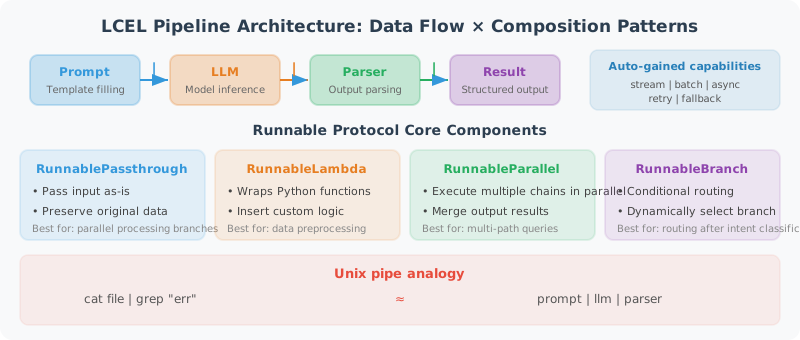
If you've used Unix pipes (cat file.txt | grep "error" | wc -l), LCEL follows exactly the same idea: data flows from left to right through a series of processing components, with each component receiving the previous one's output as its own input. In LLM applications, a typical pipeline is: prompt template | LLM | output parser — the template fills in variables to generate a complete prompt, the LLM generates a response, and the parser extracts structured results.
The core abstraction of LCEL is the Runnable protocol — all components (LLM, Prompt, Parser, Tool, Retriever) implement a unified interface (invoke, stream, batch, etc.), so any component can be freely combined with others. The benefit of this design is: once you write a chain, you automatically get streaming output, async calls, and batch processing capabilities without any additional coding.
LCEL Core Concepts
The code below demonstrates LCEL's core components and usage patterns. Pay attention to the following key points:
|operator: This is the soul of LCEL. Behind the scenes it calls Python's__or__method, chaining two Runnables into a new Runnable.RunnablePassthrough: Passes the input through unchanged. Commonly used when you need to preserve the original data while processing it.RunnableLambda: Wraps a regular Python function as a Runnable, allowing you to insert custom logic into a pipeline.RunnableParallel: Executes multiple Runnables in parallel and merges the results into a dictionary — very common in RAG (simultaneously retrieving context and passing the question).
from langchain_core.runnables import (
    RunnablePassthrough,
    RunnableParallel,
    RunnableLambda,
    RunnableBranch
)
from langchain_openai import ChatOpenAI
from langchain_core.prompts import ChatPromptTemplate
from langchain_core.output_parsers import StrOutputParser

llm = ChatOpenAI(model="gpt-4o-mini")

# ============================
# The Runnable Protocol in LCEL
# ============================

# All LCEL components implement the Runnable interface, supporting:
# .invoke(input)         → Synchronous call
# .ainvoke(input)        → Async call
# .stream(input)         → Streaming output
# .astream(input)        → Async streaming
# .batch(inputs)         → Batch processing
# .abatch(inputs)        → Async batch processing

# Basic chain
chain = (
    ChatPromptTemplate.from_messages([("human", "{question}")])
    | llm
    | StrOutputParser()
)

# Four calling methods
result = chain.invoke({"question": "What is Python?"})        # Synchronous
results = chain.batch([{"question": "Q1"}, {"question": "Q2"}])  # Batch

# ============================
# RunnablePassthrough: Pass input through
# ============================

# Scenario: need to preserve the original input while processing
from langchain_core.runnables import RunnablePassthrough

# Note: RunnablePassthrough() passes the entire input dict, not a single field.
# If the input is {"question": "xxx"}, RunnablePassthrough() returns {"question": "xxx"}.
# Use itemgetter("question") to extract a specific field.

from operator import itemgetter

rag_chain = (
    RunnableParallel({
        "context": lambda x: "Document content..." + x["question"],  # Simulate retrieval
        "question": itemgetter("question")  # Correct: extract the value of the question field
    })
    | ChatPromptTemplate.from_messages([
        ("system", "Answer based on the following context: {context}"),
        ("human", "{question}")
    ])
    | llm
    | StrOutputParser()
)

# ============================
# RunnableLambda: Wrap regular functions
# ============================

import json

def extract_json(text: str) -> dict:
    """Extract JSON from text"""
    start = text.find("{")
    end = text.rfind("}") + 1
    if start != -1 and end > 0:
        return json.loads(text[start:end])
    return {}

json_chain = (
    ChatPromptTemplate.from_messages([
        ("system", "Convert the user description into a JSON-formatted task with title and priority fields."),
        ("human", "{description}")
    ])
    | llm
    | StrOutputParser()
    | RunnableLambda(extract_json)  # Wrap regular function as Runnable
)

result = json_chain.invoke({"description": "Team meeting tomorrow afternoon, very important"})
print(result)  # {'title': 'Team meeting', 'priority': 'high'}

# ============================
# Using itemgetter to extract fields
# ============================

from operator import itemgetter

# Field routing for multi-input chains
multi_input_chain = (
    {
        "language": itemgetter("language"),
        "code": itemgetter("code"),
        "task": itemgetter("task")
    }
    | ChatPromptTemplate.from_messages([
        ("system", "You are a {language} code expert. Help the user {task}."),
        ("human", "Code:\n{code}")
    ])
    | llm
    | StrOutputParser()
)

result = multi_input_chain.invoke({
    "language": "Python",
    "code": "def add(a, b): return a + b",
    "task": "add type annotations and comments"
})
print(result)

# ============================
# Chain Composition and Reuse
# ============================

# Define reusable sub-chains
summarize_chain = (
    ChatPromptTemplate.from_messages([
        ("system", "Compress the text into a summary of 50 words or fewer."),
        ("human", "{text}")
    ])
    | llm
    | StrOutputParser()
)

translate_chain = (
    ChatPromptTemplate.from_messages([
        ("system", "Translate the text into French."),
        ("human", "{text}")
    ])
    | llm
    | StrOutputParser()
)

# Compose: summarize first, then translate
summarize_then_translate = (
    summarize_chain
    | RunnableLambda(lambda x: {"text": x})
    | translate_chain
)

result = summarize_then_translate.invoke({
    "text": "LangChain is a powerful framework that provides all the tools needed to build LLM applications..."
})
print(result)
Error Handling and Retry
In production environments, LLM API calls may occasionally fail due to network jitter, rate limiting, and other reasons. LCEL has two built-in recovery mechanisms:
with_retry: Automatically retries failed calls with support for exponential backoff (increasing intervals between retries), avoiding cascading failures during API rate limiting.with_fallbacks: When the primary chain fails, automatically switches to a backup chain — for example, the primary model uses GPT-4o and the backup uses GPT-3.5-turbo, ensuring service availability.
from langchain_core.runnables import RunnableRetry
from langchain_core.exceptions import OutputParserException

# Add retry logic
resilient_chain = (
    ChatPromptTemplate.from_messages([("human", "{input}")])
    | llm.with_retry(
        stop_after_attempt=3,
        wait_exponential_jitter=True
    )
    | StrOutputParser()
)

# Add fallback chain
fallback_chain = (
    ChatPromptTemplate.from_messages([("human", "{input}")])
    | ChatOpenAI(model="gpt-4o-mini")  # Backup model
    | StrOutputParser()
)

chain_with_fallback = resilient_chain.with_fallbacks([fallback_chain])
Summary
Key advantages of LCEL:
- Unified interface: all components are Runnables, supporting the same calling methods
- Declarative: code is documentation, clearly expressing data flow
- Built-in support: automatically supports streaming, async, and batch processing
- Composability: sub-chains can be freely combined and reused
Next section: 12.5 Practice: Multi-Function Customer Service Agent