23.5 Integration Design: From Components to Assistant
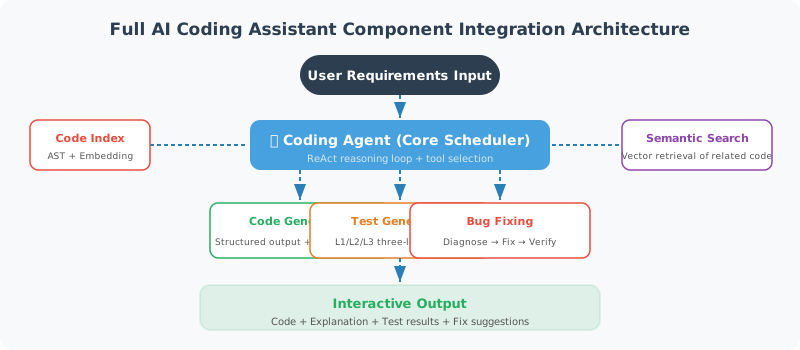
Section Objective: Assemble the components from 23.2–23.4 by responsibility into an AI coding assistant, and explain how it actually runs within the repository.
⚠️ Honest Note (On Runnability):The
CodeIndexer,CodeSearchEngine,CodeGenerator,CodeValidator,TestGenerator, andBugFixerfrom sections 23.2–23.4 are reference implementations provided in code snippet form within the book. They depend onlangchain_openaiand your API Key, and are not packages you can directlyimportfrom this repository. To actually run them, you need to save each section's code as independent modules (e.g.,code_indexer.py, etc.) and install the dependencies yourself — this section demonstrates the assembly logic, not "ready-to-run" files.If you want a tested, offline-ready minimal Agent base that runs out of the box, use the repository's root-level
reference-agent/(which includes tool invocation, permission guards, FastAPI service, evaluation, and MCP examples). The "hands-on" sections in Chapters 12–23 all use it as their reference.
Component Assembly Logic
Below, each component is combined into AICodeAssistant. It depends on the classes defined in the preceding sections; before running, please organize those classes into importable modules.
"""
AI Coding Assistant (Assembly Logic)
Dependencies: 23.2 CodeIndexer / CodeSearchEngine
              23.3 CodeGenerator / CodeValidator
              23.4 TestGenerator / BugFixer
Prerequisites: Save the above classes as independent modules and run pip install langchain-openai
"""
import asyncio
import os
from langchain_openai import ChatOpenAI, OpenAIEmbeddings

from code_indexer import CodeIndexer
from code_search import CodeSearchEngine
from code_generator import CodeGenerator
from test_generator import TestGenerator
from bug_fixer import BugFixer


class AICodeAssistant:
    """AI Coding Assistant Assembly Implementation"""

    def __init__(self, project_path: str):
        self.project_path = project_path
        self.llm = ChatOpenAI(model="gpt-4.1", temperature=0)
        self.embeddings = OpenAIEmbeddings()

        self.indexer = CodeIndexer(project_path)
        entities = self.indexer.build_index()

        self.searcher = CodeSearchEngine(entities, self.embeddings)
        self.searcher.build()

        self.generator = CodeGenerator(self.llm)
        self.test_gen = TestGenerator(self.llm)
        self.bug_fixer = BugFixer(self.llm)

        print(f"Indexed {len(entities)} code entities")

    async def chat(self, user_input: str) -> str:
        intent = await self._classify_intent(user_input)
        handlers = {
            "explain": self._handle_explain,
            "generate": self._handle_generate,
            "fix": self._handle_fix,
            "test": self._handle_test,
            "search": self._handle_search,
        }
        handler = handlers.get(intent, self._handle_general)
        return await handler(user_input)

    async def _classify_intent(self, user_input: str) -> str:
        prompt = (
            "Identify the user's intent, reply with only one word: "
            "explain/generate/fix/test/search/general.\nUser says: " + user_input
        )
        return (await self.llm.ainvoke(prompt)).content.strip().lower()

    async def _handle_explain(self, query: str) -> str:
        results = self.searcher.search(query, top_k=3)
        if not results:
            return "No relevant code found."
        context = "\n\n".join(
            f"**{e.file_path}** - `{e.name}`\n```python\n{e.source}\n```"
            for e in results
        )
        return (await self.llm.ainvoke(
            f"Explain the following code in plain language:\n\n{context}\n\nUser question: {query}"
        )).content

    async def _handle_generate(self, query: str) -> str:
        result = await self.generator.generate(query)
        return f"```python\n{result.code}\n```\n\n{result.explanation}"

    async def _handle_search(self, query: str) -> str:
        results = self.searcher.search(query, top_k=5)
        if not results:
            return "No relevant code found."
        return "\n".join(
            f"{i}. **{e.name}** ({e.entity_type}) @ {e.file_path}:L{e.start_line}"
            for i, e in enumerate(results, 1)
        )

    async def _handle_fix(self, query: str) -> str:
        results = self.searcher.search(query, top_k=3)
        if not results:
            return "Please provide specific error information and the relevant file path."
        code = results[0].source
        fix = await self.bug_fixer.diagnose_and_fix(
            code=code, error_message=query, file_path=results[0].file_path
        )
        return f"Cause: {fix.get('root_cause')}\nFix:\n```python\n{fix.get('fixed_code', code)}\n```"

    async def _handle_test(self, query: str) -> str:
        results = self.searcher.search(query, top_k=1)
        if not results:
            return "Please specify the file or function to generate tests for."
        tests = await self.test_gen.generate_tests(
            source_code=results[0].source, file_path=results[0].file_path
        )
        return f"Tests generated for `{results[0].file_path}`:\n\n{tests}"

    async def _handle_general(self, query: str) -> str:
        return (await self.llm.ainvoke(
            f"You are a professional coding assistant. Project path: {self.project_path}\nUser question: {query}"
        )).content
Key point: Intent classification is only routing; true usability depends on whether the preceding components can actually run — especially the CodeValidator (syntax/security checks) and BugFixer's "fix → test → fix again if failing" closed loop.
Automatic Fix Loop (Design Pattern)
This is the most valuable part of a Coding Agent, and also the part that must involve verification. Below is a fix loop design with an upper limit (pseudocode/simplified code, not a directly runnable file in this repository):
async def auto_fix_loop(bug_fixer, run_tests, code, test_code,
                         file_path, max_attempts: int = 3) -> dict:
    """Fix → run tests → fix again if failing, until passing or reaching the limit"""
    current_code = code
    passed, error_msg = run_tests(current_code, test_code)
    if passed:
        return {"success": True, "attempts": 0, "code": current_code}

    for attempt in range(1, max_attempts + 1):
        fix = await bug_fixer.diagnose_and_fix(
            code=current_code, error_message=error_msg, file_path=file_path
        )
        current_code = fix["fixed_code"]
        passed, error_msg = run_tests(current_code, test_code)
        if passed:
            return {"success": True, "attempts": attempt,
                    "code": current_code, "last_fix": fix["fix_description"]}

    return {"success": False, "attempts": max_attempts,
            "code": current_code, "last_error": error_msg,
            "note": "Maximum fix attempts reached, manual intervention recommended"}
Design highlights: ① Each round feeds the actual error message back to the model — no repairing in the dark; ② A max_attempts limit is mandatory to prevent an infinite loop burning tokens between two incorrect versions; ③ After fixing, run the full regression suite, not just checking "this bug is gone"; ④ On failure, degrade gracefully to manual review. This aligns with Chapter 18's cost control and Chapter 19's "AI output must have human oversight."
Summary
| Function | Implementation Approach |
|---|---|
| Code Search | Vector embeddings + cosine similarity |
| Code Understanding | AST analysis + LLM explanation |
| Code Generation | Structured output + quality validation |
| Test Generation | LLM-generated pytest tests |
| Bug Fixing | Error analysis + code repair |
🎓 Chapter Summary: We built an AI coding assistant from scratch — it can understand code, search code, generate code, write tests, and fix bugs. Although this is a simplified version, it demonstrates the core ideas behind building such tools.
📝 Chapter Exercises
After reading this chapter, first close the book and answer the following questions in your own words, then expand the reference answers to compare.
Exercise 1 (Concept): Section 23.2 uses Python's ast (Abstract Syntax Tree) to index code, extracting function names, signatures, and docstrings. Why does this project use AST parsing instead of simply "searching code text by keywords"? Explain the advantages of the AST approach in the context of a Coding Agent's actual requirements.
Reference Answer
Limitations of keyword-based text search: If you just treat code as plain text to search (e.g., grep "def login"), the machine doesn't really "understand" the code's structure. It can't tell whether a login is a function name, a variable name, or a word appearing in a comment; nor can it determine which line range the function spans, what parameters it takes, what type it returns, or whether it has documentation.
Advantages of AST parsing (see 23.2): ast.parse parses source code into a "syntax tree," allowing the Agent to precisely extract structured information:
- Accurately identify entity types: It knows whether something is a
FunctionDef(function) orClassDef(class), and won't mistake a homonymous word in a comment or string for a function. - Obtain precise location and range:
node.linenoandend_linenogive the entity's start and end lines, facilitating precise reading, modification, or bug localization. - Extract structured metadata: Function signatures (parameters + type annotations + return values) and docstrings can all be cleanly extracted — these are high-quality material for building "code indexes / semantic search descriptions" (23.2's
CodeSearchEngineuses these descriptions to generate vectors). - Lay the foundation for reliable modification: A Coding Agent does more than "read" — it also needs to "edit." With AST-based precise line numbers, modifications land in the correct position instead of accidentally affecting identically named text elsewhere.
In one sentence: A Coding Agent needs to "understand code structure," not just "match strings" — AST is the tool that elevates code from text to structured data. This is also why products mentioned in 23.1 such as Devin, SWE-Agent, Cursor, etc., universally adopt AST/LSP for code understanding.
Exercise 2 (Discernment): In Section 23.3, CodeGenerator uses with_structured_output(GeneratedCode) to make the LLM produce structured results, and after generation, the output still passes through a CodeValidator. A fellow student says: "The LLM is so powerful — the generated code can be used directly, and the validator is redundant." Refute this viewpoint.
Reference Answer
This viewpoint ignores what Section 23.3 emphasizes from the start — generating code is much harder than generating plain text: code must be syntactically correct, logically correct, stylistically consistent, and handle edge cases. No matter how powerful an LLM is, it is still "probabilistic generation" and cannot guarantee correctness every time. The validator is not redundant — it is a necessary "safety net":
- Syntax may simply be wrong: An LLM occasionally misses a bracket or misaligns indentation.
CodeValidator._check_python_syntaxusesast.parseto check whether the code compiles — something invisible at the text level. - Security risks may be introduced: An LLM might generate dangerous calls like
eval(),os.system(),pickle.loads(). The validator's_check_securityspecifically intercepts these — this is consistent with Chapter 19's "code sandbox performs AST security checks before execution." - Structured output ≠ correct content:
with_structured_outputonly guarantees the returned JSON has complete fields (code, explanation, dependencies), but it does not guarantee that the code in thecodefield actually runs or is actually safe. The structure may be correct, but the content still needs verification. - In production, "trust but verify": As stated in 23.4's best practices, AI-generated code "must undergo human review before merging." The validator is the first automated checkpoint before human review, quickly filtering out obviously problematic output and improving efficiency.
So the correct workflow is generate → auto-validate (syntax/style/security) → human review → merge. The validator is an indispensable link in this quality chain.
Exercise 3 (Hands-on): The current chapter's bug fixing is "fix once and hand it over." Drawing from the "test-diagnose-fix closed loop" thinking in 23.4, design and write an auto-fix loop with verification called auto_fix_loop: have the Agent automatically run tests after a fix, and if they still don't pass, feed the new error message back for another fix — up to N attempts. Pseudocode or simplified code expressing the core logic is sufficient.
Reference Answer
The core idea: turn "diagnose → fix → verify" into a loop with an upper limit, where each round feeds the previous round's actual error back to the Agent until the tests pass or the maximum attempts are reached. This is exactly the core working pattern of SWE-bench style Coding Agents.
async def auto_fix_loop(
    bug_fixer,          # 23.4's BugFixer
    run_tests,          # Function to run tests: returns (passed, error_message)
    code: str,
    test_code: str,
    file_path: str,
    max_attempts: int = 3,
) -> dict:
    """Auto-fix loop with verification: fix → run tests → fix again if failing"""
    current_code = code

    # Run once first to confirm there actually is a problem
    passed, error_msg = run_tests(current_code, test_code)
    if passed:
        return {"success": True, "attempts": 0, "code": current_code}

    for attempt in range(1, max_attempts + 1):
        print(f"Attempt {attempt} to fix, current error: {error_msg[:80]}")

        # 1) Have the Agent diagnose and fix based on "current code + current actual error"
        fix = await bug_fixer.diagnose_and_fix(
            code=current_code,
            error_message=error_msg,
            file_path=file_path,
        )
        current_code = fix["fixed_code"]

        # 2) Re-run tests with the fixed code (regression verification)
        passed, error_msg = run_tests(current_code, test_code)

        # 3) If passing, exit early
        if passed:
            return {
                "success": True,
                "attempts": attempt,
                "code": current_code,
                "last_fix": fix["fix_description"],
            }

    # After max_attempts attempts still failing, hand over to human
    return {
        "success": False,
        "attempts": max_attempts,
        "code": current_code,
        "last_error": error_msg,
        "note": "Maximum fix attempts reached, manual intervention recommended",
    }
Key design points:
- Feed actual errors each round: Don't fix blindly — feed the
error_msgfrom the previous round's test run back to the Agent so it "sees" what wasn't fixed last time. This is the soul of the closed loop. - Must set a maximum number of attempts
max_attempts: Otherwise the Agent might oscillate between two incorrect versions, entering an infinite loop and burning massive tokens (this also echoes Chapter 18's cost control and Chapter 20's budget governance). - Always run regression tests after fixing: As emphasized in 23.4's best practices, "After automatic fixes, the full test suite must be run to prevent the fix from introducing new issues" — don't just check "this bug is gone," also confirm "nothing else was broken."
- Must degrade gracefully to manual intervention on failure: Not being able to fix doesn't mean crashing — return a clear status for human review. This aligns with this chapter's and Chapter 19's repeated emphasis that "AI output must have human oversight."
Chapter 22 Project Practice: Intelligent Data Analysis Agent